Hoe Eén Instagram Bedrijfsaccount Beheren met Meerdere Gebruikers


Probeer Trengo gratis uit

Trengo brengt WhatsApp, e-mail, internet, sociale media en telefoontjes samen in één inbox, waardoor je team uren aan herhalend werk bespaart en ervoor zorgt dat geen enkel gesprek verloren gaat.
Bekijk Trengo in actie
- Uitgebreide integraties
- Eenvoudige configuratie
- Schaalbare prijsstructuur

Samenvatting
De WhatsApp-integratie van Shopify koppelt je webwinkel rechtstreeks aan ’s werelds populairste berichtenapp, waardoor je realtime klantenondersteuning, geautomatiseerde bestelupdates en een hogere verkoopconversie kunt bieden. Hoewel Shopify zelf geen ingebouwde chatfunctie heeft, kunnen verkopers dit tekort opvullen met tools van derden, variërend van eenvoudige ‘klik-om-te-chatten’-widgets tot robuuste API-oplossingen. In deze gids leggen we uit hoe je deze integraties effectief implementeert en waarom het gebruik van een gecentraliseerde inbox zoals Trengo de beste strategie is om je bedrijf in 2026 te laten groeien.
TL;DR
- Voor de koppeling met WhatsApp heb je bij Shopify apps van derden nodig; er is geen ingebouwde functie.
- Gratis "klik-om-te-chatten"-knoppen zijn geschikt voor winkels met weinig bezoekers, maar hebben geen geavanceerde beheerfuncties.
- De WhatsApp Business API is onmisbaar voor groeiende teams die behoefte hebben aan automatisering, meerdere gebruikers en verificatie met het groene vinkje.
- Trengo koppelt Shopify aan WhatsApp, zodat bestelgegevens direct naast de gesprekken met klanten worden weergegeven.
- Door gebruik te maken van flowbots en AI-automatisering kun je de reactietijden aanzienlijk verkorten en verlaten winkelwagentjes terugwinnen.
Kunnen meerdere mensen één Instagram-account beheren?
Ja, meerdere mensen kunnen één Instagram-account beheren, en dat is ook echt aan te raden als je een bedrijf hebt met steeds meer interacties. De manier waarop je deze toegang verleent, is echter van groot belang.
Vroeger maakten teams vaak gebruik van de methode van ‘inloggegevens delen’, waarbij iedereen op zijn eigen apparaat inlogde op de officiële Instagram-app met dezelfde gebruikersnaam en hetzelfde wachtwoord. Hoewel dit technisch gezien meerdere mensen toegang tot het account geeft, is het geen schaalbare of veilige oplossing. Moderne bedrijven maken in 2026 gebruik van professionele tools waarmee je via geautoriseerde rechten op een Instagram-zakelijk account kunt inloggen, in plaats van via gedeelde inloggegevens.
Zonder de juiste tool is dat bijna onmogelijk. Uw team moet voortdurend van scherm wisselen om ervoor te zorgen dat een bericht niet te lang blijft liggen. En aangezien er meerdere manieren zijn om een bericht te ontvangen (via DM, een reactie of een antwoord op een advertentie), wordt het gemakkelijk om een bericht over het hoofd te zien of de afzender lang te laten wachten op een antwoord. En dat willen we niet.
Met een klantenservice platform kunnen jij en je team gemakkelijk samenwerken aan al je Instagram gesprekken. Hiermee kun je al je conversaties van al je kanalen in één overzicht beheren. Het maakt niet uit of het Instagram, WhatsApp of e-mail is.
Daarnaast heeft het ook andere handige functies. Zoals de mogelijkheid om auto-replies, snelle antwoorden en zelfs chatbots te maken om je Instagram gesprekken te automatiseren. Met het statistiekengedeelte kun je monitoren hoe snel gesprekken worden opgepakt en afgesloten door je team.
Er zijn twee professionele manieren om dit te doen:
- De native methode: rollen toewijzen aan individuele Facebook-accounts met Meta Business Suite.
- De Unified-methode: je Instagram-account koppelen aan een platform voor klantbetrokkenheid zoals Trengo.
De risico’s van het delen van inloggegevens
Voordat we de oplossingen gaan bekijken, is het belangrijk om te begrijpen waarom de ‘ouderwetse’ methode – waarbij je een wachtwoord via een post-it of een Slack-bericht deelt – gevaarlijk is. Als je op dit moment inloggegevens deelt, stel je je bedrijf bloot aan verschillende risico’s:
- Beveiligingsblokkades: De beveiligingsalgoritmen van Instagram vlaggen gelijktijdige aanmeldingen vanaf verschillende IP-adressen en locaties als verdacht gedrag. Dit kan ertoe leiden dat je account wordt geblokkeerd of geschorst, waardoor de communicatie met je klanten wordt onderbroken.
- Gebrek aan verantwoordingsplicht: Als iedereen dezelfde inloggegevens gebruikt, kun je niet nagaan wie een bepaalde klant heeft geantwoord. Als een medewerker een fout maakt of ten onrechte een terugbetaling belooft, is er geen audittrail om te achterhalen wie het bericht heeft verstuurd.
- Chaos in de workflow: In de native app kun je gesprekken niet markeren als "open", "in behandeling" of "gesloten". Dit leidt er vaak toe dat medewerkers per ongeluk berichten negeren of dubbele antwoorden naar dezelfde klant sturen.
Optie 1: Met behulp van Meta Business Suite (de standaardmethode)
Voor bedrijven die op zoek zijn naar een gratis oplossing biedt Meta (Facebook) een eigen tool aan, genaamd Meta Business Suite. Met dit platform kun je je Facebook-bedrijfspagina en je Instagram-account vanuit één dashboard beheren. Om hiervan gebruik te maken, moet je je professionele Instagram-account koppelen aan een Facebook-pagina.
Zodra de koppeling is gemaakt, kun je via de instellingen onder ‘Paginaroollen’ of ‘Business Manager’ teamleden toevoegen. Je kunt verschillende toegangsniveaus toewijzen, zoals Beheerder, Redacteur of Moderator. Zo zorg je ervoor dat medewerkers op reacties en DM’s kunnen reageren zonder het daadwerkelijke hoofdwachtwoord van het Instagram-account te kennen.
Deze methode heeft echter een aantal grote nadelen voor supportteams:
- Omslachtige interface: Schakelen tussen accounts en navigeren door de suite kan traag en onintuïtief zijn.
- Gescheiden communicatiekanalen: Hoewel het Facebook en Instagram samenbrengt, houdt het deze gesprekken gescheiden van je e-mail, live chat en WhatsApp-vragen.
- Beperkte samenwerking: Je kunt collega’s niet intern in een berichtenthread taggen om hulp te vragen zonder dat de klant dit ziet.
Optie 2: Een gecentraliseerde inbox gebruiken, zoals Trengo (de schaalbare methode)
Voor teams die behoefte hebben aan efficiënt Instagram-beheer is een centrale inbox de beste keuze. Platforms zoals Trengo vervangen de standaard app-interface door een dashboard voor samenwerking dat speciaal is ontworpen voor klantenservice. Deze aanpak verandert Instagram van een marketingkanaal in een volledig geïntegreerd klantenservicetraject.
Als je wilt zien hoe dit in de praktijk werkt, kun je een uitgebreide casestudy over de team-inbox lezen, waarin de efficiëntievoordelen van centralisatie worden belicht.
Breng je communicatie samen in één centrale inbox
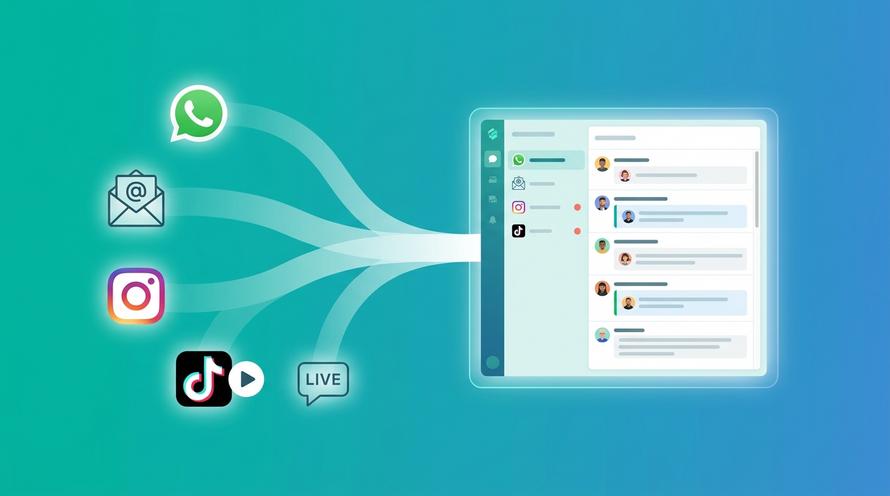
Het grootste voordeel van Trengo is dat je een Instagram-zakelijk account met meerdere gebruikers kunt beheren, naast al je andere communicatiekanalen. In plaats van heen en weer te schakelen tussen Meta Business Suite, je e-mailprogramma en het chatdashboard van je website, komen alle binnenkomende tickets in één overzicht terecht.
Of een klant nu een vraag stelt via een Instagram-DM, een Facebook-reactie of een e-mail, het verschijnt allemaal in dezelfde inbox. Zo weet je zeker dat je medewerkers nooit een bericht missen, alleen maar omdat ze vergeten zijn een bepaalde app te checken. Je kunt ook makkelijk Facebook Messenger aan je website toevoegen, naast Instagram, om leads vanuit alle hoeken binnen te halen.
Werk samen met interne notities en opdrachten
Samenwerken is lastig in native apps. In een gecentraliseerde inbox kun je specifieke Instagram-gesprekken toewijzen aan bepaalde medewerkers. Zo voorkom je het ‘toeschouwer-effect’, waarbij iedereen ervan uitgaat dat iemand anders al heeft gereageerd. Bovendien kun je interne notities (gele plakbriefjes die alleen zichtbaar zijn voor je team) rechtstreeks in de Instagram DM-thread gebruiken. Een medewerker kan een manager taggen om goedkeuring te vragen voor een korting voordat hij of zij de klant antwoordt, waardoor de kwaliteit gewaarborgd blijft.
Automatiseer Instagram-DM’s met chatbots en regels
Het handmatig afhandelen van DM’s is niet schaalbaar. Met Trengo kun je automatisering implementeren om terugkerende vragen af te handelen. Je kunt ‘Flowbots’ instellen om eerste screeningvragen te stellen of direct antwoord te geven op veelgestelde vragen, zoals over levertijden of het retourbeleid.
Door een AI-chatbot in te zetten voor de klantenservice op je Instagram-kanaal, zorg je ervoor dat klanten 24/7 direct hulp krijgen, zelfs als je menselijke medewerkers niet beschikbaar zijn.
Hoe je via Trengo met meerdere gebruikers aan de slag kunt gaan op Instagram
Als u wilt, kunt u ons platform voor klantenservice 14 dagen gratis uitproberen. Zo kunt u zien of het ook echt werkt voor u en uw team.
Dit is hoe je het instelt, zodat je kunt gaan experimenteren:
- Start uw gratis Trengo proefversie.
- Ga vervolgens naar instellingen > kanalen > Instagram.
- Klik op het groene plusteken. Deze actie stuurt u door naar Facebook. Zorg ervoor dat u bent ingelogd met een Facebook-account met beheerdersrechten.
- Geef het Instagram-kanaal vervolgens een interne naam (die alleen jij en je teamleden te zien krijgen) en wijs het/de team(s) toe die je eigenaar wilt maken van het kanaal.
- Vergeet niet op de knop 'Opslaan' te drukken.
Voor een meer technische uitleg over het koppelen van deze specifieke kanalen kun je onze handleiding raadplegen over hoe je WhatsApp en Instagram aan je Trengo-inbox toevoegt.
Begin met het efficiënt beheren van je Instagram-account
Nu ben je klaar om aan de slag te gaan met één Instagram-zakelijk account voor meerdere gebruikers. Laat me weten hoe het je vergaat. Als je meer wilt weten over het maken van een chatbot voor Instagram-DM’s, kun je ook onze pagina bezoeken.
Veelgestelde vragen
Is er een gastmodus op Instagram om accounts te beheren?
Nee, Instagram heeft geen "Gastmodus" voor het beheren van accounts. Om iemand tijdelijke of beperkte toegang te geven, moet je hem of haar een rol toewijzen via Meta Business Suite of, beter nog, hem of haar uitnodigen als gebruiker met beperkte rechten voor een externe inbox-tool zoals Trengo. Dat is veel veiliger dan het delen van wachtwoorden.
Hoe kunnen meerdere teamleden toegang krijgen tot één Instagram Business-account zonder een wachtwoord te delen?
Meerdere teamleden kunnen toegang krijgen tot een Instagram Business account zonder wachtwoorden te delen door het account te koppelen via Facebook's Meta Business Suite of door gebruik te maken van tools van derden zoals Trengo. Deze platforms maken het mogelijk om gebruikers individuele logins toe te wijzen met rolgebaseerde machtigingen, waardoor veilige en gecontroleerde toegang wordt geboden tot Instagram-berichten voor teamsamenwerking.
Welke machtigingen en rollen zijn nodig voor verschillende gebruikers op een Instagram Business-account?
Verschillende teamleden hebben specifieke rollen nodig op basis van hun verantwoordelijkheden. Veel voorkomende rollen zijn Admin, Editor, Moderator of Analist, elk met verschillende toegang tot berichten, inhoudsbeheer en analyses. Zowel Meta Business Suite als Trengo staan rolgebaseerde toegangscontrole toe om ervoor te zorgen dat teamleden de juiste rechten hebben zonder de beveiliging in gevaar te brengen.
Welke Instagram interfaces ondersteunen meerdere gebruikers (native app, Meta Business Suite, DM API)?
De Instagram app is beperkt tot één gebruiker per account. Toegang voor meerdere gebruikers wordt ondersteund door Meta Business Suite, dat Instagram-berichten voor teams integreert, en de Instagram DM API, waarmee platforms van derden zoals Trengo inboxen voor meerdere gebruikers en samenwerkingsfuncties voor zakelijke accounts kunnen aanbieden.
Hoe maakt de Instagram DM API meerdere gebruikers op één account mogelijk?
Met de Instagram DM API kunnen bedrijven hun Instagram-berichten verbinden met platforms van derden, zoals Trengo, waar meerdere gebruikers tegelijkertijd toegang hebben tot conversaties en deze kunnen beheren. Deze API ondersteunt realtime berichtsynchronisatie, tools voor teamsamenwerking en toewijzingsfuncties die het afhandelen van klantvragen over gebruikers heen stroomlijnen.
Hoe integreer ik Instagram-berichten in een gedeelde inbox voor teamsamenwerking?
Instagram-berichten integreren in een gedeelde inbox is mogelijk via de unified inbox van Meta Business Suite of via tools van derden zoals Trengo. Deze platforms consolideren Instagram DM's met andere communicatiekanalen, waardoor teams kunnen samenwerken, conversaties kunnen toewijzen en de conversatiegeschiedenis centraal kunnen bijhouden.
Wat is het verschil tussen Instagram native inbox vs Meta Business Suite vs een tool van derden zoals Trengo voor multi-user workflows?
De Instagram native inbox ondersteunt alleen aanmelding voor één gebruiker met basisfuncties voor berichten. Meta Business Suite biedt een uniforme inbox voor Instagram en Facebook, met ondersteuning voor meerdere gebruikers, maar met beperkte aanpassing van de workflow. Trengo biedt geavanceerde workflowmogelijkheden voor meerdere gebruikers, integraties met talloze kanalen, automatisering en robuuste functies voor teamsamenwerking op maat voor schaalbaar zakelijk gebruik.
Hoe bewaak ik de prestaties en reactietijden van gebruikers die Instagram vragen afhandelen?
Prestaties en responstijden kunnen in de gaten worden gehouden met de rapportagetools van Meta Business Suite of via geavanceerde analysedashboards in platforms zoals Trengo. Deze tools bieden statistieken over de reactiesnelheid van agenten, het verwerkte volume en de klanttevredenheid, zodat managers de teamprestaties effectief kunnen optimaliseren.
Hoe kan automatisering helpen als meerdere gebruikers één Instagram account beheren (bijv. routing, automatische reacties)?
Automatisering verbetert de efficiëntie door berichten te routeren naar het meest geschikte teamlid, direct automatische antwoorden te sturen op veelvoorkomende vragen en workflows te triggeren op basis van berichtinhoud. Trengo biedt deze automatiseringstools, waardoor de handmatige werklast afneemt, er tijdig wordt geantwoord en de consistentie in het beheer van Instagram-accounts voor meerdere gebruikers behouden blijft.



Ervaar de impact van Trengo en AI
Een betere, snellere service en meer loyale klanten. Bundel alle klantcontactkanalen op één platform en lever een uitmuntende service met AI.