Hoe maak je een WhatsApp Business-chatbot zonder te programmeren

Probeer Trengo gratis uit

Trengo brengt WhatsApp, e-mail, internet, sociale media en telefoontjes samen in één inbox, waardoor je team uren aan herhalend werk bespaart en ervoor zorgt dat geen enkel gesprek verloren gaat.
Bekijk Trengo in actie
- Uitgebreide integraties
- Eenvoudige configuratie
- Schaalbare prijsstructuur

Als je een WhatsApp-chatbot voor je bedrijf wilt bouwen, ben je hier aan het juiste adres.
In deze A-Z-gids vertel ik je alles over de voordelen van een WhatsApp Business-chatbot en hoe je je eigen bot kunt instellen. En dat allemaal zonder ook maar één regel code te hoeven schrijven.
Om te beginnen: wat is een WhatsApp Business-chatbot?
Een WhatsApp Business-chatbot is een technologie waarmee je via WhatsApp een gesprek met je klanten kunt simuleren. Ze worden gebruikt om veelgestelde vragen te beantwoorden, informatie te verstrekken en leads te verzamelen.
Voorbeeld van een WhatsApp Business-chatbot
Nu is het tijd voor een voorbeeld uit de praktijk.
Ferryscanner is een in Griekenland gevestigde zoek- en boekingsmachine die mensen helpt bij het vinden van betaalbare ferrytickets naar spannende bestemmingen over de hele wereld. Wanneer klanten Ferryscanner bereiken via WhatsApp, worden hen eerst een paar vragen gesteld door een flowbot.
De WhatsApp bot bespaart hen veel tijd door basisinformatie over de klant te verzamelen voordat ze in contact komen met een menselijke agent. Het niet hoeven vragen naar naam, land en boekingscode van elke klant maakt een groot verschil op de lange termijn.
Wanneer je naar de website van Ferryscanner gaat, kun je een WhatsApp chat starten via hun website widget.

Wanneer je een gesprek begint met Ferryscanner, vraagt een bot je eerst om je naam en e-mailadres, en vraagt dan hoe hij je kan helpen door meerdere opties aan te bieden:
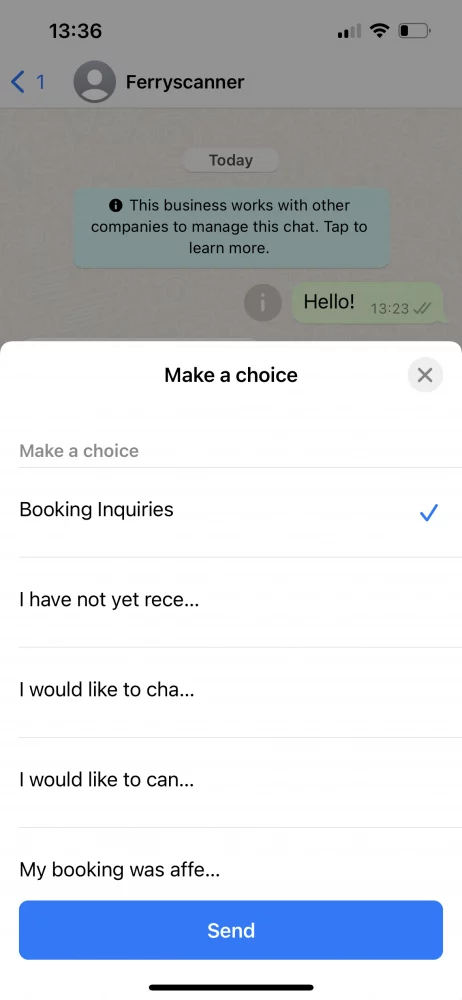
Zodra je een optie heeft geselecteerd, verbindt de bot u door met de juiste agent bij Ferryscanner die je helpt met het specifieke geval. Dit bespaart zowel de klantenservice als de klant tijd.

Wat zijn de voordelen van het gebruik van een WhatsApp-chatbot voor je bedrijf?
Door een WhatsApp Business-chatbot te bouwen, sla je meerdere vliegen in één klap.
1. De klantervaring verbeteren
Ten eerste zal uw reactietijd drastisch verbeteren. Dit betekent niet altijd dat een klant zijn vraag meteen beantwoord krijgt, maar hij krijgt altijd direct antwoord. Als de bot de vraag niet kan beantwoorden, kan hij de klant vertellen wanneer hij een antwoord van een menselijke agent kan verwachten. Zelfs buiten openingstijden.
2. De efficiëntie van het team verbeteren
Door de stijgende verwachtingen van de klant ervaren teams van klantenservice meer druk dan ooit. Ze moeten vrijwel onmiddellijk antwoorden, problemen snel oplossen en via meer communicatiekanalen dan ooit.
Met een WhatsApp-chatbot in hun team besparen medewerkers veel tijd. Veelgestelde vragen die door de bot kunnen worden beantwoord, hoeven ze niet meer te behandelen. Dringende berichten worden automatisch herkend en aan de juiste medewerker toegewezen. Zo kan de klantenservicemedewerker zich bezighouden met waar hij of zij goed in is: klanten helpen.
3. Leads genereren
Een bot is niet alleen een goede klantenservice, maar ook nuttig voor marketingdoeleinden. Vaak worden WhatsApp-bots gebouwd om contactgegevens te verzamelen en zelfs afspraken in te plannen.
Stel je voor dat je een afspraak kunt maken met je kapper door een sms te sturen en snel een tijd te bepalen met behulp van een bot. Voor de meeste mensen, vooral degenen die veel van hun tijd op WhatsApp doorbrengen, is dit handiger en persoonlijker dan naar een website te moeten navigeren.
Hoe maak je een WhatsApp-chatbot (een stapsgewijze handleiding)
Allereerst moet je de WhatsApp Business API. Dat komt omdat je met de gewone WhatsApp Business-app geen chatbots kunt bouwen, maar met de API wel. De WhatsApp Business API heeft geen eigen interface en is alleen toegankelijk via een WhatsApp Business Solution Provider zoals Trengo. Zodra je toegang hebt tot de API, kun je meteen beginnen met het bouwen van een bot.
https://www.youtube.com/watch?v=f16HrNcO8eg
Vervolgens moet je beslissen of je een chatbot, een flowbot of een combinatie van beide wilt opzetten.
Chatbot
Een chatbot begrijpt wat je klant zegt door bepaalde trefwoorden te herkennen en een antwoord te formuleren. Je kunt de bot trainen door simpelweg antwoorden in te vullen op vragen die je vaak krijgt. Hoe meer variaties je opgeeft, hoe slimmer je bot wordt.

Flowbot
Een flowbot stelt je bezoeker in staat de informatie te vinden die hij zoekt door hem meerkeuze opties aan te bieden.

📚 Lees meer: Het verschil tussen chatbots en flowbots uitgelegd
Een WhatsApp-chatbot instellen in Trengo
https://www.youtube.com/watch?v=vIH2FnCzUgs
1. Ga naar Instellingen > Automatisering > Chatbots
2. Stel de instellingen van de chatbot in

1. Interne titel:Geef je bot een naam.
2. Taal van de chatbot:Kies de taal.
3. Kanalen:Kies WhatsApp als kanaal.
4. Google Cloud-sleutel: Voeg je Google Cloud-sleutel toe.
Je hebt nu je eigen WhatsApp Business-chatbot gemaakt 🎉
Je kunt verschillende inhoudscategorieën aan je bot toevoegen. Denk bijvoorbeeld aan categorieën als prijzen, producten en levering.
3. Ga naar ‘Categorieën’ en klik op ‘Categorie toevoegen’

4. Voer de naam van je categorie in.

Je hebt met succes een categorie voor je bot aangemaakt. Nu is het tijd om vragen te bedenken.
Vragen toevoegen aan je WhatsApp-chatbot
Zorg ervoor dat je, wanneer je een vraag aan je bot toevoegt, meerdere variaties ervan toevoegt. Onze vuistregel is om ongeveer vijf variaties per vraag toe te voegen. Hoe meer je toevoegt, hoe ‘slimmer’ je bot wordt.
5. Klik eerst op ‘Vragen’ en vervolgens op het ‘plus’-icoontje naast de categorie waaraan je vragen wilt toevoegen

6. Voeg vragen en antwoorden toe. Klik op het vinkje om de vragen op te slaan

Zodra je genoeg vragen hebt toegevoegd, kun jede instellingen van je chatbot configurerenenje chatbot testen.
Een WhatsApp flowbot opzetten in Trengo
https://www.youtube.com/watch?v=_fPKhc2Q6qU
1. Ga naar instellingen >automatisering >flowbot.
2. Klik op het groene + teken om uw bot aan te maken.
3. Begin met het ontwerpen van je flowbot door er stappen, knoppen en acties aan toe te voegen.
💡Tip: Breng voordat je begint eerst een beslisboom in kaart op een stuk papier. Zo krijg je een goed overzicht van hoe je flowbot eruit komt te zien en hoeveel stappen, knoppen en acties er nodig zijn.
4. Klaar? Klik dan linksonder op 'Configureer je flowbot'.

Nu je je WhatsApp flowbot hebt gebouwd, moet je hem configureren:
- Ga naarInstellingen>Automatisering>Flowboten selecteer je WhatsApp-bot.
- Klik op 'Configureer uw flowbot'.
- Vul het onderstaande formulier in





Voordat je je chatbot voor WhatsApp Business publiceert, kun je hem eerst in de testomgeving uitproberen. Zo weet je zeker dat alles goed werkt voordat je klanten ermee aan de slag kunnen.
Tips voor succesvolle WhatsApp Business-chatbots
Nu je helemaal klaar bent, is het tijd om je bot in te stellen voor succes. Hier zijn enkele tips om een goede start te maken.
Ken je klanten
Leer meer over het gedrag van je klanten op WhatsApp voordat je een bot maakt. Welke soorten vragen stellen ze? Zijn ze support- of verkoopgerelateerd? Zorg ervoor dat je je bot daarop afstemt.
Houd je copy to the point
Als je wilt dat je klant werkelijk elk woord leest dat je hem schrijft, houd het dan kort. Te vaak ben ik bots tegengekomen die antwoorden met langdradige antwoorden die veel te lang duren om te lezen. Je klanten hebben het druk, ze willen een snel en to-the-point antwoord.
Gebruik een informele toon
Vergeet niet dat WhatsApp vooral op een informele manier wordt gebruikt. De gemiddelde consument gebruikt het om met vrienden en familie te praten. Met andere woorden, gesprekken moeten niet aanvoelen als een e-mailinteractie. Houd de toon liever informeel, zolang het niet te veel afwijkt van je merk.
Fallback berichten maken
Zorg ervoor dat je een duidelijk standaardbericht instelt als je een chatbot gebruikt. Dit is het bericht dat de bot naar je klanten stuurt als hij niet begrijpt wat de klant probeert te zeggen. Hier is een voorbeeld:
"Sorry, ik weet nog niet hoe ik daarop moet antwoorden. Stel je vraag anders."
Berichten tijdig doorsturen naar een mens
Zoals ik al eerder zei: je klanten hebben het druk. Ze willen geen tijd verspillen aan een bot die niet in staat lijkt om de juiste informatie te geven. En een bot kan nu eenmaal niet altijd perfect zijn. Daarom moet je hem zo trainen dat hij herkent wanneer hij een gesprek moet doorgeven aan een medewerker. Dat kan bijvoorbeeld zijn wanneer een klant een bepaald trefwoord gebruikt, zoals ‘boos’ of ‘klacht’. Maar je kunt dit ook doen nadat een bot de vragen van een klant meer dan twee keer niet heeft herkend. Dit voorkomt dat de klant gefrustreerd raakt over je bedrijf.
Een gesprek beëindigen? Voeg een CTA toe
Wanneer een gesprek tussen een bot en uw klant tot een einde komt, moet u het altijd afsluiten met een duidelijke oproep tot actie. Dit is een manier om uw klant de kans te geven de volgende logische actie te ondernemen zonder dat hij hoeft na te denken over wat dat zou moeten zijn.
Je hoeft geen ontwikkelaar te zijn om een WhatsApp Business API-chatbot te bouwen
Je eigen WhatsApp Business-bot bouwen hoeft niet ingewikkeld te zijn. Met Trengo kun je je eigen no-code bot bouwen zonder ook maar één regel code te hoeven gebruiken.
Je kunt vandaag nog een gratis proefperiode van 14 dagen starten om te zien hoe snel en eenvoudig het is om een bot te bouwen in Trengo. Als je hulp nodig hebt, staat ons team altijd voor je klaar.

Meer van dit



Ervaar de impact van Trengo en AI
Een betere, snellere service en meer loyale klanten. Bundel alle klantcontactkanalen op één platform en lever een uitmuntende service met AI.