WhatsApp zakelijk vs WhatsApp: Belangrijkste verschillen tussen beide


Probeer Trengo gratis uit

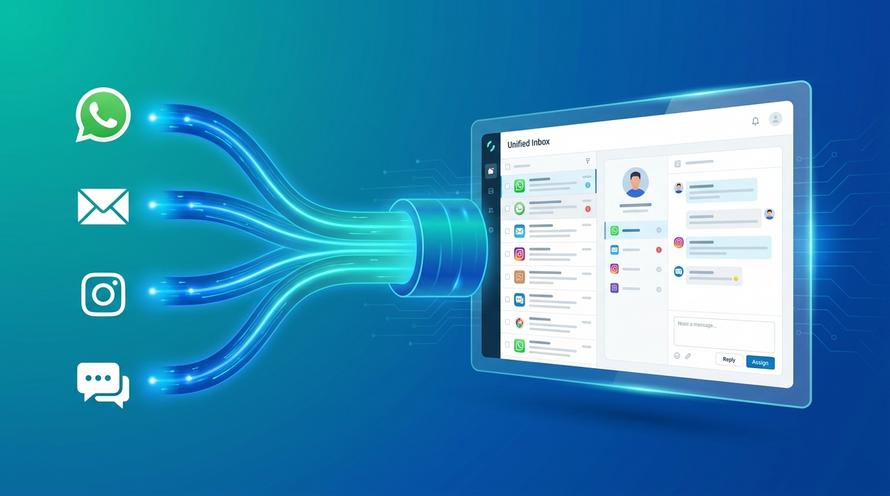
Trengo brengt WhatsApp, e-mail, internet, sociale media en telefoontjes samen in één inbox, waardoor je team uren aan herhalend werk bespaart en ervoor zorgt dat geen enkel gesprek verloren gaat.
Bekijk Trengo in actie
- Uitgebreide integraties
- Eenvoudige configuratie
- Schaalbare prijsstructuur

De belangrijkste verschillen tussen WhatsApp en WhatsApp Business
Samenvatting
Het verschil tussen WhatsApp Business en WhatsApp begrijpen is de eerste stap voor elk groeiend bedrijf dat zijn klantcommunicatie wil uitbreiden. Terwijl de standaardversie van WhatsApp is bedoeld voor persoonlijke chats, biedt WhatsApp Business twee verschillende niveaus: een gratis app voor kleine bedrijven met basisfuncties, en de krachtige WhatsApp Business API voor grotere teams die behoefte hebben aan een gedeelde inbox, toegang voor meerdere medewerkers, automatisering en CRM-integraties. Het kiezen van de juiste versie is cruciaal om vragen van klanten efficiënt af te handelen en je professionele geloofwaardigheid te behouden.
TL;DR
- WhatsApp Messenger: Bedoeld voor persoonlijke, één-op-één communicatie met vrienden en familie; het beschikt niet over zakelijke functies en is niet geschikt voor klantenservice.
- WhatsApp Business-app: Een gratis, zelfstandige app voor eigenaren van kleine bedrijven, met functies zoals een bedrijfsprofiel, productcatalogi en eenvoudige automatische berichten. Het aantal gebruikers is beperkt.
- WhatsApp Business API: Een geavanceerde oplossing voor middelgrote tot grote bedrijven zonder gebruikersinterface. Het sluit aan op een platform zoals Trengo om inboxen voor teams met meerdere medewerkers, chatbots en CRM-integraties mogelijk te maken.
- Belangrijkste verschil: Het belangrijkste verschil is de schaalbaarheid. De gewone WhatsApp-app is bedoeld voor persoonlijk gebruik, de Business-app is voor zelfstandige ondernemers en de Business API is voor teams.
- Regels voor telefoonnummers: Je kunt hetzelfde telefoonnummer niet tegelijkertijd in de persoonlijke app en de zakelijke app gebruiken. Je kunt echter wel beide apps op één telefoon hebben met twee verschillende nummers (bijvoorbeeld met een dual-simkaart).
Ongeveer 2,4 miljard mensen gebruiken WhatsApp dagelijks. Van het sms'en van hun partner over de boodschappen tot het spammen van hun vrienden over die fantastische nieuwe film die ze moeten zien. Maar wist je dat je WhatsApp ook zakelijk kunt gebruiken? Er is zelfs een versie van WhatsApp die speciaal is ontwikkeld voor bedrijven. Hij heet WhatsApp Business.
Maar wat is het verschil tussen WhatsApp en WhatsApp Business? Bieden de apps dezelfde functies? En wat zijn de voordelen van een overstap naar WhatsApp Business?
In deze blog beantwoorden we alle bovenstaande vragen. En als je klaar bent om over te stappen op WhatsApp Business, helpen we je bij het instellen van een WhatsApp Business account.
Wat is WhatsApp?
Je kent WhatsApp waarschijnlijk al van binnen en van buiten. Maar als dat niet zo is, volgt hier een kleine introductie tot de app en zijn functies.
WhatsApp is een communicatie app die is ontwikkeld voor persoonlijke gesprekken tussen vrienden en familie. Naast het versturen van tekstberichten kun je via WhatsApp foto's en documenten delen, een videogesprek starten of audioberichten versturen. Je kunt ook stickers gebruiken om je gesprekken op te fleuren of hilarische GIF's versturen.
Wat is WhatsApp Business?
Laten we nu eens kijken naar WhatsApp Business. De kans is groot dat deze app nieuw voor je is. Hij heeft een heel ander doel, maar biedt enkele van dezelfde functies als WhatsApp.
WhatsApp Business is ontwikkeld voor kleine tot middelgrote ondernemers. In de app kunnen ze customer support bieden, hun producten verkopen en klantrelaties opbouwen. WhatsApp Business biedt dezelfde functies als WhatsApp, plus enkele extra functies die meer op bedrijven zijn gericht. In WhatsApp Business kun je:
- Voeg een productcatalogus toe waarin je je product of dienst in de schijnwerpers kunt zetten.
- Gebruik standaardantwoorden om veelgestelde vragen met één klik te beantwoorden.
- Voeg labels toe aan contacten en gesprekken om een duidelijk overzicht te behouden.
- Stuur een bericht naar 256 contacten tegelijk.
- Stuur een automatisch bericht om ook buiten kantooruren te reageren.
Een ander voordeel van WhatsApp Business vs WhatsApp is dat je een uitgebreid WhatsApp Business profiel kunt toevoegen. In dit profiel kun je je adres, openingstijden, e-mailadres en website opnemen. Deze informatie maakt het makkelijker voor klanten om met je in contact te komen of je winkel te bezoeken.
Na onderzoek van WhatsApp vs WhatsApp Business kunnen we concluderen dat WhatsApp Business veel meer te bieden heeft en daarom een geweldig kanaal is om als bedrijf te adopteren. Laten we naar de voordelen van de overstap naar WhatsApp Business gaan.
WhatsApp versus WhatsApp Business
Om het verschil tussen WhatsApp en WhatsApp Business echt te begrijpen, kun je het beste hun functies naast elkaar vergelijken. De verbeteringen in de zakelijke versies zijn bedoeld om de communicatie met klanten te professionaliseren en te stroomlijnen.
Professionele bedrijfsprofielen
Bij de standaardversie van WhatsApp blijft je identiteit beperkt tot een telefoonnummer, een statusbericht en een profielfoto. Bij WhatsApp Business krijgen bedrijven een speciaal bedrijfsprofiel. Dit profiel kan worden geverifieerd met een groen vinkje om de authenticiteit aan te tonen en bevat belangrijke informatie zoals bedrijfscategorieën, een gedetailleerde beschrijving, e-mailadressen en links naar websites. Deze functie wekt direct vertrouwen bij consumenten, die vaak terughoudend zijn als ze berichten ontvangen van onbekende of niet-geverifieerde nummers.
Geautomatiseerde berichten en snelle antwoorden
De belangrijkste tijdbesparende functie die in de standaardversie van WhatsApp ontbreekt, is automatisering. De gratis WhatsApp Business-app introduceert drie belangrijke automatiseringsfuncties die de klantenservice een flinke boost geven:
- Welkomstberichten: Stuur klanten automatisch een welkomstbericht wanneer ze voor het eerst contact met je opnemen.
- Afwezigheidsberichten: Laat klanten weten dat je even niet beschikbaar bent en vertel ze wanneer ze een reactie kunnen verwachten.
- Snelle antwoorden: Maak sneltoetsen aan (bijv. "/prijzen") om direct vooraf opgestelde antwoorden op veelgestelde vragen te versturen.
Als je via Trengo een upgrade naar de API uitvoert, schaalbaar deze automatisering exponentieel dankzij dynamische, op regels gebaseerde workflows en door AI aangestuurde bots die complete gesprekken kunnen afhandelen.
Productcatalogi en winkelfuncties
In de standaardversie van WhatsApp moeten bedrijven rommelige, ongeorganiseerde fotoalbums van hun producten versturen. WhatsApp Business introduceert een ingebouwde "Catalogus"-functie. Hiermee kunnen bedrijven rechtstreeks in de app een mobiele winkelpagina maken, waarop ze tot wel 500 producten of diensten kunnen presenteren. Elk item kan een prijs, beschrijving, productcode en een directe link naar een betaalpagina op hun website bevatten, wat zorgt voor een gestroomlijnde winkelervaring.
Contactlabels en organisatie
Bij de gewone WhatsApp-app ben je voor het ordenen volledig aangewezen op de contactenlijst van je telefoon, wat al snel een rommeltje wordt. De WhatsApp Business-app introduceert ‘Labels’, een soort ‘CRM-light’ waarmee je orde schept in je chatfeed. Bedrijven kunnen aangepaste labels met kleurcodes maken, zoals 'Nieuwe klant', 'Betaling in behandeling' of 'Bestelling voltooid', om gesprekken te categoriseren en gemakkelijk terug te vinden. Hoewel dit handig is, is het nog steeds geen echt gedeeld inbox-systeem waarin gesprekken aan een team kunnen worden toegewezen en door het hele team kunnen worden gevolgd.
Het verschil tussen de WhatsApp Business-app en de WhatsApp Business API
Zodra een bedrijf de gratis app ontgroeit, is de volgende vergelijking die tussen de twee zakelijke abonnementen. De beperkingen van de app worden dan juist de sterke punten van de API, vooral voor teams die zich richten op groei.
De beperkingen van meerdere apparaten overwinnen
Het grootste struikelblok voor groeiende teams is de limiet op het aantal apparaten. Met de gratis WhatsApp Business-app kan een bedrijf maar maximaal vier gekoppelde apparaten en één hoofdtelefoon gebruiken. Voor een supportteam van tien mensen is dit een logistieke nachtmerrie. De WhatsApp Business API daarentegen, wanneer gebruikt via een platform als Trengo, staat een onbeperkt aantal gebruikers toe. Je kunt de volledige technische uitleg over hoe dit werkt vinden in onze WhatsApp Business API-gids, waarin wordt uitgelegd hoe een hele klantenserviceafdeling, een verkoopteam en een marketinggroep tegelijkertijd kunnen samenwerken via hetzelfde WhatsApp-nummer.
Geavanceerde integraties en CRM-koppelingen
De gratis Business-app werkt als een op zichzelf staand systeem. Je kunt er niet eenvoudig gespreksgegevens mee exporteren of koppelen aan een centraal CRM-systeem zoals Salesforce, HubSpot of een Shopify-webwinkel. De API is daarentegen ontworpen voor een diepgaande integratie in je bestaande tech-stack. Wanneer een klant via de API via Trengo een bericht naar je bedrijf stuurt, kan je medewerker direct de volledige aankoopgeschiedenis en het CRM-profiel van de klant naast het chatvenster zien, waardoor je een zeer persoonlijke en efficiënte service kunt bieden.
Omroep- en reclameboodschappen
In de gratis app zijn verzendlijsten beperkt tot slechts 256 contacten per keer. Belangrijker nog: alleen mensen die je zakelijke nummer in hun contactenlijst hebben opgeslagen, ontvangen het bericht, wat het bereik van je marketingcampagnes flink beperkt. De WhatsApp Business API gooit de boel volledig om door grootschalige, bulkpromotieberichten mogelijk te maken met behulp van vooraf goedgekeurde berichtensjablonen. Hiermee omzeil je zowel de limiet van 256 contacten als de vereiste dat mensen je nummer in hun contactenlijst moeten hebben staan, waardoor je schaalbare marketingcampagnes kunt voeren.
Voordelen van de overstap naar WhatsApp Business
Nu je kennis hebt gemaakt met WhatsApp Business, twijfel je misschien nog of het het juiste kanaal voor je is. Dat begrijp ik. Je wilt zeker weten dat het de juiste keuze is voordat je van kanaal wisselt.
Daarom heb ik de 5 belangrijkste voordelen van het gebruik van WhatsApp Business uitgelicht. Na het lezen ervan kun je beslissen of het bij jouw bedrijf past.
Wees daar waar je klanten zijn
WhatsApp staat wereldwijd in de top 3 van communicatiekanalen. Dat betekent dat veel (zo niet alle) klanten WhatsApp actief gebruiken. Stel je voor hoe blij ze zouden zijn als ze een chat met je kunnen starten op hun favoriete app. Ze hoeven geen andere app te downloaden of te zoeken naar een chatmogelijkheid op je website. Ze kunnen gewoon een gesprek starten naast hun andere privégesprekken.
Snellere customer support bieden
Heb je ooit een vraag van een klant via e-mail opgelost in minder dan een uur? Het zou kunnen, maar ik vermoed dat het niet vaak gebeurt. Dat komt omdat je klanten hun e-mails waarschijnlijk niet 24/7 in de gaten houden. Als ik voor mezelf spreek, zijn er dagen dat ik mijn e-mails helemaal niet controleer. Maar dat geldt niet voor WhatsApp.
Als ik een WhatsApp-bericht ontvang, reageer ik bijna onmiddellijk. En daarin ben ik niet de enige. Studies hebben aangetoond dat 90% van de mensen binnen 30 minuten reageert op instant messaging-apps.
Zie je waar ik heen ga? Deze snelle antwoorden leiden tot snelle probleemoplossing, wat leidt tot tevreden klanten. Het is een win-win-win.
Gebruik geautomatiseerde berichten
Als bedrijf moet je waarschijnlijk elke dag veel dezelfde vragen beantwoorden. "Waar ben je gevestigd?" "Wat zijn je prijzen?" "Welke producten biedt je aan?", enzovoort. Het beantwoorden van deze vragen kan veel tijd in beslag nemen die je liever aan ingewikkeldere zaken zou besteden.
Gelukkig kun je in WhatsApp Business snelantwoorden instellen. Dit zijn vooraf ingevulde berichten die je met sneltoetsen kunt versturen. Je kunt meerdere snelantwoorden toevoegen voor verschillende situaties.
Uw verkoop stimuleren
Dus, we spraken over populariteit, efficiëntie en ondersteuning. Laten we het nu hebben over verkoop. WhatsApp Business biedt verschillende functies die je kunt gebruiken om je verkoop te stimuleren. Ik zal er twee uitlichten.
Broadcast messaging
Met de functie voor verzendberichten kun je berichten tegelijkertijd naar meerdere chats sturen. Zo kun je gemakkelijk informatie over aanbiedingen, kortingen en ander nieuws in één keer naar een groep klanten sturen.
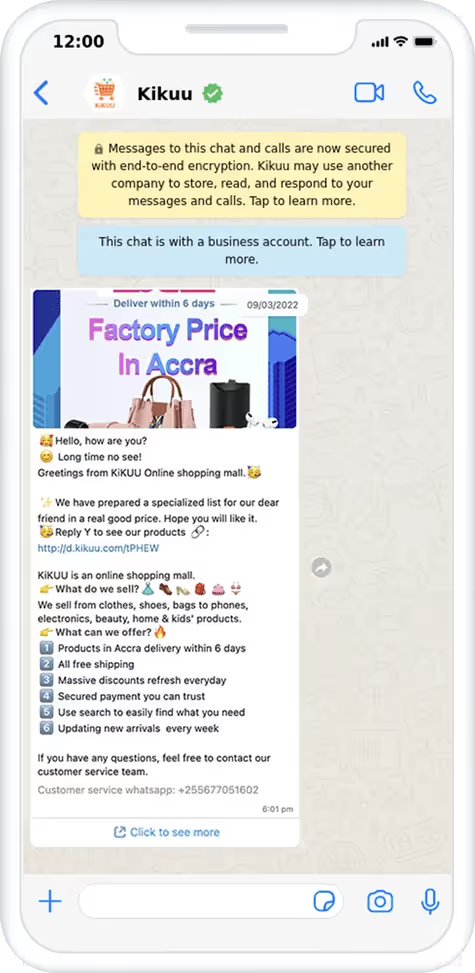
Ik hoor je denken, is dit niet hetzelfde als een WhatsApp groepschat? Dat is het niet. Het beste aan broadcastberichten is dat de klant een privébericht ontvangt. Het lijkt alsof je de tekst alleen voor hen hebt geschreven. Deze persoonlijke benadering zal de klantervaring zeker verbeteren.
Uw eigen productcatalogus
Je kunt een productcatalogus toevoegen aan je WhatsApp Business-profiel. In deze catalogus kun je maximaal 500 producten toevoegen, compleet met korte beschrijvingen, foto’s en prijzen. Het is eigenlijk de etalage van je bedrijf.
De productcatalogus kan ook van pas komen in gesprekken met je klanten. Je geeft een klant bijvoorbeeld advies over je product en kunt meteen doorlinken naar het product in je productcatalogus. Als de klant geïnteresseerd is, kan hij het meteen kopen. Dit alles zonder WhatsApp te verlaten.
Trek nieuwe klanten aan via WhatsApp Yellow Pages
Als je een onbekende stad bezoekt, gebruik je waarschijnlijk Google of Google Maps om een supermarkt of restaurant in de buurt te vinden. Het is een handige manier om snel een bedrijf te vinden. WhatsApp heeft een soortgelijke functie ontwikkeld en getest, genaamd WhatsApp Yellow Pages. Als je WhatsApp Business gebruikt, kun je je aanmelden bij de bedrijvengids van de app.
Na je registratie kunnen klanten in je buurt je WhatsApp Business-profiel bezoeken, je bedrijfsgegevens lezen en een chat starten. WhatsApp gebruikers kunnen ook zoeken naar bedrijven die een dienst verlenen of producten aanbieden die ze nodig hebben. Al met al is het een perfecte manier om je bedrijf op WhatsApp bekend te maken.
Veelgestelde vragen (FAQ)
Is de gewone WhatsApp beter dan WhatsApp Business?
Geen van beide is objectief gezien ‘beter’, omdat ze voor totaal verschillende doeleinden dienen. Gewone WhatsApp is door zijn eenvoud beter voor informele, privégesprekken met vrienden en familie. WhatsApp Business is onmiskenbaar beter voor commerciële doeleinden, dankzij de professionele profielen, automatiseringstools en productcatalogi. De beste keuze hangt er helemaal vanaf of je met je familie chat of met een betalende klant.
Wat zijn de nadelen van een WhatsApp Business-account?
De gratis WhatsApp Business-app heeft een paar kleine nadelen. Ten eerste staat er permanent een banner in je profiel met de tekst "Dit is een zakelijk account", wat volgens sommige gebruikers de informele sfeer van een persoonlijke chat wegneemt. Ten tweede betekent de beperking op het aantal apparaten dat je kunt koppelen aan de gratis app dat het geen oplossing voor de lange termijn is voor een snelgroeiend team. Ten derde hanteert Meta een strikt commercieel beleid, en bedrijven in bepaalde sectoren (zoals tabak, supplementen of wapens) lopen het risico dat hun account wordt geblokkeerd als ze producten via het platform proberen te verkopen.
Mag je WhatsApp Business voor privédoeleinden gebruiken?
Hoewel het technisch gezien mogelijk is en niet tegen de regels is, wordt het sterk afgeraden. Als je de zakelijke app gebruikt voor persoonlijke chats, zien je vrienden en familie dat je account als zakelijk is aangemerkt en kunnen ze automatische ‘afwezigheidsberichten’ ontvangen als je niet beschikbaar bent. Hierdoor raken persoonlijke en professionele gegevens door elkaar, wat leidt tot een rommelige digitale omgeving. Het is veel beter om een dual-sim-opstelling te gebruiken om je persoonlijke en professionele communicatie strikt gescheiden te houden.
Wat gebeurt er als ik overstap van WhatsApp naar WhatsApp Business?
Het migratieproces is veilig en wordt standaard ondersteund door Meta. Als je overstapt met hetzelfde telefoonnummer, zet WhatsApp automatisch al je bestaande chatgeschiedenis, media en contacten over naar de nieuwe Business-app. Maak voor de zekerheid echter altijd even een nieuwe back-up in de cloud (via Google Drive of iCloud) vlak voordat je de overstap maakt. Houd er rekening mee dat het moeilijker is om weer terug te schakelen van Business naar de gewone WhatsApp, omdat bedrijfsspecifieke gegevens zoals productcatalogi en labels dan definitief verloren gaan.
Kan ik WhatsApp Business en WhatsApp met hetzelfde nummer gebruiken?
Nee. Je kunt niet beide apps met hetzelfde nummer gebruiken, maar met de juiste instellingen kun je WhatsApp Business wel efficiënt voor meerdere gebruikers beheren. Eén telefoonnummer kan maar bij één WhatsApp-app tegelijk worden geregistreerd. Als je je persoonlijke nummer probeert te registreren in de Business-app, logt het systeem je automatisch uit bij je persoonlijke app en worden je profiel en chatgeschiedenis overgezet naar de Business-app.
Kun je WhatsApp Business en WhatsApp op dezelfde telefoon hebben?
Ja. Je kunt zowel de WhatsApp Messenger-app als de WhatsApp Business-app op één fysieke smartphone installeren. Zoals hierboven al is aangegeven, moet je echter twee verschillende telefoonnummers gebruiken om ze te activeren. Veel ondernemers lossen dit op door een dual-sim-telefoon te gebruiken of een combinatie van een eSIM en een fysieke simkaart. Met deze opzet kunnen ze persoonlijke chats op de normale app houden (met simkaart 1) en alle zakelijke communicatie op de Business-app (met simkaart 2), allemaal vanaf één apparaat.
WhatsApp Business en WhatsApp gebruiken op je Mac of desktop
Zowel de persoonlijke als de zakelijke versie van WhatsApp bieden speciale desktop-apps voor Mac en Windows, evenals webversies (WhatsApp Web). Je kunt zowel de normale WhatsApp-desktopapp als de WhatsApp Business-desktopapp tegelijkertijd op dezelfde computer draaien, ingelogd op hun respectievelijke accounts. Voor teams die de API via Trengo gebruiken, is het proces nog eenvoudiger. Zij hebben de native desktopapps helemaal niet nodig; ze loggen gewoon in op de Trengo-web- of desktopapplicatie om alle WhatsApp API-berichten vanaf elke Mac of pc te beheren.

Ervaar de impact van Trengo en AI
Een betere, snellere service en meer loyale klanten. Bundel alle klantcontactkanalen op één platform en lever een uitmuntende service met AI.