

Cómo crear un chatbot de WhatsApp Business sin programar

Prueba Trengo gratis

Trengo reúne WhatsApp, correo electrónico, web, redes sociales y llamadas en una sola bandeja de entrada, lo que ahorra a tu equipo horas de trabajo repetitivo y garantiza que nunca se pierda ninguna conversación.
Vea Trengo en acción
- Amplias integraciones
- Fácil configuración
- Estructura de precios escalable

Si quieres crear un chatbot de WhatsApp para tu negocio, has venido al lugar adecuado.
En esta guía completa, te explicaré todo lo que necesitas saber sobre las ventajas de utilizar un chatbot de WhatsApp Business y cómo configurar tu propio bot. Todo ello sin tener que escribir ni una sola línea de código.
En primer lugar, ¿qué es un chatbot de WhatsApp Business?
Un chatbot de WhatsApp Business es una tecnología que simula una conversación con tus clientes a través de WhatsApp. Se utilizan para responder a preguntas frecuentes, proporcionar información y recabar datos de clientes potenciales.
Ejemplo de chatbot de WhatsApp Business
Ahora es el momento de poner un ejemplo de la vida real.
Ferryscanner es un motor de búsqueda y reservas con sede en Grecia que ayuda a encontrar billetes de ferry asequibles a destinos interesantes de todo el mundo. Cuando los clientes se ponen en contacto con Ferryscanner a través de WhatsApp, un flowbot les hace un par de preguntas.
El bot de WhatsApp les ahorra mucho tiempo al recopilar información básica sobre el cliente antes de que se ponga en contacto con un colaborador humano. No tener que preguntar el nombre, el país y el código de reserva a cada cliente supone una gran diferencia a largo plazo.
Cuando entres en la página web de Ferryscanner, podrás iniciar un chat de WhatsApp a través del widget de su página web.

Cuando inicias una conversación con Ferryscanner, un bot te pide primero tu nombre y dirección de correo electrónico, y luego te pregunta cómo puede ayudarte ofreciéndote múltiples opciones:
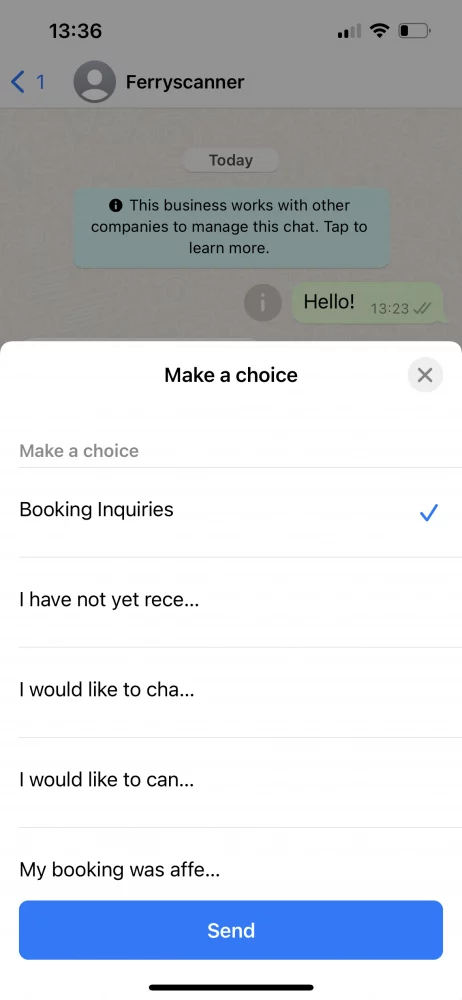
Una vez seleccionada una opción, el bot le conecta con el agente adecuado de Ferryscanner que puede ayudarle en su caso concreto. Esto ahorra tiempo tanto al equipo de atención al cliente como al cliente.

¿Cuáles son las ventajas de utilizar un chatbot de WhatsApp para empresas?
Al crear un chatbot de WhatsApp Business, matas varios pájaros de un tiro.
1. Mejorar la experiencia del cliente
En primer lugar, su tiempo de respuesta mejorará drásticamente. Esto no siempre significa que un cliente obtendrá respuesta a su pregunta de inmediato, pero siempre obtendrá una respuesta al instante. Si el bot no puede responder a la pregunta, puede indicar al cliente cuándo puede esperar la respuesta de un agente humano. Incluso fuera del horario de apertura.
2. Mejorar la eficacia del equipo
Debido al aumento de las expectativas de los consumidores, los equipos de atención al cliente experimentan más presión que nunca. Necesitan responder casi al instante, resolver problemas con rapidez y en más canales de comunicación que nunca.
Con un chatbot de WhatsApp en su equipo, los agentes ahorran mucho tiempo. Las preguntas frecuentes que puede responder el bot ya no son su responsabilidad. Los mensajes urgentes se reconocen automáticamente y se asignan al agente adecuado. Esto permite que el agente de atención al cliente se dedique a lo que mejor sabe hacer: ayudar a los clientes.
3. Generar clientes potenciales
Un bot no es solo una buena herramienta de atención al cliente, también es útil para fines de marketing. A menudo, los bots de WhatsApp se crean para recopilar información de contacto e incluso programar citas.
Imagina poder concertar una cita con tu peluquero enviando un mensaje de texto y fijando rápidamente una hora con la ayuda de un bot. Para la mayoría de las personas, especialmente las que pasan gran parte de su tiempo en WhatsApp, esto es más cómodo y personal que tener que navegar en un sitio web.
Cómo crear un chatbot de WhatsApp (una guía paso a paso)
En primer lugar, tendrás que empezar a utilizar la API de WhatsApp Business. Esto se debe a que la aplicación normal de WhatsApp Business no te permite crear chatbots, pero la API sí. La API de WhatsApp Business no tiene su propia interfaz y solo se puede acceder a ella a través de un proveedor de soluciones de WhatsApp Business como Trengo. Una vez que tengas acceso a la API, podrás empezar a crear un bot de inmediato.
https://www.youtube.com/watch?v=f16HrNcO8eg
A continuación, tendrás que decidir si quieres configurar un chatbot, un flowbot o una combinación de ambos.
Chatbot
Un chatbot entiende lo que dice tu cliente al reconocer ciertas palabras clave y formular una respuesta. Puedes entrenar al bot simplemente introduciendo respuestas a las preguntas que te hacen con frecuencia. Cuantas más variaciones proporciones, más inteligente se volverá tu bot.

Flowbot
Un flowbot permite al visitante encontrar la información que busca ofreciéndole opciones de elección múltiple.

📚 Más información: Explicación de la diferencia entre chatbots y flowbots
Configuración de un chatbot de WhatsApp en Trengo
https://www.youtube.com/watch?v=vIH2FnCzUgs
1. Ve a Ajustes > Automatización > Chatbots
2. Configurar los ajustes del chatbot

1. Título interno:Ponle un nombre a tu bot.
2. Idioma del chatbot:Selecciona el idioma.
3. Canales:Selecciona WhatsApp como canal.
4. Clave de Google Cloud: Introduce tu clave de Google Cloud.
Ya has creado tu propio chatbot de WhatsApp Business 🎉
Puedes añadir diferentes categorías de contenido a tu bot. Piensa en categorías como precios, productos y envíos.
3. Ve a «Categorías» y haz clic en «Añadir categoría»

4. Introduce el nombre de tu categoría.

Has creado correctamente una categoría para tu bot. Ahora es el momento de pensar en las preguntas.
Añadir preguntas a tu chatbot de WhatsApp
Cuando añadas una pregunta a tu bot, asegúrate de incluir varias variaciones de la misma. Nuestra regla general es añadir unas cinco variaciones por pregunta. Cuantas más añadas, más «inteligente» se volverá tu bot.
5. En primer lugar, haz clic en «Preguntas» y en el icono del signo «+» situado junto a la categoría a la que quieras añadir preguntas

6. Añade preguntas y respuestas para estas preguntas. Haz clic en el icono de la «marca de verificación» para guardar las preguntas.

Una vez que hayas añadido suficientes preguntas, puedesconfigurar los ajustes del chatbotyprobarlo.
Configurar un flowbot de WhatsApp en Trengo
https://www.youtube.com/watch?v=_fPKhc2Q6qU
1. Vaya a configuración >automatización >flowbot.
2. Haz clic en el signo + verde para crear tu bot.
3. Empieza a diseñar tu flowbot añadiéndole pasos, botones y acciones.
💡Consejo: Antes de empezar, dibuja un árbol de decisiones en un papel. Así tendrás una buena idea de cómo será tu flowbot y cuántos pasos, botones y acciones son necesarios.
4. ¿Ya está? A continuación, haz clic en "Configura tu flowbot" en la esquina inferior izquierda.

Ahora que ya ha creado su WhatsApp flowbot, tiene que configurarlo:
- Ve aAjustes>Automatización>Flowboty selecciona tu bot de WhatsApp.
- Haga clic en "Configurar su flowbot
- Rellena el siguiente formulario





Antes de publicar tu chatbot para WhatsApp Business, puedes probarlo en el entorno de pruebas. De esta forma, podrás asegurarte de que funciona correctamente antes de que tus clientes interactúen con él.
Buenas prácticas para crear chatbots eficaces en WhatsApp Business
Ahora que ya lo tienes todo listo, es hora de configurar tu bot para que tenga éxito. Aquí tienes algunos consejos para empezar con buen pie.
Conocer a tus clientes
Antes de crear un bot, aprende más sobre el comportamiento de tus clientes en WhatsApp. ¿Qué tipo de preguntas hacen? ¿Están relacionadas con la asistencia o con las ventas? Asegúrate de diseñar tu bot en consecuencia.
Mantener un texto breve y conciso
Si quieres que tu cliente lea realmente cada palabra que le escribes, hazlo corto. Demasiadas veces me he encontrado con bots que responden con respuestas que llevan demasiado tiempo leer. Tus clientes están ocupados, quieren una respuesta rápida y directa.
Usar un tono de voz informal
Hay que tener en cuenta que WhatsApp se usa sobre todo de manera informal. El consumidor medio está en la app para hablar con amigos y familiares. En otras palabras, las conversaciones no deben parecer una interacción por correo electrónico. Más bien, mantén un tono de voz informal, siempre que no se aleje demasiado de tu marca.
Crear mensajes alternativos
Cuando utilices un chatbot, asegúrate de configurar un mensaje de reserva claro. Se trata del mensaje que el bot envía a tus clientes cuando no reconoce lo que estos intentan decir. He aquí un ejemplo:
"Lo siento, no sé cómo responder a eso todavía. Por favor, reformula tu pregunta".
Reenviar mensajes a un humano a tiempo
Como he dicho antes, tus clientes están ocupados. No quieren perder el tiempo con un bot que parece incapaz de ofrecerles la información adecuada. Y es que un bot no siempre va a ser perfecto. Por eso debes entrenarlo para que reconozca cuándo debe pasar la conversación a un empleado humano. Esto podría ocurrir cuando un cliente utilice una palabra clave concreta, como «enfadado» o «queja». Pero también puedes hacerlo después de que un bot haya fallado al reconocer las preguntas de un cliente más de dos veces. Esto evita que el cliente se frustre con tu empresa.
Añadir un CTA al terminar la conversación
Cuando una conversación entre un bot y tu cliente llega a su fin, siempre debes terminarla con una clara llamada a la acción. Es una forma de dar a tu cliente la oportunidad de realizar la siguiente acción lógica sin tener que pensar cuál debería ser.
No hace falta ser desarrollador para crear un chatbot con la API de WhatsApp Business
Crear tu propio bot de WhatsApp Business no tiene por qué ser complejo. Con Trengo, puedes crear tu propio bot sin tener que usar ni una sola línea de código.
Puedes empezar hoy mismo una prueba gratuita de 14 días para comprobar lo rápido y fácil que es crear un bot en Trengo. Si necesitas ayuda, nuestro equipo está siempre dispuesto a ayudarte.

Ver más



Reunámonos
Haga crecer su negocio con la fidelización. Reúna todos los contactos con sus clientes en una única plataforma para satisfacerlos en todo momento.


