How to transform customer support with an automated ticketing system


Try Trengo for Free

Trengo unites WhatsApp, email, web, social media, and calls in one inbox, saving your team hours of repetitive work and ensures no conversation is ever lost
What is an AI ticketing system?
Summary
An AI ticketing system uses artificial intelligence to log, categorise, prioritise and route customer requests, and it can resolve simple questions on its own. Compared with a traditional help desk, it reads the intent and urgency of every message, so each ticket reaches the right person faster. This guide explains how AI ticketing works, what it changes for support teams, and how six popular tools compare. It also covers how to implement an AI ticketing system and the best practices that make AI-driven ticketing work in customer service.
TL;DR
- An AI ticketing system automatically labels, prioritises and routes support requests, and can answer routine questions itself.
- Automated ticket routing sends every conversation to the teammate with the right skills, which cuts delays and manual sorting.
- AI-guided self-service resolves simple Tier 0 and Tier 1 questions, while complex cases are escalated to your team.
- Popular AI ticketing tools include Trengo, Zoho Desk, Jira Service Management, Freshdesk, Help Scout and LiveAgent.
- Start with your most repetitive questions, keep a clear human handover, and measure response and resolution times.
An AI ticketing system, also called an automated ticketing system, is software that turns every incoming customer message into a trackable ticket and uses AI to decide what happens next. It understands what the customer is asking, adds the right labels, sets a priority and sends the ticket to the right team, or answers it straight away when the question is simple.
Managing customer conversations is the key to building lasting relationships in today’s consumer market. Did you know that 71% of consumers aged 16-24 believe that quick responses drastically improve their customer experience? This is where an AI ticketing system shines. It ensures that no customer request goes unanswered, while streamlining how inquiries are handled.
How does an AI ticketing system work?
Imagine a customer reaching out with a question. Instead of manually figuring out where their inquiry goes, an AI ticketing system steps in. Using AI and automation, it routes, prioritises and tracks every incoming request, sending it to the person in your team who has the best skills to answer it.
This process, called automated ticket routing, prevents delays and reduces the risk of errors, allowing support teams to focus on resolving issues rather than organising them. Most AI ticketing systems follow the same steps:
- Capture: messages from email, chat, WhatsApp and social media become tickets in one place.
- Understand: the AI reads the intent, language and urgency of each message.
- Label and prioritise: AI labels add topics such as order status, billing or sales leads, and urgent tickets move to the top.
- Route or resolve: simple questions are answered automatically, and the rest are assigned to the right team or teammate.
- Summarise: long conversations get a short AI summary, so the next agent does not have to read the full history.
Whether your customers write in by email or chat, the flow stays the same. If email is your busiest channel, an email ticketing system is often the first place where AI routing saves time.
AI ticketing system vs. traditional ticketing system
Traditional systems often involve a lot of manual work, which can lead to longer wait times and missed inquiries. They rely on fixed keyword rules or on a person who reads and sorts every ticket. An AI ticketing system interprets the meaning and context of a message instead, so it can label, translate and route tickets correctly even when customers phrase things differently. With features like conversation tracking and real-time categorisation, AI ticketing transforms the support process from reactive to proactive.
How do AI ticketing systems impact businesses?
AI-powered ticketing systems have the power to transform your customer support by improving efficiency, reducing costs and ensuring a better customer experience. They are often part of a wider customer service platform and help you scale your help desk operations without compromising on quality.
Here’s how they make an impact:
AI-guided self-service
Imagine a support system that empowers customers to solve issues themselves. Over 60% of customers prefer self-service tools like AI-driven chatbots. These intelligent bots use Natural Language Processing (NLP) to respond to common questions in seconds, and modern AI agents for customer service can also look up live data, such as an order status, before they answer.
By resolving Tier 0 and Tier 1 inquiries, simple issues like account access or FAQs, AI-guided self-service ensures that support agents remain focused on more critical tasks. This helps to clear the help desk backlog and gives customers instant solutions without waiting to connect with a person.
Automatic ticket escalation
AI isn’t here to replace your human team members. It is a tool that supports them. Automatic escalation ensures that complex queries are seamlessly routed to the right team without manual intervention. Tickets requiring specific expertise are prioritised and assigned, while inactive tickets can be archived to maintain an organised workflow.
With fewer repetitive tasks and a cleaner help desk, team members have more time to resolve challenging issues, boosting team productivity and morale.
Omnichannel messaging and knowledge
In today’s multichannel world, customers expect support across platforms like email, chat, WhatsApp and social media. AI-powered ticketing systems unify these interactions into a single, accessible hub.
Whether a customer starts with an email, moves to a live chat and ends with a phone call, all information such as purchase history and past inquiries is stored together. This omnichannel approach ensures consistent, personalised support while giving customer service staff the data and tools they need to resolve issues. For many teams, a WhatsApp ticketing system is the next step, because more and more customers prefer to message a business instead of calling.
Top 6 AI ticketing systems reviewed
Choosing the right AI ticketing system depends on your business needs and goals. Below are six automated ticketing platforms that each have their own advantages and might be a good fit for your business.
Trengo
Trengo is designed to simplify customer interactions by bringing channels like email, WhatsApp and Instagram together in one omnichannel inbox. Trengo's AI Agents resolve repetitive support questions around the clock in more than 70 languages, while AI Journeys route complex conversations to the right teammate. AI labels and AI summaries keep every ticket organised, and Trengo integrates with tools like Shopify and HubSpot, making it a good fit for growing businesses.
- What makes it stand out: Omnichannel support combined with AI and automation tools for a consistent customer experience.
- Pros: Simple setup, scalable, ideal for teams of all sizes.
- Cons: Advanced data visualisation options could be expanded.
- Pricing: Starting from €119 per month for 3 users (Base plan, billed annually, AI as an add-on)
Zoho Desk
Zoho Desk is a flexible help desk solution that integrates with the broader Zoho ecosystem, making it a good choice for businesses already using Zoho apps. Its automated workflows and ticket categorisation streamline support processes, while its AI assistant “Zia” provides smart insights.
- What makes it stand out: Comprehensive customisation options and AI-driven insights.
- Pros: Multichannel support, affordable pricing tiers.
- Cons: Some users find the interface outdated.
- Pricing: Starts with a free version available.
Jira Service Management
Jira Service Management combines IT service and help desk functions in one powerful platform. Known for its customisable workflows, it’s a good choice for enterprises looking to integrate support into their wider IT systems, and for teams looking for AI IT ticketing.
- What makes it stand out: Integration with IT service management (ITSM) tools for technical and customer support.
- Pros: Advanced SLA management, flexible workflows.
- Cons: Complexity can overwhelm smaller teams.
- Pricing: Starts at $19.04 per agent per month, with a free version available.
Freshdesk
Freshdesk is a go-to for businesses seeking simplicity and scalability. It offers team inboxes for collaboration, ticket merging and automation features to manage high volumes of inquiries.
- What makes it stand out: Seamless collaboration tools for cross-departmental support.
- Pros: Scalable self-service options, unified ticketing.
- Cons: Performance can lag under heavy ticket loads.
- Pricing: Starts at $18 per agent per month, with a free plan available.
Help Scout
Help Scout focuses on providing proactive customer service with features like rule-based automation and canned responses. Its simple interface and customer-centric design make it an attractive option for small and mid-sized businesses.
- What makes it stand out: Customer-first design with useful messaging tools.
- Pros: Easy to use, actionable analytics.
- Cons: Limited scalability for larger teams.
- Pricing: Starts at $50 for 100 contacts per month and unlimited users.
LiveAgent
LiveAgent is an all-in-one support solution offering ticket management, live chat and a call centre. Its hybrid ticketing feature collects inquiries from multiple channels into one unified thread, helping teams stay organised.
- What makes it stand out: Hybrid ticketing system that consolidates multichannel inquiries.
- Pros: Multichannel support, advanced automation rules, knowledge base integration.
- Cons: User interface could be modernised.
- Pricing: Starts at $15 per agent per month, with a free plan available.
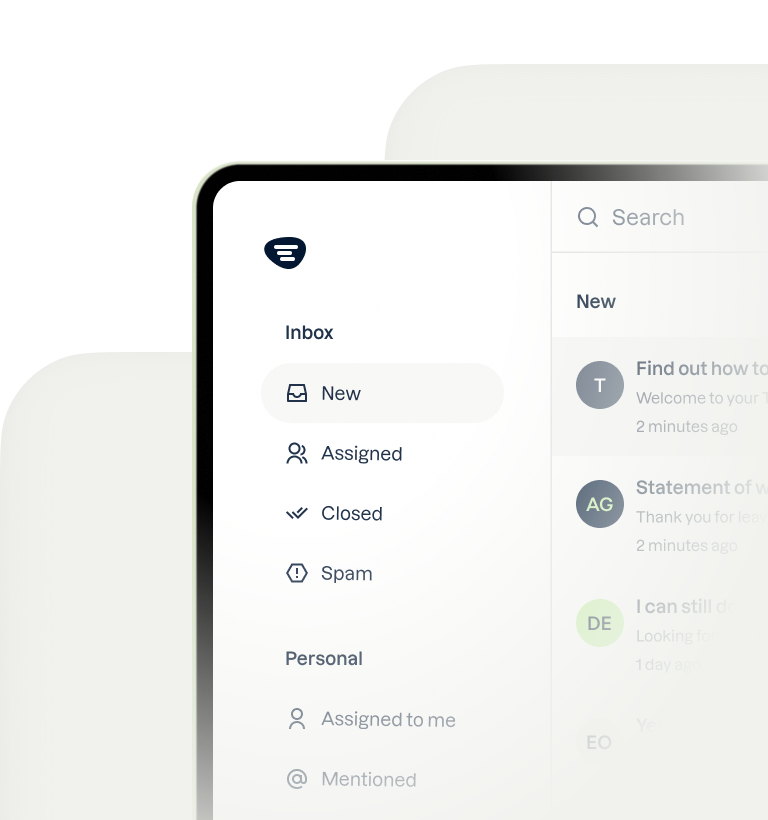
Every conversation in one inbox
WhatsApp, email, live chat, social and voice together, with the customer's details next to every conversation.
How to implement an AI ticketing system
Integrating AI ticketing software into your business doesn’t have to be overwhelming. By following these three steps, you can set yourself up for success:
Choose and integrate an AI ticketing system
The first step is choosing a system that fits your business needs. Look for AI-powered tools that integrate seamlessly with your existing tech stack, such as your CRM or communication platforms. Smooth integration ensures that your workflows are uninterrupted while you get all the benefits of automation. If your sales and support teams share customer data, a CRM ticketing system keeps every ticket linked to the right customer profile.
Configure routing, labels and escalation
Tailor your system to align with your support goals. Set up rules for ticket routing, categorisation and escalation, and decide which questions the AI may answer on its own. Customise workflows to ensure that every inquiry reaches the right person at the right time. Don’t forget to train your team on the new system to maximise efficiency.
Set a target for success
Define clear goals for your ticketing system, whether it’s faster resolution times, improved customer satisfaction scores or a reduced agent workload. Use the system’s analytics to track progress and refine your approach over time, ensuring continuous improvement.
By implementing an AI ticketing system strategically, your business can enhance efficiency, improve customer relationships and set the stage for scalable growth.
Best practices for AI-driven ticketing in customer service
Implementing AI-driven ticketing works best when you introduce it step by step. These best practices help you get value quickly while keeping the quality of your service high. They build on how AI in customer service is changing the way support teams work.
- Start with your most repetitive questions, such as order status, opening hours or password resets, and let the AI handle those first.
- Build a clear and up-to-date knowledge base, because the AI can only answer as well as the information you give it.
- Always offer a human handover, so customers with complex or sensitive issues reach a person quickly.
- Use AI labels and priorities to assign tickets, and review the routing rules regularly as your products and teams change.
- Use AI summaries and translations, so agents can pick up conversations in any language without reading the full history.
- Measure first response time, resolution time and customer satisfaction before and after you launch, and adjust based on the results.
Benefits of an AI ticketing system
AI ticketing systems help you streamline customer support and transform how your business connects with its audience. Here’s how adopting one can make a lasting impact:
Loyal customers
Happy customers are loyal customers. AI ticketing ensures every query is handled promptly, reducing wait times and frustration. By routing conversations to the right person instantly, customers receive tailored, efficient support. This builds trust and satisfaction, which are the foundation of long-term loyalty.
Talent and retention
Burnout is one of the leading causes of employee turnover in customer service. AI ticketing systems minimise repetitive tasks, allowing your team to focus on meaningful conversations. When employees feel empowered and supported, they’re more likely to stay, fostering a stable and skilled support team.
Scalable help desk support
As businesses grow, so does the number of customer inquiries. AI ticketing systems scale effortlessly to handle increasing volumes, maintaining efficiency without requiring significant additional resources. Together with other customer service automation software, an automated solution keeps the help desk running smoothly, whether you handle hundreds or thousands of conversations.
Get started with an AI ticketing system in Trengo
An AI ticketing system is becoming a necessity for any business aiming to deliver exceptional customer experiences. By streamlining processes, enhancing team productivity and fostering customer loyalty, these systems provide the foundation for scalable and efficient support.
If you’re ready to transform your customer conversations and take your support strategy to the next level, Trengo brings every channel into one inbox and empowers your team with smart automation. With Trengo's AI Agents, routine questions are resolved instantly, and every other ticket reaches the right teammate with the context they need.
Frequently Asked Questions

An AI ticketing system is software that turns every customer message into a ticket and uses artificial intelligence to categorise, prioritise and route it. It reads the intent and urgency of each request, sends it to the right team or teammate and can answer simple questions automatically, so customers get help faster and agents spend less time sorting tickets.
AI ticket routing reads each incoming message, recognises the topic, language and urgency, and then assigns the ticket to the team or agent with the right skills. Labels and priorities are added automatically, and complex or sensitive cases are escalated to a person. The best way to implement AI-driven ticket assignment is to start with clear routing rules for your most common topics and review the results regularly.
Look for automatic labelling, ticket prioritisation and routing, AI summaries of long conversations, multilingual support and translations, and a clear handover from AI to a human agent. It should also bring all your channels into one place, integrate with your CRM and other tools, and give you reporting on how both AI and human agents resolve tickets.
Popular ticketing systems include Trengo, Zoho Desk, Jira Service Management, Freshdesk and Help Scout. Trengo focuses on omnichannel support with AI and automation, Zoho Desk fits businesses that already use Zoho apps, Jira Service Management suits IT teams, Freshdesk offers simple and scalable ticketing, and Help Scout is popular with small and mid-sized businesses.
Yes, several ticketing systems offer a free plan or free version, including Zoho Desk, Freshdesk, LiveAgent and Jira Service Management. Free plans usually have limits on agents, channels or features, and advanced AI features are often part of paid plans or add-ons, so check what the free plan includes before you choose.
Pricing depends on the tool, the number of users and the AI features you need. Trengo starts from €119 per month for 3 users on the Base plan, billed annually, with AI as an add-on. Other tools charge per agent per month, and some offer a free plan with limited features.
A traditional ticketing system relies on fixed rules or manual work to sort and assign tickets. An AI ticketing system understands the meaning and context of each message, so it can label, prioritise, translate and route tickets automatically, and it can resolve simple questions without an agent.
No, an AI ticketing system supports your team rather than replacing it. The AI handles repetitive questions and the sorting of tickets, while complex, sensitive or high-value conversations are escalated to people. This gives agents more time for the conversations where a human touch makes the difference.
Still switching between five inboxes?
Trengo puts every channel in one inbox.
More like this


Let's meet
Grow your business with loyalty. Bring all of your customer contact into one, single platform to unlock delight at every step of the way.