

E-commerce chatbot guide: benefits, examples & how to get started


Try Trengo for Free

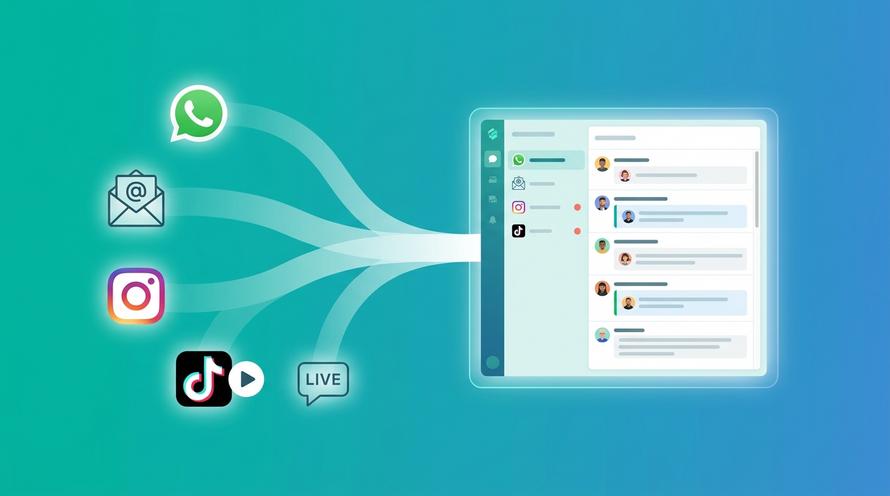
Trengo unites WhatsApp, email, web, social media, and calls in one inbox, saving your team hours of repetitive work and ensures no conversation is ever lost

Your customers are shopping at 2 AM in their pyjamas, expecting instant answers. They're messaging you on WhatsApp, sliding into your Instagram DMs during their lunch break, and sending emails at the weekend. The traditional "we'll get back to you in 24 to 48 hours" just doesn't work anymore.
That's where you need an e-commerce chatbot platform for your store. These super intelligent tools handle customer conversations automatically, answering questions, tracking orders, and even helping shoppers find the perfect product without needing a human agent glued to their desk 24/7.
And before you worry, ”This sounds complicated,” modern platforms have made setting these up surprisingly easy.
In this guide, we'll tell you real e-commerce chatbot examples, break down the benefit, and show you exactly how to get one up and running for your store.
Whether you're running a boutique Shopify shop or managing a massive WooCommerce catalogue, you'll find practical advice you can actually use.
Let’s start with the basics.
What Is an E-commerce Chatbot?
An e-commerce chatbot is a software tool that chats with your customers on your behalf. It's like having a shop assistant who never sleeps, never gets grumpy, and can handle hundreds of conversations at once.
These chatbots live on your website, social media pages, or messaging apps.
When a customer types a question like "What's your return policy?" or "Where's my order?", the chatbot understands what they're asking and fires back a helpful response.
The crazy part is, it all happens in seconds, and to the customer, it feels like they're having a proper conversation.
Modern e-commerce chatbots use natural language processing (NLP) to understand what customers mean, not just what they type.
So if someone asks "Do you have this in blue?" or "Got this in blue?", the bot recognises both questions are asking the same thing.
Top Benefits of E-commerce Chatbots
Here are the top benefits of how chatbots add real value to your business and improve the customer experience.
24/7 Customer Support
A chatbot never clocks out. Whether someone’s browsing at 3 in the morning or during a lunch break, they’ll always get help right away. For small online shops, that’s a huge advantage as you get round-the-clock support without paying for night shifts or extra staff.
Instant Replies
No one likes waiting when they’re ready to buy. Chatbots reply in seconds, keeping your shoppers engaged instead of wandering off to another site. In e-commerce, speed really does make the sale.
Handle Lots of Chats at Once
Your team might manage a few conversations at a time, but a chatbot can handle hundreds. During busy sales like Black Friday or Christmas, every customer still gets an instant reply instead of sitting in a queue.
Reduce Abandoned Baskets
Around 70% of online baskets get abandoned, often because people have a small question about delivery or returns. A chatbot can pop up at just the right time to answer it.
Consistent Brand Voice
Whether customers message on your website, Instagram, or WhatsApp, a chatbot makes sure they get the same helpful tone and information every time. It keeps your brand consistent and professional.
Save Money as You Grow
Hiring, training, and managing support staff can be expensive. Chatbots scale instantly. You don't need to sign contracts, there's no overtime, and no training is needed. As your shop grows, your customer support costs stay low.
Top 7 E-commerce Chatbot Use Cases with Examples
Learn how leading e-commerce brands use chatbots to streamline operations, boost sales, and improve customer support.
- Product Discovery and Recommendations
When a shopper lands on your site with hundreds of options, it’s easy to feel overwhelmed. A chatbot can step in with a friendly “Looking for running shoes, casual trainers, or something else?”
After asking about size, colour, and budget, it recommends the best matches. H&M and Nike use this approach brilliantly, helping customers find products faster through guided, conversational shopping.
- Order Tracking and Updates
“Where’s my order?” is the top question in e-commerce. A chatbot can instantly check and reply with updates like “Your parcel is out for delivery and should arrive today.”
Amazon and Zara use similar automated systems to keep customers informed without the need for human agents.
- Returns and Refunds
Returns can be time-consuming, but chatbots simplify the process. They explain return policies, generate labels, and keep customers updated on refunds.
ASOS and Boohoo both use chatbots to handle returns quickly, while their teams focus on more complex issues.
- Checkout Assistance
When shoppers hesitate at checkout, a chatbot can help by offering discounts or explaining delivery options.
Sephora and PrettyLittleThing use chatbots to suggest add-ons or exclusive offers just before payment, turning hesitation into confirmed sales.
- Post-Purchase Support
Once customers receive their orders, they often have questions about use or care. Chatbots can share how-to guides, videos, and product tips instantly.
IKEA and Samsung use post-purchase chatbots to provide assembly instructions, troubleshooting help, and product advice right in chat.
- Customer Feedback Collection
Instead of long surveys, chatbots can send friendly follow-ups like “How are you liking your new trainers?”
Shopify stores and brands like Gymshark use post-purchase chatbots to collect quick reviews and feedback, helping improve products and boost social proof.
- Lead Generation and Qualifying
For wholesale or B2B sites, a chatbot can ask simple questions like “Are you buying for business or personal use?” and pass qualified leads to sales teams.
Alibaba and FashionTIY use chatbots to filter serious buyers from casual visitors, saving time and improving conversions.
Types of Chatbots for Different E-commerce Tasks
When building your e-commerce chatbot strategy, it's important to understand that not all bots are created equal. Let's break down the two main types:
Rule-Based Chatbots (Decision Tree Bots)
How they work: These follow predetermined paths based on buttons, keywords, or menu options. Think of them as automated phone menus but much friendlier.
Best for:
- FAQs (returns policy, shipping costs, opening hours)
- Order tracking (enter order number → see status)
- Simple product filters (trainers → running → size 9 → show options)
- Booking or appointment scheduling
- Lead capture forms
Pros:
- Predictable and reliable
- Easy to set up and maintain
- Perfect for high-volume, repetitive queries
- Clear conversation paths reduce confusion
Cons:
- Limited flexibility
- Struggle with unexpected questions
- Can feel robotic if not designed well
AI-Powered Chatbots (Conversational AI)
How they work: These use natural language processing and machine learning to understand context, intent, and nuance. They can handle free-text input and learn from conversations.
Best for:
- Complex customer queries with multiple variables
- Natural conversation flow
- Product recommendations based on nuanced preferences
- Handling complaints or sensitive issues before escalation
- Multi-turn conversations that require context
Pros:
- Feels human and natural
- Handles unexpected questions gracefully
- Learns and improves over time
- Can understand typos, slang, and different phrasings
Cons:
- More complex to set up initially
- Requires training data and ongoing refinement
- Can occasionally misunderstand niche terminology
The Smart Approach: Hybrid Systems
The secret sauce for your business success is that you don't have to choose. The best e-commerce chatbot platforms let you combine both.
Use rule-based flows for predictable interactions as they're faster and more reliable for simple stuff.
Then layer AI on top to handle everything else. When a customer types something unexpected, the AI tries to help. If it can't, it smoothly hands over to a human agent with full context.
This hybrid approach gives you the efficiency of automation with the flexibility of intelligence. Your customers get quick answers for simple queries and thoughtful assistance for complex ones.
How to Build an E-commerce Chatbot
Building an e-commerce chatbot might sound technical, but it’s actually a super easy process once you know what to focus on. Here's a practical, step-by-step approach:
Step 1: Define Your Goals
Before touching any software, ask yourself: What do I want this chatbot to achieve?
Common goals:
- Reduce support tickets by 40%
- Increase conversion rates by answering pre-purchase questions
- Automate order tracking
- Reduce cart abandonment
- Generate leads for B2B sales
Be specific. "Improve customer service" is too vague. "Answer the top 10 FAQs automatically, reducing tickets by 30%" is actionable.
Step 2: Map Your Customer Journey
Walk through your typical customer interactions. Where do people get stuck? What questions appear repeatedly in your support inbox?
Look at:
- Your FAQ page (these are chatbot goldmines)
- Support ticket history (what are the most common themes?)
- Live chat logs (where do customers ask for help?)
- Cart abandonment data (when do people leave?)
This research tells you exactly what your chatbot needs to handle first.
Step 3: Choose Your Chatbot Platform
You need a platform that:
- Integrates with your e-commerce system (Shopify, WooCommerce, Magento)
- Supports multiple channels (website, WhatsApp, Instagram, email)
- Offers both rule-based and AI-powered options
- Provides analytics to track performance
- Allows seamless handover to human agents
Step 4: Design Your Conversation Flows
Start simple. Pick your top 3-5 use cases and build flows for those.
For each use case:
- Set the trigger (what starts this conversation?)
- Map the questions (what info do you need from the customer?)
- Define the responses (what does the bot say at each step?)
- Plan the outcome (resolution or handover to human?)
Example flow for order tracking:
- Trigger: Customer types "track order" or "where's my package"
- Bot: "I can help! What's your order number?"
- Customer: Enters number
- Bot: Checks order status via Shopify API
- Bot: "Your order is out for delivery! Expected arrival: today by 6 PM"
- Bot: "Anything else I can help with?"
Step 5: Write Your Chatbot Scripts
Your chatbot represents your brand, so write in your brand's tone. If you're a fun, casual brand, let the bot be chatty. If you're premium and professional, keep it polished.
Tips for good chatbot copy:
- Use contractions (we're, it's, you'll) to sound natural
- Keep messages short as mobile users are skimming
- Ask one question at a time
- Avoid jargon
- Add personality without being annoying
- Include emojis if it matches your brand (but don't overdo it)
Step 6: Integrate with Your Systems
Your chatbot needs data access. Connect it to:
- Your e-commerce platform (product catalogue, inventory, orders)
- Your CRM (customer history, preferences)
- Your shipping provider (tracking information)
- Your payment system (refund status)
Once connected, your chatbot can pull real-time information without manual updates.
Step 7: Set Up Escalation Rules
Not everything belongs with a bot. Define when conversations should escalate to humans:
- Customer explicitly asks for a person
- Bot doesn't understand after two attempts
- High-value orders or VIP customers
- Complaints or refund requests above a certain value
- Complex technical issues
Step 8: Test Thoroughly
Before going live, test everything:
- Try every conversation path
- Test with typos and variations ("wheres my order", "track my package")
- Check integrations work correctly
- Verify data appears accurately
- Test on mobile devices (most customers chat on phones)
- Get colleagues to try breaking it
Fix issues before real customers encounter them.
Step 9: Launch and Monitor
Start with a soft launch. Enable the chatbot for a small percentage of visitors or specific pages. Monitor how it performs:
- Resolution rate (what percentage of chats end successfully?)
- Escalation rate (how often does it need human help?)
- Customer satisfaction scores
- Time to resolution
Step 10: Iterate and Improve
Your first version won't be perfect. That's fine. Use the data to improve:
- Which questions does the bot struggle with? Add those flows.
- Where do customers get frustrated? Rewrite that section.
- What unexpected uses are customers finding? Support them.
- What new questions emerge? Update your knowledge base.
Successful e-commerce chatbots continue to develop. Plan to review performance monthly and make improvements.
Best E-commerce Chatbot Practices
You've built your chatbot. Now let's make it brilliant. Check out these proven best practices:
1. Set Clear Expectations Immediately
The first message should tell customers what the bot can do: "Hi! I'm your assistant. I can help you track orders, answer product questions, and process returns. What can I help with today?"
This manages expectations and prevents frustration when someone asks something out of scope.
2. Make Human Escalation Obvious
Always offer an easy path to human support. Include buttons like "Speak to a person" or detect frustration ("This isn't helping" → immediate escalation).
Nothing annoys customers more than being trapped with an unhelpful bot.
3. Keep Responses Concise
Mobile screens are small. Break information into short messages. Instead of one long paragraph, send 2-3 shorter messages. It's easier to read and feels more conversational.
4. Use Buttons and Quick Replies
For common responses, offer buttons. It's faster than typing and ensures consistent input for your bot to process.
"What can I help with? [Track Order] [Return Item] [Product Question] [Talk to Human]"
5. Personalise When Possible
If you know the customer's name, use it. If they're a repeat customer, acknowledge it: "Welcome back, Sarah! Need help with a new order or your recent purchase?"
6. Be Transparent About Being a Bot
Don't pretend to be human. Customers appreciate honesty. "Hi, I'm your super cool chatbot" works fine. It sets appropriate expectations.
7. Handle Errors Gracefully
When the bot doesn't understand, don't say "Error" or "I don't understand." Try: "Hmm, I'm not quite sure about that. Could you rephrase, or would you like to speak with our team?"
8. Collect Feedback
At the end of interactions, ask: "Did I answer your question? 👍 👎" Use this feedback to identify problems and improvements.
9. Update Your Knowledge Base Regularly
As products change, policies update, or new questions emerge, keep your chatbot current. Outdated information is worse than no information.
10. Test on Real Customers
Your team's testing isn't enough. Real customers use things in unexpected ways. Monitor actual conversations and adjust based on real behaviour, not assumptions.
11. Optimise for Different Channels
A chatbot on your website might have more screen space than one on WhatsApp. Adapt your flows for each channel. Trengo's omnichannel approach helps here, but you can still customise per platform.
12. Balance Automation with Human Touch
Don't automate everything just because you can. Some interactions benefit from human warmth. Complex complaints, angry customers, or nuanced product advice might need a person's empathy and judgment.
Why Choose Trengo as Your Chatbot Platform for Your E-commerce Store?
Trengo helps you automate repetitive questions, give instant replies 24/7, and keep every chat organised, no matter where it started. Basically, it solves the chaos of managing multiple channels while improving your customers’ experience from first click to checkout. Some of its features are:
True Omnichannel Support
Your customers don't live on just your website. They're on WhatsApp, Instagram, Facebook Messenger, email, and live chat. Most chatbot platforms handle one or two channels. Trengo handles them all, with everything flowing into one unified inbox.
No switching between platforms, no missed messages, no context lost. Your team sees every conversation in one place,
Built for e-commerce
Trengo wasn't adapted for e-commerce; it was built for it. Native integrations with Shopify, WooCommerce, and Magento mean your chatbot accesses real-time product data, inventory levels, and order information without complicated custom code.
You get e-commerce-specific features out of the box: abandoned cart recovery, order tracking, product recommendations, and return automation.
Hybrid Intelligence
Remember our chat about rule-based vs AI-powered? Trengo gives you both. Use Flowbots for straightforward automation (fast, reliable, predictable) and layer AI on top for complex queries.
This flexibility means you're not locked into one approach. Start simple with rules, add AI as you grow.
No-Code Setup
You don't need a developer. Trengo's visual Flowbot builder uses drag-and-drop elements. It's genuinely intuitive.If you can use PowerPoint, you can build Trengo chatbots.
This means faster deployment, easier updates, and no ongoing developer costs.
Seamless Human Handover
When escalation is needed, agents receive the full conversation history, customer information, and relevant data. They jump in smoothly without asking customers to repeat themselves.
This continuity creates a professional experience where automation and human support feel like one integrated service.
Powerful Analytics
Trengo's dashboard shows exactly how your chatbots perform:
- Resolution rates
- Average response times
- Most common queries
- Escalation triggers
- Customer satisfaction scores
- Conversion impact
These insights help you continuously refine and improve. You're not guessing—you're optimising based on data.
Team Collaboration Tools
Multiple agents can collaborate on tickets, leave internal notes, and assign conversations. The unified inbox means your entire support team works together efficiently, whether handling chatbot escalations or direct messages.
Scalability
Whether you're handling 100 conversations a month or 100,000, Trengo scales with you. Pricing is transparent, and the platform handles increased volume without performance drops.
Responsive Support
Building chatbots can feel daunting initially. Trengo's support team helps you set up, troubleshoot, and optimise. You're not alone figuring this out.
Cost-Effective
Compare Trengo's pricing to hiring additional support staff. The ROI becomes clear quickly. You're getting an omnichannel chatbot platform, unified inbox, CRM integration, and analytics for less than one full-time support agent.
Final Words
There you have it. Your complete guide to e-commerce chatbots.
We've covered what they are, why they matter, how to build them, and best practices for making them brilliant. More importantly, you've seen real examples of how e-commerce businesses just like yours are using chatbots to answer questions faster, reduce support costs, and boost sales.
Your competitors are probably already using chatbots. The question isn't whether you need one. It's how quickly you can implement one that truly serves your customers and supports your team.
Ready to give it a go? Contact Trengo today for smooth integration and customer support. Book a demo.
Frequently Asked Questions (FAQs)
How can I add a chatbot to my eCommerce website?
To add a chatbot to your eCommerce website, choose a chatbot platform compatible with your website infrastructure. Platforms like Trengo offer easy-to-install widgets with customisable conversation flows, allowing you to engage visitors automatically. Integration usually involves embedding a code snippet or connecting via a plugin depending on your website platform.
What platforms can I use to build an eCommerce chatbot?
You can build eCommerce chatbots using platforms such as Trengo, ManyChat, Chatfuel, or Intercom. Each offers tools to design AI-powered chatbots capable of supporting sales, customer service, and marketing automation with integrations to popular eCommerce systems.
How can chatbots help recover abandoned carts?
Chatbots recover abandoned carts by proactively messaging customers who left items without purchasing. They can send personalised reminders, offer discounts, and answer last-minute questions. Trengo enables automated workflows and multi-channel messaging that effectively nudge customers toward completing purchases.
Can chatbots handle product recommendations and upselling?
Yes, chatbots analyse browsing behaviour and purchase history to suggest complementary or higher-value products during conversations. This personalised approach boosts average order value. Trengo’s chatbot capabilities include automated upsell and cross-sell messaging to enhance customer experience.
How do I train my chatbot to answer product-specific questions?
Training involves feeding your chatbot product information, FAQs, and common queries. Leveraging natural language processing, platforms like Trengo allow continuous learning from interactions to improve accuracy, helping the chatbot respond effectively to product-specific questions.
Can eCommerce chatbots manage returns, refunds, and order tracking?
Yes, chatbots can automate handling of returns, refunds, and order tracking by integrating with your order management, CRM, or logistics systems. This reduces manual workload and provides instant updates. Trengo supports these integrations, ensuring smooth and consistent service.
How can I make my eCommerce chatbot sound more human?
Use conversational language, empathetic phrasing, and personalise interactions with the customer’s name and purchase history. Incorporate variations in responses to avoid repetition. Platforms like Trengo enable easy editing of chatbot scripts to match your brand’s tone and personality.
Can I use the same chatbot across WhatsApp, Instagram, and website chat?
Yes, omnichannel platforms like Trengo allow deploying a single chatbot across WhatsApp, Instagram, website chat, and other channels, providing consistent and seamless customer experiences regardless of touchpoint.
How does Trengo integrate with Shopify, WooCommerce, or Magento to automate order updates?
Trengo integrates natively or via APIs with Shopify, WooCommerce, and Magento, syncing order data to trigger chatbot notifications. Customers receive real-time updates on order status, shipping, and delivery, with automated FAQs and support available through chat.



Let's meet
Grow your business with loyalty. Bring all of your customer contact into one, single platform to unlock delight at every step of the way.


