

A complete guide to the WhatsApp business api for ecommerce brands


Try Trengo for Free

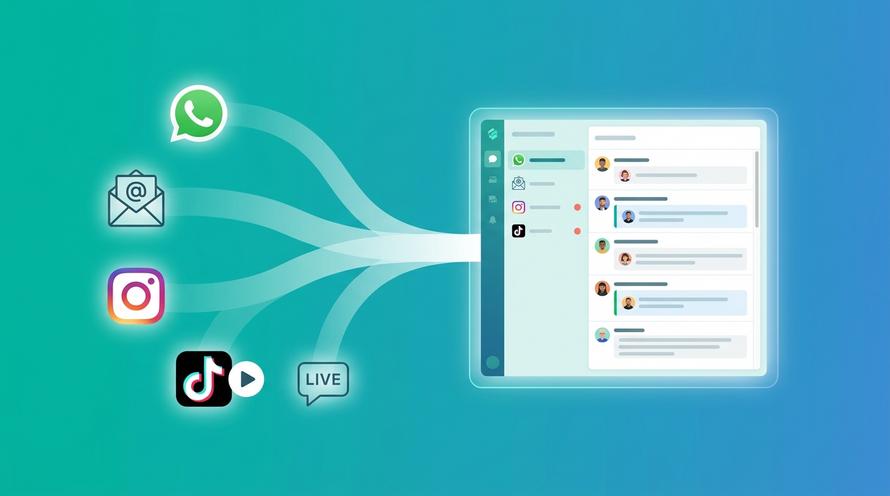
Trengo unites WhatsApp, email, web, social media, and calls in one inbox, saving your team hours of repetitive work and ensures no conversation is ever lost

For most ecommerce teams, staying close to customers can feel challenging—especially when messages come in from many different channels. This is where the WhatsApp API for ecommerce makes a real difference. WhatsApp is already part of people’s daily lives, and customers feel comfortable reaching out through a channel they trust.
Many shoppers prefer messaging instead of calling or emailing. It’s quick, personal, and gives them the freedom to ask questions whenever it suits them. Studies also show that customers are more likely to buy from businesses they can message directly. This creates a simple opportunity for ecommerce brands to be more present, more helpful, and more responsive.
By using the WhatsApp API, ecommerce teams can manage conversations at scale, automate routine replies, and guide customers throughout their buying journey—all from one place. It helps teams move from reactive support to proactive service, without overwhelming their workflow.
In this blog, we’ll explore how the WhatsApp API works for ecommerce and how it can help your team serve customers faster, build trust, and keep sales moving.
How ecommerce businesses can use the WhatsApp business api
Ecommerce customers expect quick answers and clear communication, especially when they can’t visit a store in person. The WhatsApp business api helps teams bring that level of support into a channel that customers open many times a day. With the right setup, it becomes one of the easiest ways to guide shoppers, reduce uncertainty, and keep conversations moving.
Below are practical and modern ways ecommerce brands are using the api today.
1. Make it easy for customers to start a conversation
The WhatsApp business api works best when customers can reach you without friction. Instead of waiting for someone to fill in a form or browse multiple pages, you can invite them to message you instantly through their preferred channel.
Add a WhatsApp chat option to your store
A WhatsApp button can replace or complement your existing chat widget. When shoppers tap it, they enter a direct conversation where they can ask about products, sizing, availability, or delivery—without leaving your website.
Offer opt-ins for useful updates
Customers often want quick updates about specific products. With the api, they can subscribe to alerts when something is back in stock, discounted, or nearly sold out. These updates feel timely and personal, helping customers decide faster.
Use ads that open straight into WhatsApp
Click-to-WhatsApp ads connect interested buyers to your team the moment they tap the ad. Instead of sending them to a landing page, the conversation opens immediately. This helps you answer questions quickly and gives customers confidence to move forward.
2. Support customers after purchase with clear, timely updates
Once an order is placed, customers want reassurance more than anything else. The api helps businesses keep communication predictable and prevents customers from wondering what’s happening behind the scenes.
Up-to-date order notifications
Every important moment—order confirmed, packed, shipped, or delivered—can be shared through WhatsApp. Customers stay informed in a channel they check often, reducing the need for follow-up messages.
Simple delivery tracking
The api supports automated links and live tracking updates, allowing customers to see where their package is without switching apps. This reduces uncertainty and lowers the volume of “where is my order?” questions your team normally receives.
Personal suggestions after purchase
You can share product add-ons, care tips, or recommended bundles based on the customer’s previous order. These suggestions feel helpful rather than pushy because they arrive in a conversation the customer already trusts.
Collect quick, honest feedback
People generally reply faster on WhatsApp than through email surveys. You can ask simple questions—such as delivery experience or product satisfaction—and use the insights to improve your operations.
Keep loyalty programmes active
Shoppers can check points, receive personalised offers, or view upcoming rewards directly in WhatsApp. This keeps your loyalty programme top-of-mind without forcing users to download another app.
3. Bring customer support into a channel customers prefer
Many shoppers now choose messaging over waiting in phone queues or searching through help articles. With the api, your support team can respond through one unified inbox—without needing to switch back and forth between devices.
Once connected to an omnichannel platform, your team can:
- Handle WhatsApp chats alongside email, chat, and social media
- Assign conversations fairly across your team
- Keep a full history of every customer interaction
- Reduce response time through guided workflows and automation
This makes customer support feel more personal and organised, even when volumes increase.
Benefits of connecting WhatsApp Business with your Trengo account
Connecting the WhatsApp business api to Trengo gives your ecommerce team a more organised, reliable, and scalable way to support customers. It centralises conversations, reduces manual work, and uses automation and AI to help your team stay one step ahead.
Below are the key benefits of managing WhatsApp inside Trengo.
Manage every channel from one place
Once WhatsApp is connected to Trengo, your team can handle messages from email, live chat, Instagram, Facebook, and WhatsApp in a single, clean inbox. This helps agents stay focused, avoid missed messages, and respond faster—without switching tabs or devices.
Use automation to route conversations with ease
Trengo’s automated workflows send each WhatsApp message to the right person or team. Whether it's a question about shipping, payments, or returns, routing happens instantly. This reduces manual sorting and ensures customers get the right help from the start.
Support customers smarter with Trengo AI
Trengo AI helps your team offer faster, more consistent support on WhatsApp. It can:
- Draft helpful responses for agents to review
- Suggest the best reply based on conversation context
- Summarise long chats so your team can understand the issue quickly
- Learn from past conversations to improve future suggestions
This makes support feel smoother for both your team and your customers.
Offer 24/7 assistance with an AI chatbot
You can set up an AI-powered chatbot to handle common questions when your team is busy or offline. The chatbot can:
- Answer FAQs instantly
- Collect customer details
- Share order information (when integrated with your ecommerce platform)
- Guide shoppers toward the right product or action
This gives customers immediate support while reducing the pressure on your team.
Provide personalised answers with full customer context
Trengo shows your ecommerce data—such as order history, delivery status, and past interactions—next to every WhatsApp chat. This allows agents to respond with accuracy and empathy because they understand the customer’s situation right away.
Resolve customer issues faster with built-in tools
Features like quick replies, response templates, internal notes, and collaboration workflows help your team reply with speed and consistency. It keeps every conversation organised, even during high-traffic periods.
Track real-time performance to improve your service
Trengo gives you clear insights into chat volume, response times, agent productivity, and customer behaviour. These metrics help you understand what customers need most and where your team can improve—without digging through complex dashboards.
How to set up the WhatsApp business api for your ecommerce team
If your ecommerce business is ready to scale its customer conversations, setting up the WhatsApp business api in connection with Trengo will help you get started with confidence. Below are practical steps and clear checkpoints to guide you through the process.
1. Prepare your business for integration
Before you make any technical moves, start by setting up your business infrastructure.
- Ensure you have a verified business account with the parent platform (Meta Business Manager) where your WhatsApp business account will live.
- Select and reserve a dedicated phone number for your WhatsApp business messages.
- Gather any required business documents, such as registration proof, website link, and business description. This helps your validation process go smoothly.
Taking care of these steps upfront means your integration with Trengo will start on solid ground.
2. Connect WhatsApp with Trengo
Once your business setup is ready, you can link WhatsApp to your Trengo workspace so your team can manage messages effortlessly.
- Choose a WhatsApp Business Solution Provider (BSP) or use the cloud API option offered by the platform.
- Within Trengo, open the integrations section and select WhatsApp. Provide the API credentials that your BSP or provider gives you.
- Test your connection: send a message to your new WhatsApp number and confirm it appears in your Trengo inbox. This helps verify the setup before you launch publicly.
3. Build message templates and automations
With the technical link in place, it’s time to create the content and workflows that will power your communications.
- In WhatsApp’s message templates section, define outbound message types such as order confirmation, shipping updates, or cart reminders. Templates must be approved before they can be used.
- In Trengo, set up automation flows: for example, when an order is shipped, trigger a WhatsApp template message; or route a refund request to a specific support agent.
- Configure a chatbot or auto-reply flow in Trengo for commonly asked questions: sizing, returns policy, and tracking links. This lets your team focus on more complex chats.
4. Collect opt-ins and ensure compliance
Since WhatsApp is a personal channel, it’s important to earn consent and respect customer preferences.
- Add an opt-in checkbox on your checkout page or signup form asking customers if they are happy to receive WhatsApp messages for order updates or offers.
- Clearly allow customers to opt out of WhatsApp communications at any time.
- Avoid sending unsolicited messages—adhere to WhatsApp’s policies and keep your outbound templates relevant and timely.
5. Launch, monitor, and optimise
You’re now ready to go live—but the work doesn’t stop there.
- Gradually launch: start with order updates and support messages, then expand into promotions once everything is working smoothly.
- Monitor key metrics in Trengo’s analytics dashboard: average reply time, number of WhatsApp conversations, chat resolution rate.
- Adjust your workflows and templates based on performance data. For example, if many customers ask the same question, add a chatbot step or quick-reply shortcut.
- Keep refining: update message templates, test new chat flows, and ensure your team receives the right training.
Final words
The WhatsApp business api gives ecommerce teams a powerful way to stay close to their customers. It brings conversations into a familiar channel, helps your team respond faster, and creates a smoother experience from product discovery to post-purchase care. When combined with Trengo’s shared inbox, automation, and AI capabilities, it becomes a complete communication system that supports your growth without overwhelming your team.
If you’re ready to see how this can work for your business, we’re here to help. Book a free demo with Trengo and explore how WhatsApp, automation, and AI can elevate your customer experience.
Frequently Asked Questions (FAQs)
How is WhatsApp API changing how online stores talk to customers?
The WhatsApp Business API is revolutionising e-commerce communication by giving brands a direct, personalised, and instant channel to interact with customers. It allows stores to manage high message volumes, automate notifications, and provide real-time assistance for orders and support. Tools like Trengo integrate the WhatsApp API seamlessly, enabling teams to manage multiple conversations in one place while maintaining a consistent tone and faster response times.
What kinds of messages can e-commerce stores send via WhatsApp API (e.g., order updates, product recommendations, support)?
E-commerce stores can send various message types through the WhatsApp API, including order confirmations, payment receipts, shipping updates, returns, abandoned cart reminders, and promotional product recommendations. With Trengo, these messages can be automated using event-based triggers for timely and personalised communication throughout the customer journey.
How do I integrate WhatsApp API with my e-commerce platform (Shopify / WooCommerce / Magento)?
Integrating the WhatsApp API is simple with omnichannel solutions like Trengo, which offers native integrations for Shopify, WooCommerce, Magento, and Lightspeed. Once integrated, your store can send automated messages such as order confirmations and shipping updates, respond to chat enquiries in real time, and manage interactions through a unified team inbox for enhanced collaboration.
Can I automate WhatsApp messages like abandoned cart reminders, shipping updates and return alerts?
Yes. The WhatsApp Business API supports automation workflows that send timely and relevant updates to customers. For instance, abandoned cart reminders and shipping notifications can be triggered automatically after defined events. Trengo enables these automatised workflows while offering analytics to evaluate message open rates and effectiveness.
What templates and message types are allowed under WhatsApp API for retail/e-commerce?
WhatsApp API supports both session messages (within a 24-hour reply window) and template messages for notifications such as order confirmations, promotional offers, or re-engagement campaigns. Templates must be pre-approved by WhatsApp to ensure compliance. Customisable formats in Trengo allow you to personalise templates with dynamic elements like names, tracking links, and product details.
Is WhatsApp API cost-effective for medium-sized e-commerce businesses?
Yes, the WhatsApp API is particularly cost-effective for medium-sized businesses because it uses a pay-per-conversation or message model. Pricing is flexible depending on message volume and location. Integrating the API via providers like Trengo keeps costs predictable while offering value-added features such as automation, multi-agent access, and detailed reporting for higher ROI.
How do I scale WhatsApp API interactions when my customer base grows?
Scaling is easy with Trengo, as the platform supports multi-user access, shared inboxes, automation, and chatbot integration. As message volumes grow, Trengo’s rules-based workflows can automatically route conversations to available agents and prioritise queries by urgency. This ensures prompt, high-quality support at scale while maintaining a personal touch.



Let's meet
Grow your business with loyalty. Bring all of your customer contact into one, single platform to unlock delight at every step of the way.


