Follow-Up Email After No Response (8 Templates)


Try Trengo for Free

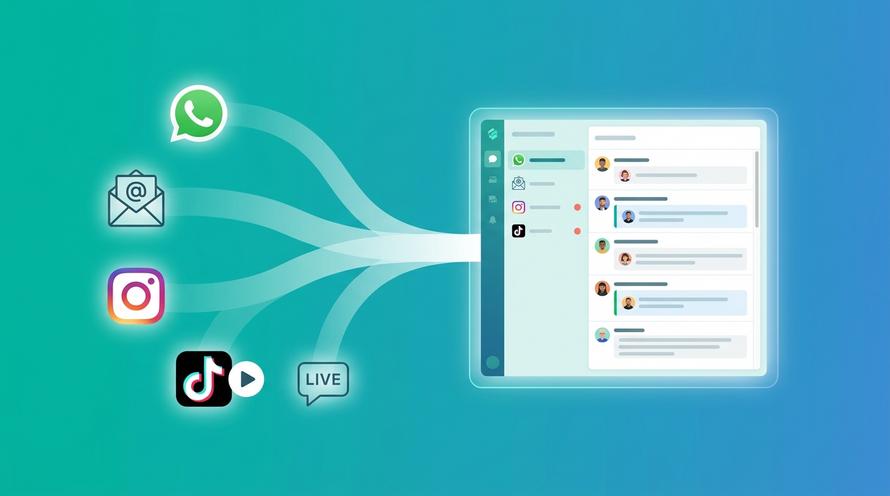
Trengo unites WhatsApp, email, web, social media, and calls in one inbox, saving your team hours of repetitive work and ensures no conversation is ever lost
How to Write a Follow-Up Email After No Response: Templates & Examples for 2026
Summary
Learning how to write an effective follow up email after no response is a critical skill for any professional in 2026. This article provides a complete framework for crafting compelling follow-ups, including when to send them, how to structure them, and what to write. We offer eight copy-paste templates for common scenarios like job interviews, sales outreach, and client communication, transforming silence into productive conversations.
TL;DR
- The key to a good follow-up is timing; wait 3-5 days for job interviews, 2-3 for sales, and 1-2 for client requests.
- Always reply in the original email thread to provide context or use a clear, new subject line if necessary.
- Your follow-up message should remind the recipient of the context, add new value, and include a clear, easy call-to-action.
- Avoid common mistakes like following up too soon, using a passive-aggressive tone, or sending vague requests.
- Leverage a shared inbox and automation tools like Trengo to streamline and manage team follow-ups efficiently.
- Use specific, professional templates tailored to the situation, whether it's for a job application, an unpaid invoice, or a sales prospect.
The Anatomy of a Perfect Follow-Up Email
Before jumping into templates, it's essential to understand the core principles that make a follow-up email successful. A great follow-up isn't just a reminder; it's a strategic communication tool designed to re-engage your recipient and prompt action. It's concise, adds value, and makes it incredibly easy for the other person to respond. Mastering how to follow up on email is less about persistence and more about providing a gentle, helpful nudge that respects the recipient's time. The following sections break down the essential components: timing, subject line, and message structure.
Nail the Timing: When to Send a Follow-Up Email
One of the most common questions is how long to wait before sending a follow up email after no response. Sending it too soon can seem desperate, while waiting too long can cause the opportunity to go cold. While every situation is unique, here are some reliable guidelines for different professional contexts:
- Job Interview: Wait 3-5 business days. This gives the hiring team enough time to debrief and discuss candidates without letting your name fade from their memory.
- Sales Prospect: For a first follow-up, 2-3 business days is a good rule of thumb. Subsequent follow-ups should be spaced further apart (e.g., 4-5 days, then a week) to avoid being perceived as spammy.
- Client Request: If the matter is time-sensitive, following up within 1-2 business days is perfectly acceptable and shows you're on top of things.
- General Inquiry: For less urgent matters, such as a networking request or a general question, wait about a week before sending a polite follow-up.
Remember, these are starting points. Always consider the context, your relationship with the recipient, and any specific timelines they might have mentioned.
Craft a Subject Line That Gets Opened
Your subject line is the gatekeeper of your message. If it doesn't compel the recipient to click, the content of your email doesn't matter. The best approach is usually one of clarity and simplicity. Here are two main strategies and several examples:
- Reply to the Original Thread: This is often the most effective method. Simply hitting "Reply" keeps the entire history of your conversation intact. The subject line will look like "Re: [Original Subject]," which immediately provides the recipient with all the necessary context.
- Create a New, Clear Subject Line: If you're starting a new thread or feel the old one is stale, a fresh subject line can work well. It should be concise and professional.
Here are a few examples for different situations:
- For a job application: "Following up on my application for the Marketing Manager role"
- After a meeting: "Following up on our conversation about Project X"
- For a sales prospect: "A quick question about your team's goals"
- General check-in: "Checking in on our previous discussion"
Structure Your Message for a Quick Response
The body of your follow-up email needs to be scannable, direct, and actionable. A rambling message is likely to be archived and forgotten. Follow this simple four-part formula to structure your email for maximum impact and a higher chance of getting a response.
- Context is Key: Start by briefly and politely reminding them of your last interaction. Don't assume they remember your email out of the hundreds they receive. A simple line like, "I'm writing to follow up on my email last Tuesday regarding the project proposal," is all you need.
- Add Value: This is the most critical step. Instead of just asking, "Did you see my last email?" provide something new. This could be a helpful resource, a relevant article, a concise summary of your previous point, or an answer to a question they might have. For sales, this might be a case study. For a job application, it might be a brief mention of a new company achievement you admire. This shows you're thoughtful, not just demanding a reply.
- Clear Call-to-Action (CTA): Make it effortless for them to respond. Vague CTAs like "Let me know what you think" create mental work for the recipient. Be specific. Ask a direct, simple question. For example: "Would you be free for a 15-minute call next Tuesday or Thursday afternoon?" or "Is this something you'd like me to move forward with?"
- Professional Closing: End the email on a polite and confident note. A simple "Best regards," "Sincerely," or "Thank you for your time," followed by your name and signature, is perfect.
8 Follow-Up Email Templates for Any Professional Scenario
Knowing the theory is one thing, but having ready-to-use examples makes all the difference. This section provides a clear sending a follow-up email after no response sample for eight common professional situations. Feel free to adapt these templates to fit your specific needs and tone, but use their structure as a proven foundation for getting the response you're looking for.
1. Follow-Up Email After a Job Interview
This follow up email after no response interview template works because it's enthusiastic, professional, and specific. It jogs the interviewer's memory by mentioning a key discussion point and reinforces your value and continued interest in the position.
Subject: Re: Following up on the [Job Title] interview
Hi [Interviewer's Name],
I hope you’re having a great week.
I’m writing to follow up on my interview for the [Job Title] position last [Day of the week]. I truly enjoyed our conversation, especially discussing [mention a specific, interesting point from the conversation].
Our discussion further solidified my excitement about this opportunity and my confidence that my skills in [Your Skill 1] and [Your Skill 2] would be a great asset to your team.
I'm very eager to hear about the next steps, but please let me know if there is any additional information I can provide.
Best regards,
[Your Name]
2. Follow-Up Email for a Job Application No Interview Yet
When you need to send a follow up email after no response job application, the goal is to be polite and professional without being pushy. This template is concise and shows proactive interest, which can help your application stand out from the pile.
Subject: Following up on my application for [Job Title]
Dear [Hiring Manager's Name or "Hiring Team"],
I hope this email finds you well.
I am writing to follow up on the application I submitted on [Date] for the [Job Title] position I found on [Platform, e.g., LinkedIn, company website].
I am very enthusiastic about the possibility of joining your team at [Company Name] and am confident that my experience in [mention 1-2 key skills or experiences] aligns well with the requirements of the role.
Could you please provide a brief update on the status of my application? I am available for an interview at your earliest convenience.
Thank you for your time and consideration.
Sincerely,
[Your Name]
3. Follow-Up Email to a Client or Sales Prospect
A successful follow up email after no response from client or sales prospect focuses on value, not just checking in. This template provides a new resource or idea, repositioning the email as a helpful touchpoint rather than a simple request.
Subject: A thought about [Their Goal]
Hi [Client's/Prospect's Name],
I'm just circling back on my previous email regarding [Original Topic].
When we last spoke, you mentioned you were focused on [mention their goal or challenge]. With that in mind, I thought you might find this article on [Relevant Topic] interesting: [Link to article/resource]. The section on [Specific part] seems particularly relevant to your situation.
Do you have 15 minutes to connect sometime next week to discuss this further?
Best,
[Your Name]
4. Follow-Up Email for a Meeting Request
This template is designed to be short and logistical. It makes it extremely easy for the recipient to check their calendar and reply without needing to re-read a long email chain. It's direct and respects their busy schedule.
Subject: Re: [Original Meeting Subject]
Hi [Recipient's Name],
I’m writing to quickly follow up on my invitation to discuss [Topic].
Would you be available for a brief chat sometime next week? My schedule is flexible.
Let me know what works best for you.
Thanks,
[Your Name]
5. Follow-Up Email for an Unpaid Invoice
When dealing with finances, the tone should be polite but firm and clear. This template provides all the necessary information upfront (invoice number, amount, due date) and makes it simple for the client to process the payment.
Subject: Following up on Invoice #[Invoice Number]
Hi [Client's Name],
I hope you are well.
This is a friendly reminder that invoice #[Invoice Number] for the amount of [Amount], which was due on [Due Date], is now outstanding. I have attached the original invoice to this email for your convenience.
You can make the payment via [Payment Method, e.g., bank transfer, this payment link].
Please let me know if you have any questions. I appreciate you taking care of this as soon as possible.
Best regards,
[Your Name]
6. Follow-Up Email to a Colleague
Internal follow-ups can be slightly less formal but must remain professional and clear. This template states the need and deadline directly while remaining collaborative and respectful of your colleague's workload.
Subject: Checking in on the [Project/Task Name] update
Hi [Colleague's Name],
Just wanted to circle back on my request from [Day of the week] regarding [briefly describe the task].
I need the [specific item] to move forward with my part of the project, and my deadline is [Your Deadline]. Is there anything I can do to help you on your end?
Let me know when you think you might have it ready.
Thanks!
[Your Name]
7. Follow-Up Email to a Professor
Communicating with a professor requires a formal and respectful tone. This template includes key identifiers like the course name and is very mindful of their time, increasing the likelihood of a prompt and helpful response.
Subject: Follow-up: Question about [Course Name and Number]
Dear Professor [Professor's Last Name],
I hope you are having a good week.
I am writing to follow up on my email from last [Day] regarding [briefly state your original question, e.g., the upcoming paper].
I understand you have a very busy schedule, but I would be very grateful for your guidance when you have a moment. I have re-read the syllabus and was still unclear on [specific point of confusion].
Thank you for your time.
Sincerely,
[Your Name]
[Your Student ID Number]
8. The "Break-Up" Email: The Final Follow-Up
When you've followed up multiple times with no response, the "break-up" email can be a surprisingly effective strategy. It politely closes the loop and removes pressure, which can sometimes trigger a response from prospects who were simply too busy to reply earlier.
Subject: Closing the loop
Hi [Prospect's Name],
I've reached out a few times regarding [Original Topic] but haven't heard back, so I'll assume your priorities have shifted or you're no longer interested.
I won't be in touch again, but please feel free to reach out in the future if anything changes on your end.
Wishing you and your team all the best.
Regards,
[Your Name]
Stop Juggling Follow-Ups: How to Manage Them with Trengo
Now that you know how to write a follow up email after no response, the next challenge is managing this process at scale, especially within a team. Manually tracking who needs a follow-up, when to send it, and what was last said is inefficient and leads to missed opportunities. This is where a modern customer service platform like Trengo transforms your workflow from a manual chore into a streamlined, collaborative process.
Gain Full Visibility with a Shared Team Inbox
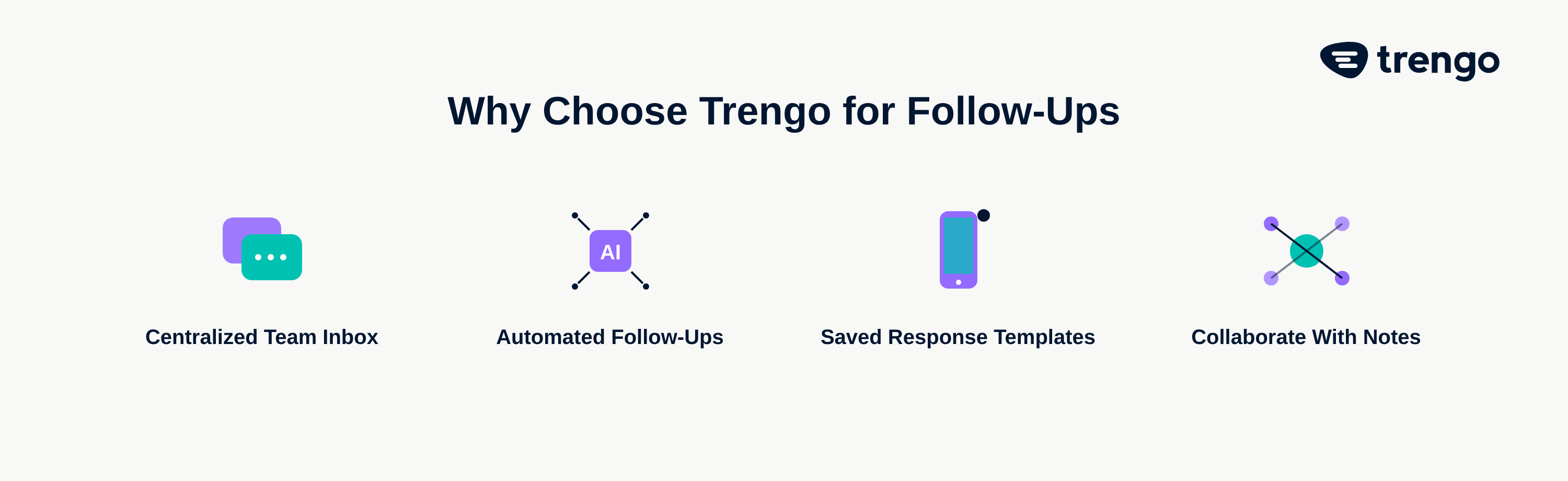
The problem with traditional email is that conversations live in isolated, individual inboxes. If a sales rep is on vacation, their prospect's urgent query goes unanswered. If a support agent is sick, their pending tickets are left in limbo. This creates frustrating delays and a disjointed customer experience. Trengo’s shared inbox solves this by centralizing all customer communication channels—email, WhatsApp, live chat, and more—into a single, unified view. Your entire team can see the status of any conversation, assign follow-ups to available colleagues, and leave internal notes to collaborate on the best response. No query is ever lost, and every follow-up is handled promptly.
Automate Your Follow-Ups with Templates and Rules
Remember those powerful templates we just covered? Instead of copying and pasting them from a document, your team can save them directly within Trengo. This ensures brand consistency, saves hours of repetitive typing, and empowers new team members to communicate effectively from day one. But the real power comes from automation. With Trengo's rules, you can Automate Your Follow-Ups by setting triggers. For example, a rule can automatically send an invoice reminder email seven days after the due date or tag a sales conversation as "needs follow-up" if there's been no reply for 48 hours. This proactive system ensures nothing slips through the cracks and frees your team to focus on high-value conversations. For more inspiration, check out our list of the Best customer service email templates. With the rise of AI-powered automated customer service, you can even use AI chatbots to handle initial inquiries, reducing the number of manual follow-ups needed in the first place.
What to Avoid: Common Follow-Up Email Mistakes
Even with the best templates, a few common mistakes can undermine your follow-up efforts. Being aware of these pitfalls is key to maintaining a professional image and getting the results you want. Here are the top mistakes to avoid:
- Following up too soon or too often: Bombarding someone's inbox is the fastest way to get your emails ignored or marked as spam. Respect the timelines outlined earlier.
- Using a passive-aggressive tone: Phrases like "As per my last email..." or "As I'm sure you're aware..." can come across as condescending. Always maintain a polite and professional tone.
- Writing long, rambling emails: Your recipient is busy. Get to the point quickly. A follow-up should be shorter and more direct than your original message.
- Having a vague or missing call-to-action: Don't make the reader guess what you want. A clear, specific CTA is essential for prompting a response.
- Forgetting to check your spelling and grammar: Typos and grammatical errors look unprofessional and can distract from your message. Always proofread before you hit send.
Getting the tone right is crucial, especially when things go wrong. See our Best apology email templates for your business for guidance on navigating delicate situations.
Frequently Asked Questions

To politely follow up, be patient, reply to the original email to provide context, add a new piece of value (like a helpful resource), and end with a specific, easy-to-answer call-to-action. Always maintain a professional and understanding tone, acknowledging that the recipient is likely busy.
There are several professional phrases you can use instead of just "following up." Consider using alternatives like, "I'm writing to circle back on my previous email," "I wanted to check in on our conversation about...", or "Just wanted to bring this back to the top of your inbox."
A good general rule is to wait 3-5 business days, but this depends heavily on the context. For time-sensitive client matters, 1-2 days is appropriate, while you should wait 2-3 days for an initial sales follow-up and about a week for a less urgent general inquiry.
It is better to frame the follow-up around your next action rather than their inaction. Instead of saying, "I'm waiting for your response," try a proactive approach like, "I'm checking in on my previous email to see if you had any initial thoughts on the proposal before I proceed with the next steps."



Let's meet
Grow your business with loyalty. Bring all of your customer contact into one, single platform to unlock delight at every step of the way.