Can You Actually Remove a Negative Google Review?


Try Trengo for Free

Trengo unites WhatsApp, email, web, social media, and calls in one inbox, saving your team hours of repetitive work and ensures no conversation is ever lost
Setting Realistic Expectations: Can You Actually Remove a Negative Google Review?
Summary
Removing bad reviews from your Google My Business profile in 2026 is possible, but only when a review violates specific Google policies. This article details which reviews are removable, provides a clear process for flagging them, and introduces a superior, long-term strategy: managing all feedback effectively through a unified communication platform. For reviews that are simply negative but don't violate policies, the most powerful tool is a professional and empathetic public response.
TL;DR
- You can only remove Google reviews that violate Google's content policies, not just because they are negative.
- Violations include spam, fake content, off-topic rants, harassment, and conflicts of interest.
- To request removal, you must find the review on Google Maps or your Business Profile and "flag" or "report" it, selecting the specific violation.
- If flagging fails, you can escalate the issue through Google Business Profile support.
- A proactive response strategy is more powerful than removal. Responding professionally to all reviews builds trust with potential customers.
- Using a shared inbox like Trengo centralizes your Google reviews with all other customer messages, enabling fast, collaborative, and consistent responses.
Let’s set the record straight from the beginning: you cannot simply delete a negative Google review because you disagree with it or because it hurts your star rating. In 2026, Google's commitment to authentic, user-generated feedback is stronger than ever. The platform is designed to reflect genuine customer experiences, both good and bad. However, this does not mean you are powerless. Removal is an option, but only for reviews that cross a line and violate Google's specific content guidelines. The key is understanding the critical difference between a review that is legitimately negative (a customer's poor opinion or documented bad experience) and one that is illegitimate (fake, spam, or abusive). For the former, your strategy will be management and response; for the latter, your strategy is removal.
Identifying a Removable Review: What Violates Google's Content Policy?
Before you can take action, you must determine if a review actually qualifies for removal. Google has a comprehensive set of policies to protect businesses from fraudulent and abusive content. Familiarizing yourself with these categories is the first step in cleaning up your online reputation. If a review falls into one or more of the following categories, you have a strong case for flagging it.
Spam and Fake Content
This is one of the most common grounds for removal. Spam and fake content include reviews that are not based on a real experience with your business. Examples include reviews posted by bots with the sole purpose of manipulating your rating, content from a competitor trying to sabotage your profile, or reviews from a disgruntled ex-employee with a personal vendetta. If the content is clearly not from a genuine customer, it's a violation.
Off-Topic and Irrelevant Content
A Google review should be about a customer's experience with your business. It is not a forum for social or political commentary, personal rants, or discussions about the wrong business location. If a one-star review complains about parking in the general area or expresses a political opinion unrelated to your services, it is considered off-topic and can be flagged for removal.
Restricted and Illegal Content
Google strictly prohibits content that promotes illegal products or services. This also includes reviews that contain links to malicious software (malware), viruses, or phishing scams. Furthermore, any content that is sexually explicit or terrorist-related will be removed immediately upon review. These violations are taken very seriously by Google's moderation team.
Dangerous and Derogatory Content
There is a zero-tolerance policy for content that is dangerous or derogatory. This includes hate speech that attacks individuals or groups based on race, religion, disability, gender, age, or sexual orientation. It also covers harassment, bullying, and direct threats of violence against your business, your staff, or other customers. This type of content is a clear-cut violation and should be reported without hesitation.
Impersonation and Conflicts of Interest
Authenticity is paramount. A review cannot be posted by someone pretending to be another person or an official representative of an organization they do not belong to. Additionally, there's a significant conflict of interest when a business owner or employee reviews their own business. Similarly, asking current employees to post positive reviews is a direct violation of policy. These reviews are designed to mislead customers and are grounds for removal.
Every conversation in one inbox
Bring email, WhatsApp, social, and voice together so your team replies faster — without switching tabs.
Your Step-by-Step Action Plan to Flagging and Reporting a Bad Review
Once you've identified a review that clearly violates one of Google's policies, it's time to take action. The flagging process is your official channel for alerting Google's moderators. Following these steps correctly is crucial for increasing the likelihood of a successful removal.
Step 1: Find the Review
You can report a review from two primary places. The first is directly on Google Maps. Simply search for your business, navigate to your reviews, find the specific one you wish to report, and proceed. The second, and often more efficient, method is through your Google Business Profile Manager dashboard. This central hub gives you direct access to manage and respond to all your reviews in one place.
Step 2: Flag the Review for Removal
Next to the review in question, you will see three vertical dots. Click on them to reveal a menu of options, and select "Report review" (or sometimes "Flag as inappropriate"). You will then be presented with a list of violation types. It is critical to select the reason that most accurately reflects how the review violates Google's policy. Choose the best fit, such as "Hate speech," "Spam," or "Conflict of interest," and submit your report. Learning How to change a bad review often starts with excellent communication, but for illegitimate reviews, flagging is your first step.
Step 3: Wait for Google's Decision
Patience is key. After you submit your report, it enters a queue for review by Google's team, which uses a combination of automated systems and human operators. This process can take anywhere from a few days to over a week. Google does not always send a direct notification about the outcome, so you will need to monitor your profile to see if the review has been removed.
What to Do When Flagging Isn't Enough
Sometimes, your initial flagging attempt might be denied, even if you believe the review is a clear violation. When this happens, you still have options to escalate the case and get another look from Google.
Escalating with Google Business Profile Support
If the review remains after a week, you can follow up using the Google Business Profile support tool. Navigate to the support section of your dashboard and select the "Contact Us" option. You can specify that your issue is related to "customer reviews and photos" and then select the option to "manage customer reviews." This will allow you to see the status of reviews you've already reported and submit an appeal if one was rejected. Be prepared to provide the reviewer's name, the content of the review, and a clear explanation of which specific policy it violates.
The Legal Removal Request
For extreme and serious cases, such as a review that contains defamatory statements causing tangible harm to your business, you may have legal recourse. Google provides a formal legal removal request tool for content that you believe is illegal. This is a much more serious step and typically requires consultation with a legal professional to ensure you have a valid claim based on local laws. This should be considered a final resort for the most severe violations.
Juggling messages across five apps?
Trengo unifies every channel in one shared inbox.
The Ultimate Strategy: Master Your Review Response
While removing illegitimate reviews is important, a far more powerful and sustainable strategy for long-term reputation management is mastering how you respond to all reviews, especially the negative ones. A thoughtful response can neutralize the damage of a bad review and demonstrate your commitment to customer satisfaction to every potential customer who reads it.
Why a Public Response is Non-Negotiable
Ignoring a negative review is one of the biggest mistakes a business can make. Research consistently shows that over 90% of consumers read a business's responses to reviews. Your reply is not just for the unhappy customer; it's a public statement about your brand's values. A professional response shows that you listen, you care, and you are dedicated to providing excellent customer service. It provides context, allows you to correct misinformation, and can often turn a negative situation into a chance to win back a customer's loyalty. Learning in detail how to respond to google reviews is an essential skill to build trust and protect your brand.
How to Turn Negative Feedback into a Positive Signal
Crafting the perfect response doesn't have to be complicated. Follow this simple but effective formula:
- Acknowledge and Apologize: Start by thanking the customer for their feedback and apologizing for their negative experience, even if you don't feel you were at fault. A simple "We're sorry to hear your experience didn't meet your expectations" goes a long way.
- Show Empathy: Briefly restate their specific issue to show you've read and understood their complaint. This validates their feelings and demonstrates empathy.
- Do Not Get Defensive: Never make excuses, blame the customer, or argue in a public forum. This will only escalate the situation and make your business look unprofessional.
- Take the Conversation Offline: Offer to resolve the specific issue directly. Provide a phone number or email address and ask them to contact you so you can learn more and make things right.
- Keep it Professional: Maintain a calm, helpful, and professional tone throughout your response. Your reply is a permanent part of your online presence.
Streamline Your Responses with a Shared Inbox
Managing Google reviews on top of emails, social media messages, and live chat can quickly become chaotic. Notifications get missed, responses are delayed, and the brand voice becomes inconsistent. This is where a modern customer service platform becomes a game-changer. By centralizing all your customer communications, you can transform your review management from a reactive chore into a proactive strategy.
Unify Your Communication Channels
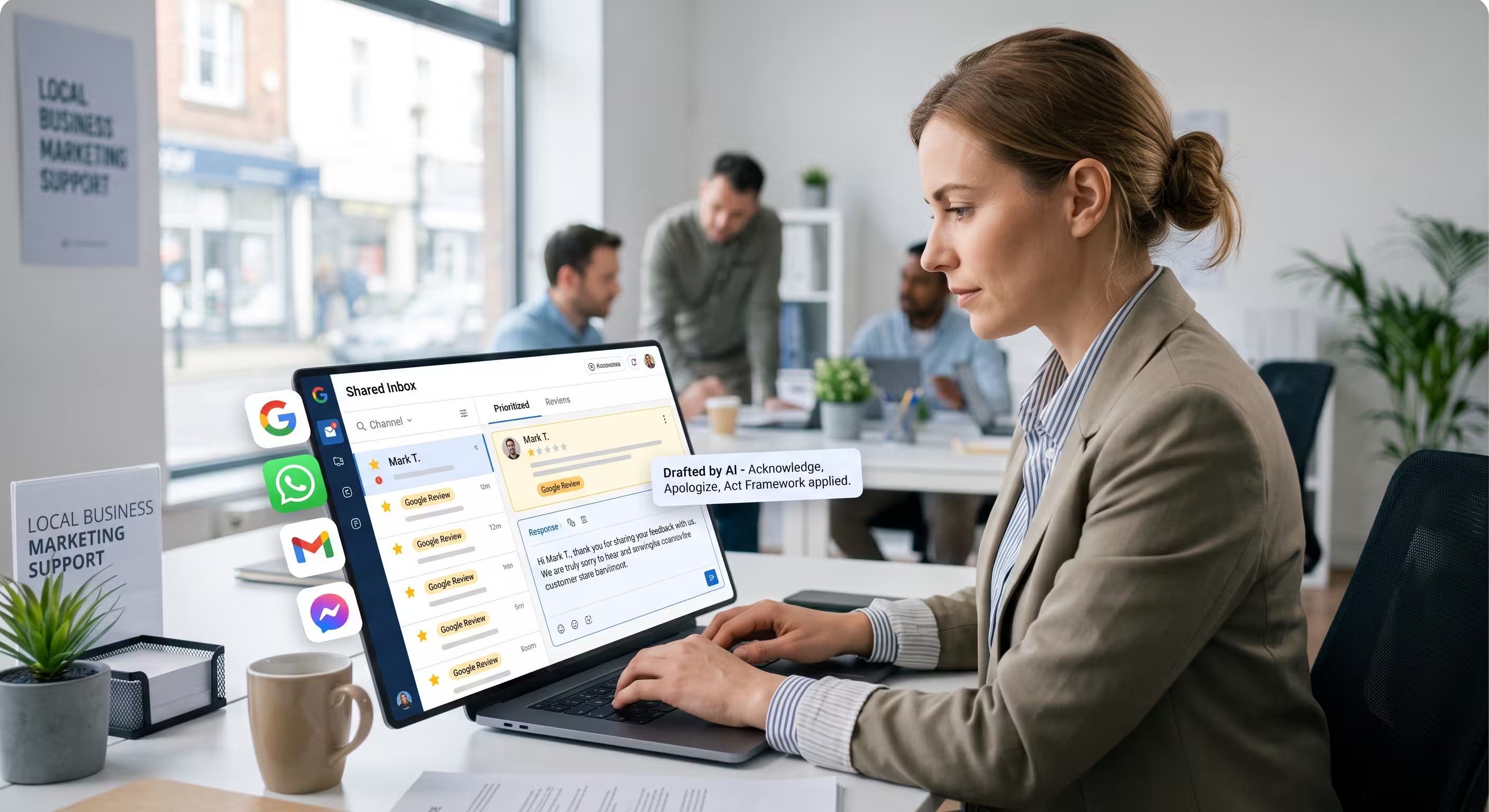
Imagine your Google Business Profile reviews appearing directly in the same central dashboard as your emails, WhatsApp messages, and website chat. With Trengo's Omnichannel inbox, this is a reality. This unified view ensures no review ever slips through the cracks and gives your team a complete picture of every customer interaction, regardless of the channel.
Collaborate on the Perfect Response
Not every review can be handled by one person. For a particularly sensitive or complex piece of feedback, collaboration is key. Trengo allows your team to work together seamlessly on a response. You can tag a colleague or manager directly on a review (@mention), leave internal notes to provide context for the rest of the team, and assign the review to a specific agent to ensure clear ownership and a timely reply.
Ensure Speed and Consistency
Responding quickly is crucial, but so is maintaining a consistent brand voice. Within Trengo, your team can use quick replies and templates for common feedback. This allows you to Ensure Speed and Consistency by sending prompt, pre-approved, and on-brand initial responses, freeing up your team to focus their energy on personalizing the solution and resolving the customer's underlying issue.
Frequently Asked Questions

No, you cannot disable or turn off the Google review feature for your business profile. The only way to prevent new reviews is to completely remove your business listing from Google, which is highly discouraged as it will severely damage your online visibility, SEO, and ability to attract new customers.
Removing your business from Google reviews means deleting your entire Google Business Profile. To do this, you would sign in to your profile manager, select the business, and under the "Actions" menu, choose to "Remove business." This is an extreme and permanent step that will erase your map visibility, all existing reviews, and your local search rankings, and should only be considered as an absolute last resort.
The review process typically takes between 3 to 7 business days. However, this timeframe can vary and may take longer depending on the complexity of the case and the volume of reports Google's team is handling at that time. It's best to wait at least a week before considering escalating the issue.
No, you should never pay a third-party service that guarantees review removal. Most of these services are scams or use unethical tactics that violate Google's terms of service. Engaging with them can put your entire Google Business Profile at risk of being penalized or suspended. The only legitimate method for removal is through Google's official reporting channels.
The best and only course of action is to respond publicly, politely, and professionally. Use your reply to correct the misinformation without being combative. For example, you could write, "Thank you for your feedback. We'd just like to clarify for other customers that our service includes X, not Y as mentioned. We appreciate you bringing this to our attention and hope to serve you again." This sets the record straight for future readers.



Let's meet
Grow your business with loyalty. Bring all of your customer contact into one, single platform to unlock delight at every step of the way.