

How to use AI for customer success in 2026


Try Trengo for Free

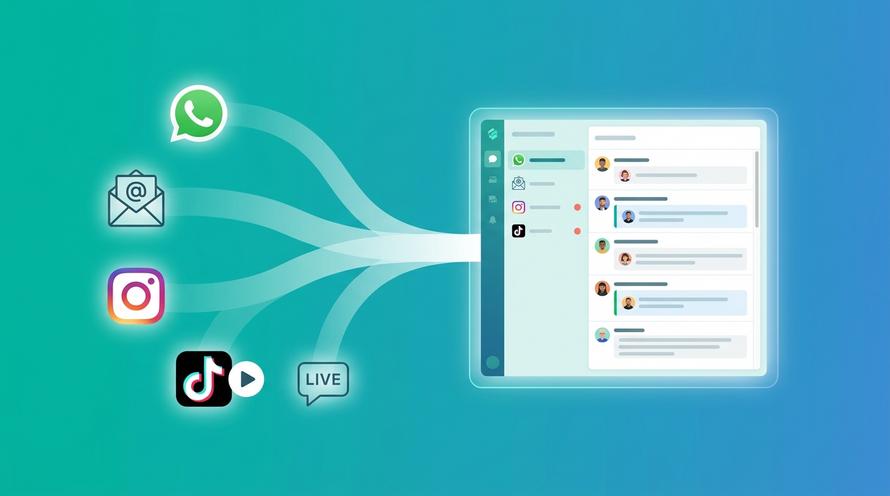
Trengo unites WhatsApp, email, web, social media, and calls in one inbox, saving your team hours of repetitive work and ensures no conversation is ever lost

Artificial intelligence is moving at a breakneck pace. According to the latest McKinsey Global Survey, the use of generative AI at work jumped from 33% in 2023 to 71% in 2024, and 80% of companies will be using AI-powered chatbots for customer service by 2025. Whether you run a small mom-and-pop shop or a global enterprise, falling behind on AI isn’t an option.
Just look at Blockbuster and Kodak. Those giants missed new technology and paid the price.
In this blog, you will learn exactly how to use AI for customer success in 2026. You will discover simple strategies for setting up automated check-ins, spotting customers who might cancel, and personalising outreach without hiring more staff.
We will also highlight the best AI tools to try and show you key metrics to track. By the end of this blog, you’ll have a clear plan to keep your customers happy and grow your business.
Why your team needs AI for customer success
Modern customer success teams face an impossible choice. They have to either deliver personalised experiences or serve customers at scale.
AI eliminates this trade-off, letting you maintain the human touch while reaching every customer when they need you most. With AI, your team becomes a proactive powerhouse that keeps customers happy and loyal.
- Scale personalised care
To start, with AI you can send hundreds of friendly messages at once without sounding like a robot. The system pulls each person’s name, plan details, and recent activity to create a custom check-in or renewal reminder.
That means every message feels like you wrote it by hand, even when you reach out to thousands of customers in one go.
- Spot at-risk customers early
AI watches important data points such as login frequency, feature usage, and satisfaction scores. When it sees a customer using your product less or missing key milestones, it flags them automatically.
You can then jump in with a helpful email or phone call to solve their problem before they decide to leave.
- Speed up responses
Tools like Trengo’s Smart Inbox sort incoming questions by topic so your team always sees the right messages first. AI also suggests complete responses based on what the customer asked, letting agents answer in just one click.
This cuts down each reply from several minutes to a few seconds and keeps customers happy.
- Save time on reporting
After every chat or support call, AI creates a clear summary of the conversation’s most important points. You get bullet-style notes with next steps, issues raised, and customer sentiments in seconds.
That saves your team from spending time writing reports and makes it easier to hand off cases between coworkers.
- Free up your team
AI can take over everyday jobs like sending welcome emails, scheduling check-ins, or running feedback surveys on its own schedule. This means your staff doesn’t have to spend hours on these chores every week.
Instead, they can focus on solving tricky problems that need a human touch and building stronger relationships with key clients.
The risks of skipping AI in customer success
McKinsey found that companies deploying AI for personalisation see up to a 15% lift in customer satisfaction and revenue. So, if you skip AI, you might experience:
Hidden churn risks
When you rely on manual reviews, you might catch only one or two customers who are about to leave each week. A human can miss subtle warning signs in usage data or survey responses.
AI, on the other hand, can scan thousands of records every hour and flag ten or more accounts showing a drop in logins, shrinking order sizes, or negative feedback. Missing these early signals means you lose customers you could have helped.
Inconsistent follow-up
On a busy day, even the best team can forget to send a check-in email or renewal reminder. Studies show that 20 per cent of follow-up messages slip through the cracks when handled by people alone.
AI never forgets. It sends automated nudges on the exact day you schedule them, keeps track of who replied, and escalates any unanswered messages. Without this reliability, you risk leaving customers feeling ignored.
Slower response times
Customers today expect an answer in under one hour. When request volume spikes, let's say during a product launch or holiday sale, your support queue can back up fast. Without AI triage and suggested replies, response times can stretch to 4 or 5 hours or more.
AI-powered inboxes sort questions by priority and draft instant reply templates. This keeps your average first-response time under 60 minutes, even on your busiest days.
Lack of clear insights
Writing detailed conversation summaries by hand takes 5 to 10 minutes after each call or chat. Multiply that by 20 daily sessions, and you spend up to three hours on notes alone.
AI generates bullet-point summaries in seconds, highlighting key issues, next steps, and customer sentiment. Skipping this means your team spends precious work time on admin tasks instead of solving real problems.
Stunted, costly growth
Hiring a new customer success representative typically costs $30,000 to $40,000 a year in salary and benefits. Even then, one person can handle only a limited number of accounts.
AI tools often run on a simple subscription, sometimes under $100 per month, and can engage thousands of users simultaneously. Without AI, your only way to scale is to add more headcount, which grows your costs far faster than your revenue.
7 easy ways to add AI to your success workflow
Now that you’ve decided to bring AI into your customer success workflows, start with the following 7 easy-to-implement strategies.
1. Automated check-ins
AI can be configured to monitor each customer’s journey and send a friendly check-in at exactly the right time. For example, once a new client reaches their first project milestone, such as creating their initial report or completing a tutorial, the system automatically delivers an email or in-app message saying,
“Congrats on hitting your first goal! Here are three tips to make your next step even smoother.”
These touchpoints keep customers engaged, reduce confusion, and eliminate the need for your team to track dozens of individual start dates manually.
2. Smart ticket routing
Instead of a general inbox where every support request lands, AI analyses each incoming message and assigns it to the team best equipped to handle it.
If a customer emails about a billing question, the AI tags it “billing” and sends it straight to your finance or accounts team. If another user reports a software bug, that ticket automatically goes to your engineering queue.
This targeted routing slashes resolution times by up to 50 per cent because messages never sit in the wrong department’s backlog.
3. One-click suggested replies
When support agents open a customer message, AI reviews the conversation history and suggests two or three complete reply drafts tailored to that context.
For instance, if a customer asks how to upgrade their subscription, the AI might offer a reply that includes a link to the upgrade page, an outline of pricing differences, and a friendly sign-off.
The agent can choose the best draft, make a quick tweak if needed, and send. This reduces typing time from several minutes per response to just a few seconds, enabling your team to handle more inquiries with consistent quality.
4. Daily churn-risk alerts
Every morning, AI runs through your customer database looking at login frequency, feature adoption rates, support history, and survey feedback. It assigns each account a churn-risk score.
When an account’s score crosses a threshold, let’s say 70%, it triggers an alert to the assigned success manager.
This manager then receives a concise report detailing exactly which metrics dipped and can reach out with targeted resources, from a one-on-one training session to personalised best-practice guides, well before the customer decides to cancel.
5. Instant conversation summaries
After each live chat or phone call, AI generates a structured summary that highlights the main issue, steps already taken, and recommended next actions. For example, a summary might read:
- Issue: User unable to connect external plugin
- Actions Tried: Restarted app, cleared cache
- Next Steps: Provide updated plugin link, schedule a follow-up call
These bullet-point summaries save your team 5 to 8 minutes per case and ensure that when another agent picks up the ticket, they have full context without reading through hours of chat logs.
6. Tailored onboarding sequences
AI can segment new customers by their survey responses and early usage patterns to deliver tailored onboarding. If a customer says they are a “marketing beginner,” the system sends a series of three emails over two weeks, each with simple how-to articles and video walkthroughs.
If another customer shows technical expertise, AI instead shares advanced feature guides and links to API documentation. This personalised approach increases product adoption by up to 40 per cent compared to one-size-fits-all onboarding.
7. 24/7 self-service chatbots
Integrate an AI chatbot in your help centre or product interface to handle routine questions at any hour, everything from “How do I reset my password?” to “Where can I find the API key?”
When the bot encounters a question it cannot resolve, it creates a ticket in your support system, attaches the full chat transcript, and notifies an available agent.
This 24/7 self-service cuts simple ticket volume by up to 60%, so your team can focus on complex issues that truly require human expertise.
Our top 3 AI picks for better customer success
When you search for best AI tools for customer success, consider these leaders:
1. Trengo - Best AI-powered customer success hub
Trengo unifies email, live chat, social messaging, and voice channels into a single inbox and layers in AI to automate repetitive tasks. Your support and success teams can see every customer message, regardless of channel, in one view. This process cuts out app-switching and manual sorting so agents can focus on complex, high-value work.
Standout features
- Omnichannel smart inbox: Manages conversations from WhatsApp, email, chat, and social in one place, reducing app switching.
- AI-driven ticket routing: Automatically tags incoming messages (for example, “billing,” “technical,” or “feature request”) and sends them to the right team, slashing resolution times by up to 50%.
- AI Journeys: No-code workflow builder that triggers multi-step automations, like sending welcome messages before check-in or follow-up surveys after departure, to guide customers through personalised paths.
- AI helpmate & flowbots: 24/7 chatbots that answer FAQs, suggest knowledge-base articles, and escalate complex issues to humans with full context and chat history.
- AI labelling & sentiment tagging: Scans closed conversations, categorises topics, and highlights customer sentiment so you can quickly spot trends and recurring issues.
- Actionable analytics dashboard: Real-time reports on response times, customer satisfaction trends, automation rates, and support team performance.
What we liked
- True multichannel view: All customer touchpoints appear in one inbox, eliminating lost messages and reducing context-switching.
- Powerful No-Code Automations: AI Journeys and Flowbots let non-technical users build complex workflows in minutes without IT support.
- Rapid Insights: Sentiment tagging and AI labeling surface critical trends like spikes in billing questions before they become major issues.
What we disliked
- Advanced Reporting Limits: Custom report creation and deeper analytics require an upgraded plan.
- Learning Curve for Workflows: Building Journeys with multiple triggers and actions can take time to master, especially for larger teams.
With its blend of omnichannel support, intelligent automation, and real-time insights, Trengo stands out as a complete AI hub for scaling customer success and support operations.
2. Gainsight PX - Best AI engagement & health scoring
Gainsight PX is a product experience platform that uses AI to help you understand how customers interact with your software, measure their satisfaction, and drive timely, personalised outreach.
Standout features
- Behavioural analytics: Tracks every click, page view, and feature use so you can see exactly which parts of your product customers love (or struggle with).
- AI health scores: Combines usage metrics, NPS responses, survey feedback, and support history into a single health score that updates in real time.
- Automated engagements: Triggers in-app guides, tooltips, or email campaigns when a customer hits a key milestone or misses one, so you can onboard effectively and prevent churn.
What we liked
- Deep insights: You get clear, visual reports on adoption trends and drop-off points.
- Flexible rules engine: Non-technical users can set up custom health-score models and engagement triggers without coding.
What we disliked
- Complex setup: It can take several weeks to instrument all the tracking events and configure health-score rules for large products.
3. Zendesk Sunshine - Best AI-driven support platform
Zendesk Sunshine is a CRM platform built on AWS that enriches your existing Zendesk Support system with AI-powered self-service, automation, and sentiment insights.
Standout features
- Answer bot: Uses natural-language understanding to suggest relevant help-centre articles directly in chat or email, resolving up to 30 per cent of routine tickets automatically.
- Sentiment analysis: Tags incoming conversations as positive, neutral, or negative so you can prioritise urgent issues, like frustrated customers, before they escalate.
- Workflow builder: Automates ticket escalation, tagging, and follow-up reminders based on AI-driven rules you define.
What we liked
- Seamless integration: Installs right into Zendesk Support so agents don’t have to switch platforms.
- Scalable automation: You can create complex, multi-step workflows, such as auto-escalating negative feedback to a manager, in just a few clicks.
What we disliked
- Limited outside Zendesk: AI features only work within the Zendesk ecosystem, so you’ll need separate solutions for non-Zendesk channels.
Final Words
AI for customer success is far more than just a trendy term. Bringing AI into your customer success workflow means your team has extra time to focus on what matters most is building genuine relationships and solving complex challenges. You can expect up to 60% faster response times, early detection of churn risks, and messages that feel hand-written at scale.
With Trengo on your side, you can automate routine check-ins, flag at-risk customers sooner, and turn every conversation into clear, actionable insights. Trengo’s Smart Inbox brings all channels into one view, and its AI Journeys builder lets you set up personalised follow-up sequences without writing a single line of code.
Ready to see it in action? Try Trengo free today and discover how easy it is to deliver world-class support without growing your headcount.
Frequently Asked Questions (FAQs)
What is AI for customer success and how does it work?
AI for customer success uses artificial intelligence to analyse customer data, predict behaviours, and automate actions that help clients achieve their goals with your product or service. It works by gathering insights from interactions, usage patterns, and feedback, then recommending or triggering the best next steps. Platforms like Trengo combine AI-driven conversation management with integrated customer data to ensure every interaction is timely, relevant, and value-driven.
Can AI help improve customer onboarding?
Yes. AI can deliver personalised onboarding experiences by adapting the process to each customer’s needs, providing guided tutorials, and automating follow-ups. For example, with Trengo, onboarding messages can be sent via email, WhatsApp, or live chat based on the customer’s preferred channel—ensuring a smooth start and reducing the time to value.
What customer success tasks can be automated with AI?
AI can automate:
- Sending onboarding sequences and training reminders.
- Identifying and addressing at-risk accounts.
- Scheduling check-ins or product adoption prompts.
- Analysing feedback for improvement opportunities.
With Trengo, these automated tasks can run across multiple channels from one unified inbox, keeping customer communications consistent and efficient.
How does AI improve the overall customer experience (CX)?
AI improves CX by providing faster, more accurate responses, predicting needs before customers ask, and ensuring personalised engagement. For example, Trengo’s AI features can analyse sentiment, recommend tailored solutions, and maintain context across interactions—helping teams deliver a seamless, high-quality experience at every stage of the customer journey.
How can AI help reduce customer churn?
AI can identify early warning signs—such as reduced engagement, negative sentiment, or missed product milestones—and trigger targeted retention strategies. Using Trengo, customer success teams can automatically follow up with personalised offers, reminders, or support to re-engage at-risk customers before they leave.
Which AI tools are best for customer success teams?
For communication and workflow automation, Trengo is an excellent choice, centralising all customer conversations while integrating with other systems. Other useful AI tools include Gainsight (customer health scoring), ChurnZero (engagement tracking), and HubSpot (CRM automation). The best approach is to choose tools that connect seamlessly so data flows freely between them.
Can AI personalise customer success strategies for different clients?
Yes. AI can segment customers based on usage data, preferences, and goals, then tailor engagement plans for each group or individual. With Trengo, you can trigger different communication flows and resources depending on customer segment, ensuring each client receives the support that best matches their needs.
How can AI be integrated with CRM systems for better customer success?
AI works best when it has access to complete, accurate customer data. By integrating Trengo with CRMs like HubSpot, Salesforce, or Pipedrive, you can sync communication history, automate updates, and give AI-powered assistants the context needed to make personalised recommendations—helping customer success teams work more proactively.



Let's meet
Grow your business with loyalty. Bring all of your customer contact into one, single platform to unlock delight at every step of the way.


