

How to use WhatsApp Business with multiple numbers

Try Trengo for Free

Trengo unites WhatsApp, email, web, social media, and calls in one inbox, saving your team hours of repetitive work and ensures no conversation is ever lost

A big challenge for a lot of teams is figuring out how to use WhatsApp Business with multiple numbers efficiently. But with the WhatsApp Business API, companies can manage multiple WhatsApp numbers in one view. The entire team gets access to one platform and all the messages from all numbers are collected in one view. Convenient, efficient, and fast.
How to manage WhatsApp Business with two numbers (or more)
With Trengo, you can manage multiple WhatsApp Business numbers in one customer service platform. So you won't have to toss phones around the office any longer. 😉
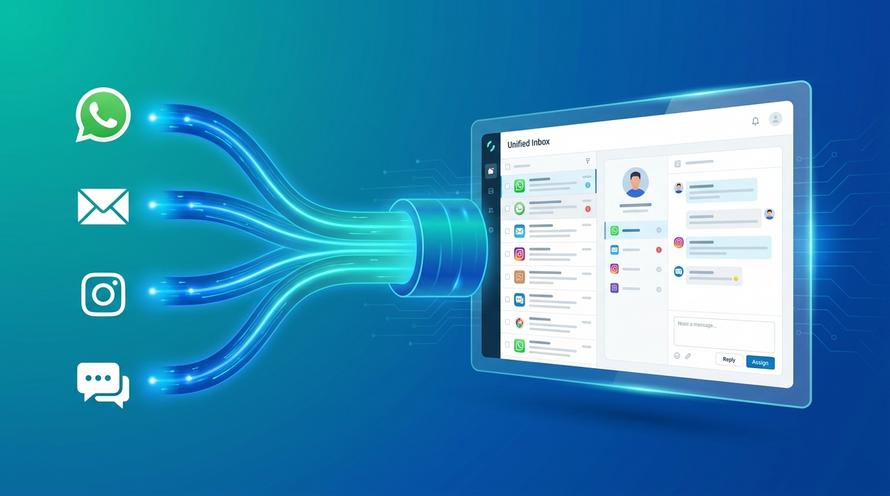
You and your colleagues will work together in one view where all the messages from multiple WhatsApp Business numbers come together. It's easy to either pick up, assign, or even collaborate on messages — whether your team works remotely or in the office.

The advantages of managing WhatsApp Business with multiple numbers in one platform
The WhatsApp Business app was primarily designed for small businesses. That's why you can only use the app with one phone number, one user, and one device. This is fine when you run a small mom-and-pop store. But it doesn't suffice when you're a mid-sized or large company. In that case, your team needs the possibility to collaborate. Here's why Trengo makes managing WhatsApp Business with multiple numbers easy:
1. Manage all WhatsApp Business conversations with your team
Let's say you have one WhatsApp number for your sales team and one for customer service. Forwarding conversations without the right infrastructure can be painful. You have to send the customer a phone number of an email address in that case.
But you don't want that. You want to help your customers, no matter on which number they reached out. The forwarding should be with you.
Trengo makes using WhatsApp Business with your team easy. When you decide to manage your messages per team, those teams can easily forward the messages to another team — without having to annoy the customers with any extra actions.
2. Automate conversations on WhatsApp Business with a chatbot
By managing your WhatsApp Business conversations in Trengo, you get the ability to use chatbots. If this sounds intimidating, don't worry. Setting up a chatbot in Trengo is easy, you need no coding skills at all. Everything you need to do is move some drag & drop blocks around.
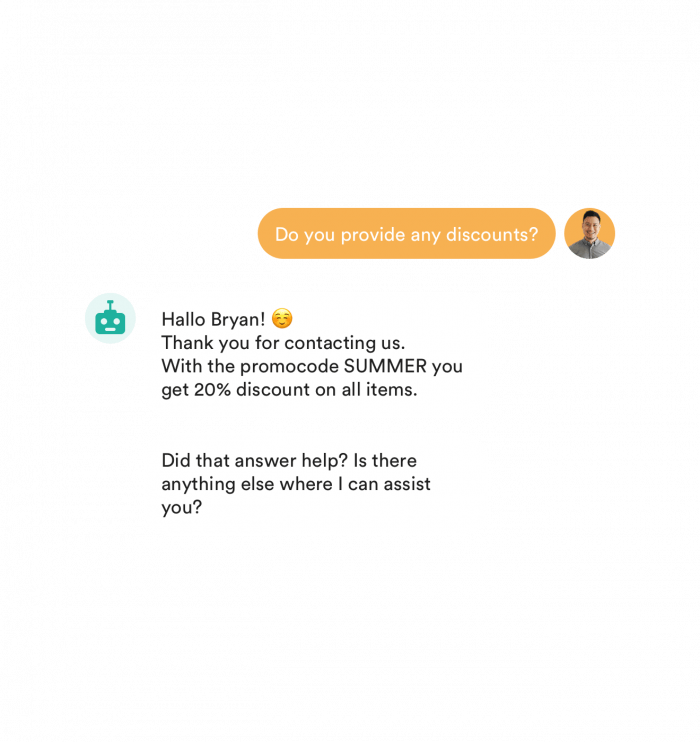
You can deploy these bots to automatically answer frequently asked questions. This saves you and your team time that you can use to help customers with more complicated questions.
3. Get valuable insights
By connecting the WhatsApp Business API to a customer service platform like Trengo, you can get valuable insights on your WhatsApp Business conversations.
Get answers to questions like:
- How many WhatsApp conversations is your team having daily?
- How fast is your team responding to incoming WhatsApp messages?
- What are the most frequently asked questions via WhatsApp?
- Which products do we sell most often via WhatsApp?
4. Keep all your communication in one platform
Aside from only WhatsApp, you can also manage all your other communication channels in Trengo's customer service platform. From email to voice and from WhatsApp to Facebook Messenger. This gives your team the ability to keep a clear overview.
It also prevents you from clicking back and forth between tools all the time. And nobody wants that.
Frequently Asked Questions (FAQs)
Can I use multiple phone numbers with WhatsApp Business?
Yes, you can use multiple phone numbers with WhatsApp Business, but how you do so depends on the solution you choose. The WhatsApp Business app is limited to one number per device, making it suitable for small businesses. For larger teams or businesses needing to manage several numbers, the WhatsApp Business API is the best choice. With the API, you can connect multiple WhatsApp numbers and manage them all from a single platform, such as Trengo, allowing your team to handle conversations from different numbers in one omnichannel inbox.
How do I set up WhatsApp Business accounts for different numbers?
To set up WhatsApp Business accounts for different numbers, you need to register each phone number separately. In the app, this means using a separate device for each number. With the API, you can add multiple numbers to your WhatsApp Business Account through your solution provider (like Trengo). Each number will appear as a separate chat to customers and can have its own display name, status, and messaging limits. Trengo guides you through connecting each number and ensures all messages from every number are collected in one view for easy management.
What’s the difference between using multiple WhatsApp Business apps and the API?
Using multiple WhatsApp Business apps means each number is tied to a separate device and managed individually, which quickly becomes inefficient as your business grows. The WhatsApp Business API, on the other hand, allows you to connect multiple numbers to a single platform, automate workflows, and collaborate as a team. Platforms like Trengo bring all conversations from all numbers into one dashboard, making it much easier to assign, track, and automate customer interactions at scale.
How do businesses manage customer service with multiple WhatsApp numbers?
Businesses manage customer service across multiple WhatsApp numbers by using platforms such as Trengo, which integrates with the WhatsApp Business API. This setup allows all incoming messages from different numbers to be routed into one shared inbox, where teams can pick up, assign, or collaborate on conversations. Automation features, such as chatbots and message routing, further streamline the process, ensuring customers receive fast, consistent support regardless of which number they contact.
Is there a tool to manage all WhatsApp numbers from a single dashboard?
Yes, Trengo is a leading tool that enables you to manage all your WhatsApp Business numbers from a single dashboard. It centralises communication, supports automation, and provides valuable insights across all numbers, making it easy for teams to work together efficiently whether in the office or remotely.
Is WhatsApp Business API better for handling multiple numbers at scale?
Absolutely. The WhatsApp Business API is designed for scalability, allowing you to connect and manage multiple numbers, automate responses, and integrate with other business systems. With Trengo, you can handle high message volumes, automate workflows with chatbots, and maintain a clear overview of all customer conversations making it the ideal solution for businesses looking to scale their WhatsApp communication.



Let's meet
Grow your business with loyalty. Bring all of your customer contact into one, single platform to unlock delight at every step of the way.


