
Blog

Chatbots und automatische Instagram Antworten auf WhatsApp über den WhatsApp Business Account
So erstellst du einen WhatsApp Business-Chatbot ohne Programmierkenntnisse
So erstellst du einen WhatsApp Business-Chatbot ohne Programmierkenntnisse

Probier Trengo kostenlos aus

Trengo bringt WhatsApp, E-Mails, Web, Social Media und Anrufe in einem Posteingang zusammen, spart deinem Team stundenlange Routinearbeit und sorgt dafür, dass keine Unterhaltung verloren geht.
Trengo in Aktion sehen
- Umfassende Integrationen
- Einfache Konfiguration
- Skalierbare Preisstruktur

Wenn du einen WhatsApp-Chatbot für dein Unternehmen erstellen möchtest, bist du hier genau richtig.
In diesem A-Z-Leitfaden erkläre ich dir alles über die Vorteile eines WhatsApp Business-Chatbots und wie du deinen eigenen Bot einrichtest. Und das ganz ohne eine einzige Zeile Code.
Zunächst einmal: Was ist ein WhatsApp Business-Chatbot?
Ein WhatsApp Business-Chatbot ist eine Technologie, die über WhatsApp ein Gespräch mit deinen Kunden simuliert. Sie werden eingesetzt, um häufig gestellte Fragen zu beantworten, Informationen bereitzustellen und Leads zu sammeln.
Beispiel für einen WhatsApp Business-Chatbot
Jetzt ist es Zeit für ein Beispiel aus der Praxis.
Ferryscanner ist eine in Griechenland ansässige Such- und Buchungsmaschine, die Menschen hilft, günstige Fährtickets zu spannenden Zielen auf der ganzen Welt zu finden. Wenn sich Kunden über WhatsApp an Ferryscanner wenden, werden ihnen zunächst ein paar Fragen von einem WhatsApp Business Chatbot (Flowbot) gestellt.
Der WhatsApp-Bot spart ihnen eine Menge Zeit, indem er grundlegende Informationen über den Kunden sammelt, bevor dieser mit einem menschlichen Agenten in Kontakt tritt. Dass sie nicht von jedem einzelnen Kunden nach Name, Land und Buchungscode fragen müssen, macht auf lange Sicht einen großen Unterschied.
Wenn du auf die Website von Ferryscanner gehst, kannst du über das Widget der Website einen WhatsApp-Chat starten.

Wenn du eine Konversation mit Ferryscanner beginnst, fragt dich ein Bot zunächst nach deinem Namen und deiner E-Mail-Adresse und bietet dir dann mehrere Optionen an, wie er dir helfen kann:
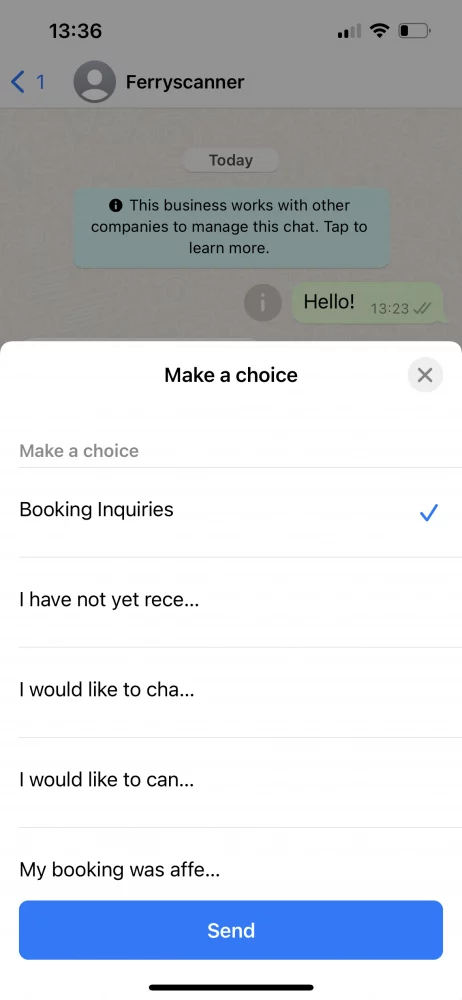
Sobald du eine Option ausgewählt hast, verbindet dich der Bot mit dem richtigen Mitarbeiter von Ferryscanner, der dir in deinem speziellen Fall helfen kann. Das spart sowohl dem Kundendienstteam als auch dem Kunden Zeit.

Was sind die Vorteile eines WhatsApp-Chatbots für Unternehmen?
Wenn du einen WhatsApp Business-Chatbot erstellst, schlägst du mehrere Fliegen mit einer Klappe.
1. Verbessere das Kundenerlebnis
Zunächst einmal wird sich deine Reaktionszeit drastisch verbessern. Das bedeutet nicht immer, dass ein Kunde seine Frage sofort beantwortet bekommt, aber er bekommt immer sofort eine Antwort. Wenn der Bot die Frage nicht beantworten kann, kann er dem Kunden mitteilen, wann er eine Antwort von einem menschlichen Mitarbeiter erwarten kann. Auch außerhalb der Geschäftszeiten.
2. Die Effizienz des Teams verbessern
Aufgrund der steigenden Kundenerwartungen stehen die Kundendienstteams mehr denn je unter Druck. Sie müssen fast sofort antworten, Probleme schnell lösen und das auf mehr Kommunikationskanälen als je zuvor.
Mit einem WhatsApp-Chatbot im Team sparen die Mitarbeiter viel Zeit. Häufig gestellte Fragen, die der Bot beantworten kann, fallen nicht mehr in ihren Zuständigkeitsbereich. Dringende Nachrichten werden automatisch erkannt und dem richtigen Mitarbeiter zugewiesen. So bleibt dem Kundendienstmitarbeiter die Aufgabe, das zu tun, was er am besten kann: Kunden helfen.
3. Leads generieren
Ein Bot ist nicht nur ein gutes Kundenservice-Tool, sondern auch für Marketingzwecke nützlich. Oft werden WhatsApp-Bots entwickelt, um Kontaktinformationen zu sammeln und sogar Termine zu vereinbaren.
Stell dir vor, du könntest einen Termin mit deinem Friseur vereinbaren, indem du eine SMS schickst und mit Hilfe eines WhatsApp Bots schnell eine Zeit festlegst. Für die meisten Menschen, vor allem für diejenigen, die viel Zeit auf WhatsApp verbringen, ist das bequemer und persönlicher, als auf eine Website gehen zu müssen.
So erstellst du einen WhatsApp-Chatbot (eine Schritt-für-Schritt-Anleitung)
Zunächst musst du die WhatsApp Business APInutzen. Das liegt daran, dass du mit der normalen WhatsApp Business App keine Chatbots erstellen kannst, mit der API hingegen schon. Die WhatsApp Business API verfügt über keine eigene Benutzeroberfläche und ist nur über einen WhatsApp Business Solution Provider wie Trengo darauf zugreifen. Sobald du Zugriff auf die API hast, kannst du sofort mit der Entwicklung eines Bots beginnen.
https://www.youtube.com/watch?v=f16HrNcO8eg
Als Nächstes musst du entscheiden, ob du einen Chatbot, einen Flowbot oder eine Kombination aus beidem einrichten möchtest.
Der Instagram DM Chatbot: Einkauf und Öffnungszeiten
Ein Chatbot versteht, was dein Kunde sagt, indem er bestimmte Schlüsselwörter erkennt und eine Antwort formuliert. Du kannst den Bot trainieren, indem du einfach Antworten auf Fragen eingibst, die dir oft gestellt werden. Je mehr Varianten du angibst, desto schlauer wird dein Bot.

Nutze innerhalb deines WhatsApp Business Accounts den Flowbot
Ein Flowbot ermöglicht es deinem Besucher, die Informationen zu finden, die er sucht, indem er ihm Multiple-Choice-Optionen anbietet.

📚 Mehr dazu: Der Unterschied zwischen Chatbots und Flowbots
Einen WhatsApp-Chatbot in Trengo einrichten
https://www.youtube.com/watch?v=vIH2FnCzUgs
1. Geh zu Einstellungen > Automatisierung > Chatbots
2. Konfiguriere die Chatbot-Einstellungen

1. Interner Titel:Gib deinem Bot einen Namen.
2. Chatbot-Sprache:Wähle die Sprache aus.
3. Kanäle:Wähle WhatsApp als Kanal aus.
4. Google Cloud-Schlüssel: Füge deinen Google Cloud-Schlüssel hinzu.
Du hast jetzt deinen eigenen WhatsApp Business-Chatbot erstellt 🎉
Du kannst deinem Bot verschiedene Inhaltskategorien hinzufügen. Denk dabei an Kategorien wie Preise, Produkte und Lieferung.
3. Geh zu „Kategorien“ und klick auf „Kategorie hinzufügen“

4. Gib den Namen deiner Kategorie ein.

Du hast erfolgreich eine Kategorie für deinen Bot erstellt. Jetzt ist es an der Zeit, dir Fragen auszudenken.
Fragen zu deinem WhatsApp-Chatbot hinzufügen
Wenn du deinem Bot eine Frage hinzufügst, achte darauf, mehrere Varianten davon hinzuzufügen. Als Faustregel gilt: Füge etwa fünf Varianten pro Frage hinzu. Je mehr du hinzufügst, desto „intelligenter“ wird dein Bot.
5. Klicke zunächst auf „Fragen“ und dann auf das Plus-Symbol neben der Kategorie, zu der du Fragen hinzufügen möchtest

6. Füge Fragen und Antworten zu diesen Fragen hinzu. Klicke auf das Häkchen-Symbol, um die Fragen zu speichern

Sobald du genügend Fragen hinzugefügt hast, kannst dudie Einstellungen deines Chatbots konfigurierenundihn testen.
Einen WhatsApp Flowbot in Trengo einrichten
https://www.youtube.com/watch?v=_fPKhc2Q6qU
1. Gehe zu Einstellungen >Automatisierung >Flowbot.
2. Klicke auf das grüne + Zeichen, um deinen Bot zu erstellen.
3. Beginne mit der Gestaltung deines Flowbots, indem du ihm Schritte, Schaltflächen und Aktionen hinzufügst.
💡Tipp: Bevor du anfängst, solltest du einen Entscheidungsbaum auf einem Blatt Papier entwerfen. Auf diese Weise bekommst du einen guten Überblick darüber, wie dein Flowbot aussehen wird und wie viele Schritte, Schaltflächen und Aktionen erforderlich sind.
4. Bist du fertig? Dann klicke auf "Konfiguriere deinen Flowbot" in der linken unteren Ecke.

Jetzt, wo du deinen WhatsApp Flowbot gebaut hast, musst du ihn konfigurieren:
- Geh zu„Einstellungen“>„Automatisierung“>„Flowbot“und wähle deinen WhatsApp-Bot aus.
- Klicke auf "Konfiguriere deinen Flowbot".
- Fülle das Formular unten aus





Bevor du deinen Chatbot für WhatsApp Business veröffentlichst, kannst du ihn im Playground testen. So kannst du sicherstellen, dass er reibungslos funktioniert, bevor deine Kunden mit ihm interagieren.
Bewährte Methoden für erfolgreiche WhatsApp Business-Chatbots
Jetzt, wo du alles vorbereitet hast, ist es an der Zeit, deinen WhatsApp Bot auf Erfolg zu trimmen. Hier sind einige Tipps für einen guten Start.
Kenne deine Kunden
Bevor du einen WhatsApp Bot erstellen willst, solltest du mehr über das Verhalten deiner Kunden auf WhatsApp erfahren. Welche Arten von Fragen stellen sie? Sind sie support- oder verkaufsbezogen? Stelle sicher, dass du deinen WhatsApp Bot entsprechend gestaltest.
Halte deinen Text abgehackt
Wenn du willst, dass dein Kunde wirklich jedes Wort liest, das du ihm schreibst, halte es kurz. Zu oft bin ich auf WhatsApp Chatbots gestoßen, die mit langatmigen Antworten antworten, die viel zu lange zum Lesen brauchen. Deine Kunden haben viel zu tun, sie wollen eine schnelle Antwort auf den Punkt.
Verwende einen informellen Tonfall
Bedenke, dass WhatsApp hauptsächlich informell genutzt wird. Der Durchschnittsverbraucher nutzt es, um mit Freunden und Familie zu sprechen. Mit anderen Worten: Unterhaltungen sollten sich nicht wie eine E-Mail-Interaktion anfühlen. Achte auf einen informellen Tonfall, solange er sich nicht zu weit von deiner Marke entfernt.
Fallback-Nachrichten erstellen
Wenn du einen Chatbot verwendest, solltest du unbedingt eine klare Fallback-Nachricht festlegen. Das ist die Nachricht, die der Bot an deine Kunden sendet, wenn er nicht versteht, was der Kunde sagen möchte. Hier ein Beispiel:
"Tut mir leid, ich weiß noch nicht, wie ich das beantworten soll. Bitte formuliere deine Frage neu."
Nachrichten rechtzeitig an einen Menschen weiterleiten
Wie ich bereits gesagt habe, haben deine Kunden viel zu tun. Sie wollen keine Zeit mit einem Bot verschwenden, der ihnen offenbar nicht die richtigen Informationen liefern kann. Und ein Bot kann nun mal nicht immer perfekt sein. Deshalb solltest du ihn so trainieren, dass er erkennt, wann er ein Gespräch an einen menschlichen Mitarbeiter weiterleiten muss. Das könnte zum Beispiel der Fall sein, wenn ein Kunde ein bestimmtes Schlüsselwort verwendet, wie „verärgert“ oder „Beschwerde“. Du kannst dies aber auch tun, wenn ein Bot die Fragen eines Kunden mehr als zweimal nicht erkannt hat. So verhinderst du, dass der Kunde frustriert über dein Unternehmen wird.
Du beendest ein Gespräch? Füge einen CTA hinzu
Wenn ein Gespräch zwischen einem WhatsApp Bot und deinem Kunden zu Ende geht, solltest du es immer mit einer klaren Handlungsaufforderung beenden. So gibst du deinem Kunden die Möglichkeit, die nächste logische Handlung zu ergreifen, ohne dass er darüber nachdenken muss, welche das sein soll.
Du musst kein Entwickler sein, um einen WhatsApp Business API-Chatbot zu erstellen
Deinen eigenen WhatsApp Business Chatbot zu erstellen, muss nicht kompliziert sein. Mit Trengo kannst du deinen eigenen No-Code-Bot erstellen, ohne auch nur eine Zeile Code verwenden zu müssen.
Du kannst noch heute eine 14-tägige kostenlose Testversion starten, um zu sehen, wie schnell und einfach es ist, einen Bot in Trengo zu erstellen. Wenn du Hilfe brauchst, steht dir unser Team jederzeit zur Seite.

Mehr erfahren



Interessiert an einem Gespräch?
Lassen Sie Ihr Geschäft durch Kundentreue wachsen. Vereinen Sie alle Ihre Kontakte auf einer einzigen Plattform, um bei jedem Schritt Begeisterung zu erzeugen.


© 2026 Trengo

in europäischem Besitz