

How to easily create a Telegram Bot - ultimate guide


Try Trengo for Free

Trengo unites WhatsApp, email, web, social media, and calls in one inbox, saving your team hours of repetitive work and ensures no conversation is ever lost

In 2021, Telegram has more than 500 million monthly active users around the world. The messaging app is becoming big competition for huge players like WhatsApp and Facebook Messenger. And that shouldn't come as a surprise.
Telegram thanks much of its popularity to its secure privacy policy which is getting more important to customers than ever. And where customers sign up, companies will soon follow.
With a Telegram bot, you can improve accessibility, increase your response time, and boost customer satisfaction. Trengo's chatbot takes over simple support queries, routes customers to the right colleague, and answers frequently asked questions.
What is a chatbot?
The chatbot is an automated conversation partner you can use on communication channels such as WhatsApp, live chat, Facebook Messenger, and also Telegram. This scripted AI tool is programmed to help your team handling simple support queries and collecting customer information.
The benefits of using a chatbot
Using a chatbot has the following benefits:
Increases customer satisfaction: you can assure your customer of a fast answer. They don't have to switch channels or be forwarded to another department to receive the support they need.
Improves response time: chatbots are always available — day and night. They reply faster than the speed of light.
Saves time and costs: chatbots take over time-consuming tasks, so your team can focus on more complicated issues.
How to make a Telegram bot
You first need to connect your Telegram account to Trengo's platform. This gives you the opportunity to create your own no-code chatbot, and collect Telegram messages together with other channels in one view.
At Trengo, you can pick between two different kinds of chatbots:
1. The regular chatbot
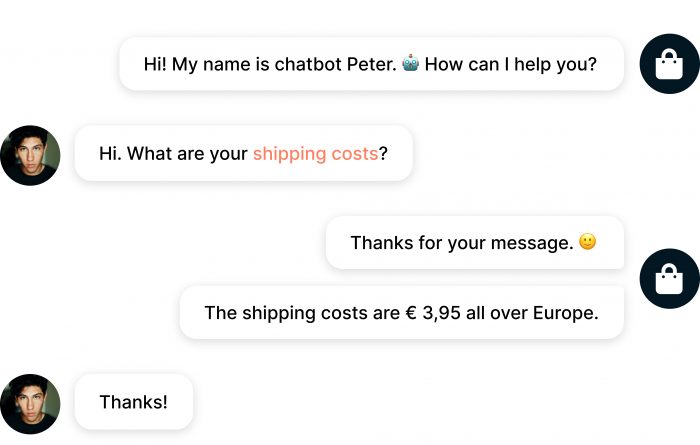
A conversation with a regular chatbot looks just the same as a conversation between you and your customer. When the customer asks a question, the chatbot recognizes keywords and sends pre-filled answers. In the conversation below, the chatbot recognizes the keyword 'shipping costs' and provides the customers with the right answer within seconds.
Learn how to set up a chatbot with Trengo
2. The flowbot
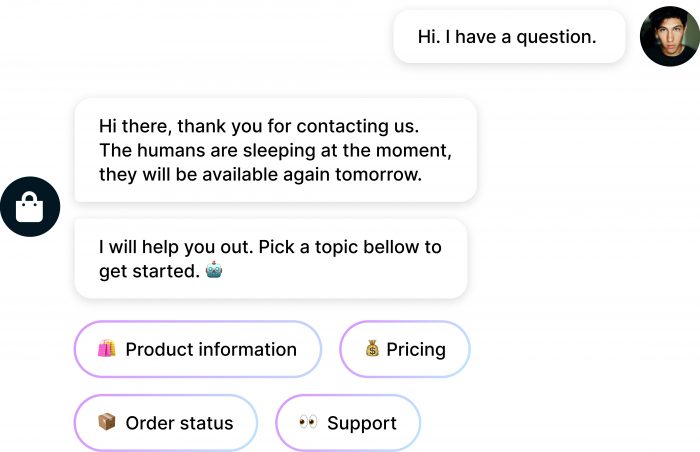
The flowbot simulates conversations with your customers and prospects in a slightly different way. Instead of replying to open questions, the flowbot asks multiple-choice questions. Based on the customer's answer, he will be forwarded to the right team or information.
Learn how to set up a flowbot with Trengo
Read more about the differences between a chatbot and a flowbot
3 ways to use a Telegram bot
With about 55.2 million active Telegram users a day, your Telegram messages will soon pile up. Time to expand your team with a chatbot to take over the busy work. Here are three examples of how to use a chatbot for Telegram:
1. Answer frequently asked questions
No matter how many questions you get every day, I bet a lot of them are quite repetitive. Most of these questions include:
- Return policies
- Available products
- Opening hours
- Shipping costs
It takes your team a lot of time to answer these questions over and over again. Instead, you can safely use a chatbot to answer them for you. The bot recognizes the question and answers with relevant information.

Tip: learn more about your customer's behaviour before you start creating a bot. Which types of questions do they ask? You can do this by adding labels to conversations. After that, you can set up questions for your chatbot based on the most frequently used labels.
2. Handle support queries by using dynamic content
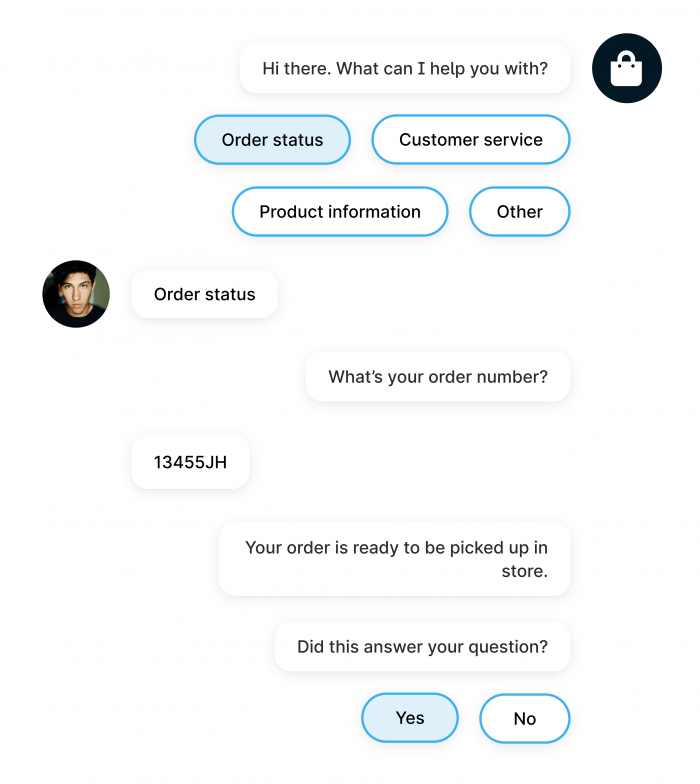
By using dynamic content, your chatbot can retrieve customer information and answer personal questions.
If you receive a newsletter from your favorite brand, you might recognize the following headline: "Hi [your name]". Dynamic content is the content between [ ... ] that changes based on customer information.
Trengo’s chatbot can retrieve dynamic content through integrations with, for example, software like Shopify and Picqer.
This makes it possible for a chatbot to support your customers with:
- Order status and information
- Product issues
- Product information
3. Gather leads by asking for customer information
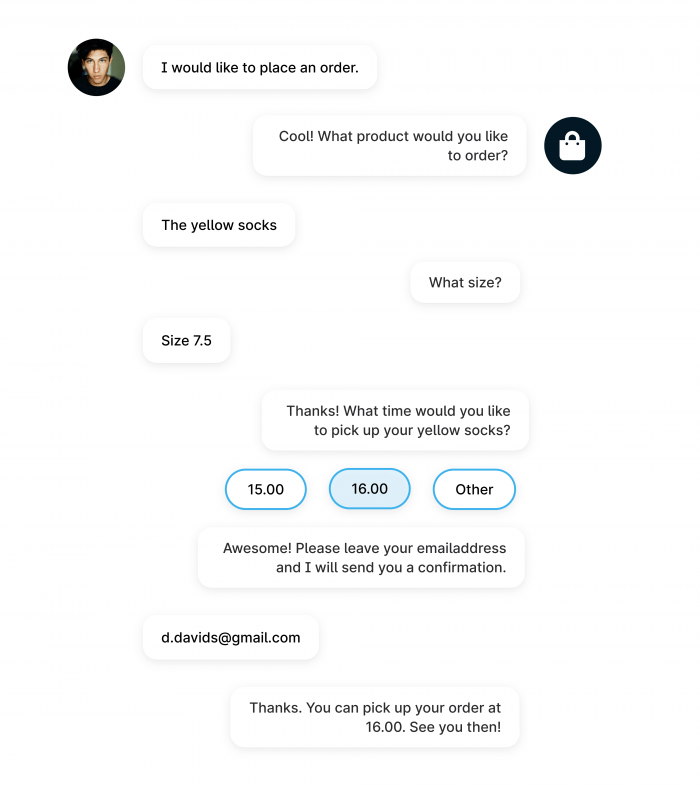
The chatbot collects customer information and saves it under a customer contact profile in Trengo. After gathering the information, the chatbot routes the conversation back to your team. This leaves your sales team with a nice list of leads to get in touch with.
Build your Telegram bot with Trengo
It's time to make full use of Telegram's potential. In Trengo, you can create your own no-code chatbot and start offering even faster service than before.
Plan a free demo today
Frequently Asked Questions (FAQs)
What is a Telegram bot and what can it do?
A Telegram bot is an automated program that runs inside the Telegram app, capable of performing a wide variety of tasks from answering customer queries and sending notifications to processing orders, moderating groups, and integrating with external services. Bots can handle customer support, automate e-commerce, provide news updates, manage communities, and even facilitate payments or games, all within Telegram’s secure environment.
Do I need coding skills to create a Telegram bot?
No, you don’t need coding skills to create a Telegram bot. While developers can build bots using the Telegram Bot API and popular programming languages, many no-code platforms like Manybot, Botmother, BuildShip, and Chatfuel allow you to create powerful bots using drag-and-drop interfaces and templates. Trengo also supports Telegram integration, enabling you to automate replies and manage conversations without writing code.
How do I create a Telegram bot step-by-step?
- Start with BotFather: Open Telegram, search for @BotFather, and use the /newbot command to create your bot. Choose a name and unique username, then copy the API token provided.
- Choose a platform: For no-code creation, use platforms like Trengo, Manybot, or Botmother. Sign up and connect your bot using the API token.
- Configure your bot: Set up commands, auto-replies, menus, and workflows using the platform’s visual editor. Customise your bot’s profile, welcome message, and features.
- Deploy and test: Add your bot to groups or channels, test its responses, and refine its behaviour as needed. For advanced automation, integrate with tools like Trengo to manage all chats centrally and automate customer service.
Which platforms or tools can I use to create a no-code Telegram bot?
Popular no-code platforms for Telegram bots include Manybot, Botmother, BuildShip, Chatfuel, and BotPenguin. These tools offer visual editors, templates, and easy integration with Telegram. Trengo is ideal for businesses wanting to automate customer service, manage Telegram alongside other channels, and use advanced reply automation.
Can I make my Telegram bot respond automatically to messages?
Yes, Telegram bots can be set up to respond automatically to specific keywords, commands, or triggers. You can use built-in features, third-party bots (like Rose Bot or GroupHelpBot), or platforms like Trengo to set up auto-replies, FAQs, and even advanced workflows for customer support and sales.
Can Telegram bots send messages to groups or channels?
Absolutely. Telegram bots can send messages, media, and files to groups, supergroups, and channels. They can also automate announcements, moderate discussions, and interact with users in both public and private settings. Bots can be added as admins to manage group tasks or broadcast updates to channel subscribers.
More like this




Let's meet
Grow your business with loyalty. Bring all of your customer contact into one, single platform to unlock delight at every step of the way.


