

The 10 best AI assistants for business we tested in 2026


Try Trengo for Free

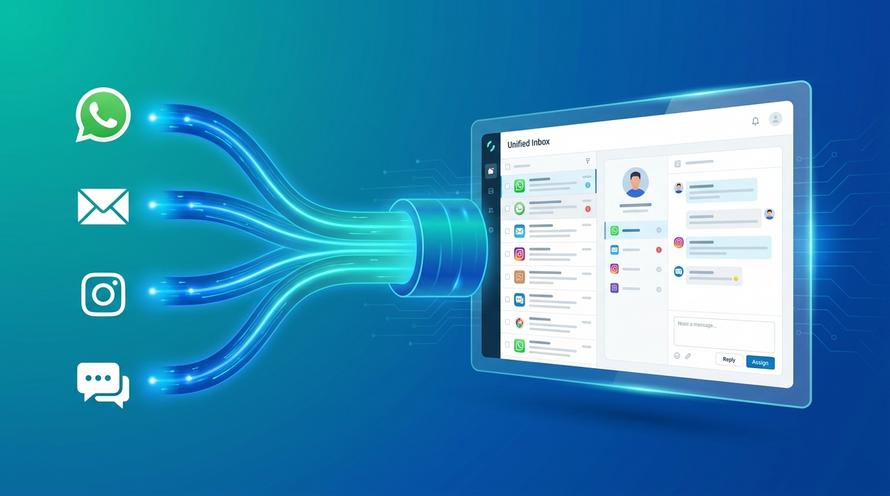
Trengo unites WhatsApp, email, web, social media, and calls in one inbox, saving your team hours of repetitive work and ensures no conversation is ever lost

Businesses are under more pressure than ever to become more efficient and move faster. To meet growing demands, leaders are investing more in AI. According to recent research, 92% of executives plan to increase their AI budgets over the next three years. Over half expect to boost spending by at least 10%.
But the focus is shifting. It’s no longer just about experimenting with AI. Now, companies are expected to show results.
That’s where the best AI assistants for business come in. They help teams reduce busywork, respond to customers faster, and get more done across channels.
The role of AI assistants in business
AI assistants are changing how work gets done. They take on routine tasks, give instant answers, and help teams move faster, without adding pressure to an overloaded support desk or complicating long workflows.
Unlike consumer tools like Alexa or Siri, AI assistants for business are built to support work across different departments. They connect with the tools your team already uses, like Microsoft Teams, Slack, or HR and IT systems, and offer help that feels like chatting with a colleague.
For example, teams can:
- Reset their passwords without raising a ticket
- Retrieve company policies or knowledge in seconds
- Schedule meetings or manage calendars automatically
- Update HR records or approve leave requests
- Pull performance or sales reports on demand
These assistants do more than just save time. They reduce friction. They make it easier to navigate complex systems, especially as businesses grow. For teams juggling multiple platforms, AI becomes a single access point, bringing clarity and speed to everyday work.
And the more you use them, the better they get. Advanced tools learn from every interaction, giving more accurate answers over time and helping your business scale without the usual growing pains.
The best use cases for AI assistants in the workplace
AI assistants are most valuable when they take on the repetitive work that slows teams down. The right tool helps your people focus on bigger priorities, such as supporting customers, launching new projects, or improving team performance.
Here are some of the best use cases for AI assistants in business today:
Onboarding new team members
Starting a new role should be smooth, and give a great first impression to your new hire. AI assistants make it easier for HR teams to deliver a great first-day experience.
With AI in place, you can:
- Automatically send contracts and collect signed documents
- Provide instant answers to questions about benefits, holidays, and payroll
- Grant access to tools and resources based on role and department
- Share tailored onboarding content and schedule reminders
That means less back and forth, faster onboarding, and more time for HR to focus on people, not paperwork.
IT support that runs 24/7
Technical hiccups slow everyone down. AI assistants take care of first-line IT support by answering common questions, solving basic issues, and routing tickets based on priority.
For example, employees can:
- Reset their own passwords
- Troubleshoot device issues using automated flows
- Request new software or access without waiting for helpdesk approval
All of these things can be done around the clock, which is especially useful for teams in different time zones that might find IT offline when a problem occurs. AI also helps IT teams scale support by monitoring systems, flagging problems early, and reducing the need for manual triage.
Self-service across every department
The best AI assistants act as a self-service layer across your entire business. Whether it’s updating personal details, finding a policy, or submitting a request, people get what they need, when they need it.
Use cases include:
- Searching your internal knowledge base for company updates or SOPs
- Requesting holiday time and seeing remaining leave
- Booking a meeting room or shared workspace
- Updating contact or payroll information
This reduces the strain on internal teams and gives employees more control and independence.
Improving operational efficiency
Beyond individual teams, AI assistants improve how your organisation runs. They keep projects on track, help teams stay aligned, and take care of the repetitive tasks that eat up time.
With the right setup, AI can:
- Schedule meetings and coordinate calendars
- Create and distribute meeting agendas or project updates
- Send deadline reminders or follow-ups
- Collect and summarise feedback from surveys or forms
- Generate reports from CRM or support data
At Trengo, AI supports these use cases in a customer-facing context too. For example, Journeys and Flowbots help teams automate parts of the customer journey, such as qualifying leads or guiding users through troubleshooting.
10 best AI assistants for businesses in 2026
Here are the top AI assistants for business that stand out in 2026.
1. Trengo AI
Trengo AI is built for fast, scalable customer communication across channels. It combines powerful automation tools like Flowbots and Journeys with an intuitive multichannel Inbox. Teams can use Trengo to automate conversations, assign messages, suggest replies, and manage service across WhatsApp, email, and more. It’s especially useful for customer support and operational teams who want to reduce manual work without sacrificing that personal human touch.
Standout features
- Inbox AI for faster replies
- Flowbots for automated conversations
- Journeys to guide customers step-by-step
- Multichannel setup (email, chat, WhatsApp)
Pros
- Easy to set up with no-code tools
- Reduces ticket volume and response time
- Built-in analytics to measure automation ROI
Cons
- More complex workflows may require some guidance in the beginning
2. Zendesk AI
Zendesk AI improves customer support by helping teams to handle tickets more efficiently. The assistant uses machine learning to suggest responses, prioritise tickets, and automate simple requests. It’s ideal for support teams with high volumes of repetitive queries, and it’s fully integrated within the Zendesk Suite.
Standout features
- Smart ticket routing and automation
- Response recommendations
- Sentiment detection in conversations
- Insights into customer behaviour
Pros
- Improves agent productivity
- Reduces resolution time for common issues
- Seamless fit for Zendesk users
Cons
- Customisation can be time-consuming
- Advanced AI requires higher-tier pricing
3. Gong
Gong is a sales AI assistant that analyses calls, meetings, and emails to give you insights that help your sales teams improve conversions. It identifies deal risks, buyer objections, and coaching opportunities based on real conversations. It’s especially useful for revenue teams that rely heavily on relationship-driven sales.
Standout features
- Call analysis with actionable insights
- Forecasting tools
- Real-time coaching prompts
- CRM integrations
Pros
- Boosts deal conversion by analysing interactions
- Helps managers coach teams with real data
- Tracks trends across large sales teams
Cons
- Premium pricing makes it less suitable for small teams
- Transcription accuracy can vary by accent or industry terms
4. Otter.ai
Otter.ai is a meeting assistant that transcribes, records, and summarises conversations. It connects to video platforms like Zoom or Google Meet and automatically captures everything in real-time. Otter is great for hybrid or remote teams looking to reduce manual note-taking and improve meeting follow-ups.
Standout features
- Auto-transcription and slide capture
- Meeting summaries with action points
- Integration with Google and Microsoft calendars
- Easy note sharing
Pros
- Saves time during and after meetings
- Helps keep teams aligned with clear summaries
- Works across most major meeting tools
Cons
- Struggles with more technical terms
- Full functionality requires a paid subscription
5. Motion
Motion is an AI-powered productivity assistant that schedules your tasks automatically. It builds out your calendar based on priorities, deadlines, and availability. Perfect for busy professionals and teams who want to focus on more important tasks than managing their calendars manually.
Standout features
- Smart task scheduling
- Calendar syncing and dynamic updates
- Project timeline views
- Task automation
Pros
- Helps structure your day around priorities
- Reduces time spent planning
- Flexible and adapts to schedule changes
Cons
- Best results require detailed task input
- Higher-tier plans needed for some key features
6. Jasper
Jasper is a generative AI writing assistant built for marketing and content teams. It helps create on-brand content such as blog posts, emails and social media copy fast. Jasper adapts to your brand tone and even includes tools for AI-generated images, making it a great choice for creative teams.
Standout features
- Customisable brand voice
- Templates for blogs, emails, and ads
- Campaign planning features
- AI image creation
Pros
- Speeds up content production
- Ensures consistency across channels
- Simple prompts for quick outputs
Cons
- Still needs human editing
- Pricing is on the higher end for small teams
7. Taskade
Taskade is a flexible team workspace with AI support for task management, planning, and creative collaboration. Users can build custom AI agents to help automate tasks, brainstorm ideas, or manage projects. It’s a good choice for distributed teams that want real-time collaboration and task tracking in one place.
Standout features
- AI agents for task automation
- Built-in chat and video tools
- Mind maps and structured task lists
- Custom workspace templates
Pros
- Combines task management and collaboration
- Easy to build custom AI support
- Good fit for remote or hybrid teams
Cons
- Limited advanced database features
- Feature access is tied to pricing tiers
8. CastorDoc
CastorDoc is an AI analytics assistant that makes data accessible to non-technical users. It translates natural language questions into real insights that help teams make faster decisions. With strong governance features, it’s also a good option for enterprises handling sensitive data across departments.
Standout features
- Natural language data queries
- Self-service analytics dashboards
- Automated documentation
- Access control and compliance support
Pros
- Empowers teams to use data independently
- Reduces reliance on analysts
- Supports data sharing and collaboration
Cons
- May require query rephrasing for more complex topics
- Some data literacy still needed to interpret results
9. Zapier Agents
Zapier Agents brings AI to Zapier’s automation platform so that users can create workflows using simple chat commands. It connects with over 5,000 apps, making it ideal for businesses looking to automate tasks between tools like Slack, Google Sheets, and HubSpot.
Standout features
- Chat-based workflow creation
- Pre-built automation templates
- AI suggestions based on usage patterns
- Real-time error detection
Pros
- No coding required
- Integrates with a huge range of apps
- Great for teams without more technical staff
Cons
- Limited advanced control without manual tweaks
- Requires setup time to fine-tune automations
10. Microsoft Copilot
Microsoft Copilot integrates directly into Microsoft 365 apps to support productivity within familiar tools. It helps with document creation, summarises meetings, analyses data, and generates responses across Outlook, Word, Excel, and Teams. It’s great for businesses who already use the Microsoft ecosystem.
Standout features
- Document drafting in Word and PowerPoint
- Excel data analysis and visualisation
- Teams transcription and summarisation
- Search across Microsoft cloud tools
Pros
- Embedded into the tools your teams already use
- Boosts productivity with minimal training
- Real-time assistance for daily tasks
Cons
- Requires a Microsoft 365 licence
- Some advanced features only available on enterprise plans
What features to look for in an AI assistant tool
Choosing the best AI assistant for business is all about finding a solution that fits your workflows, works with your tools, and delivers real value from day one.
Here’s what to consider before you make a decision:
1. Clear use case
Start with the problem you’re trying to solve. Do you need to speed up IT support, improve onboarding, or reduce response times in customer service? AI assistants often specialise in specific areas such as HR, analytics, or workflow automation, so knowing your biggest need will help you figure out which tool will work best.
2. Usability
Your team shouldn’t need hours of training just to get started. Look for a tool that’s intuitive from the start, with simple prompts and automation builders. If it works like a chat interface or fits inside tools your team already uses (like Slack or Microsoft Teams), adoption will be much faster.
3. Integration with your tools
The best AI assistants don’t work in isolation. They connect to your existing stack such as your CRM, ticketing system, HR software, calendar, etc. Check for integrations or API accesses that work with the tools already in your stack.
4. Multi-channel coverage
Many businesses now serve customers across WhatsApp, live chat, email, and social media. AI that works across all these channels, like Trengo, helps teams offer consistent support without switching tools.
5. Scalability and flexibility
Your business will evolve, and so should your AI assistant. Look for tools that support growth, whether that means handling more tickets, adding new automation flows, or managing data across different regions or departments. Customisable features are also a plus.
6. Security and compliance
If your AI assistant is handling customer data, make sure it’s protected. Look for built-in data controls, user permissions, audit logs, and compliance with regulations like GDPR. This is critical for teams in finance, healthcare, and other regulated sectors.
7. ROI and reporting
You should be able to see the value clearly. Choose a tool that gives you data on usage, time saved, and impact. This makes it easier to justify costs and optimise performance over time.
8. Fast, low-code setup
Getting set up shouldn’t take months or weeks. The best AI assistants offer low-code or no-code setup, so teams can launch automations, workflows, or chatbots without needing help from developers. This speeds up implementation and makes it easier for non-technical teams such as support, HR, or ops to quickly start using the tools. A fast start means faster results.
What are the latest trends in AI assistants for business?
Here are six key trends shaping the future of AI assistants in 2026:
1. Multimodal intelligence is unlocking new possibilities
AI assistants are no longer limited to text inputs and outputs. Many now combine voice, image, video, and file recognition to understand and respond in more complex and complete ways. This can make a huge difference in customer support, creative collaboration, and field operations, where communication is often done in more than simple text. Tools that understand a product image, can summarise a video call, or extract details from a PDF are helping teams save time with manual input.
2. Shift from conversational to agentic AI
AI assistants are moving on from simply answering questions to completing whole tasks. This shift means AI assistants are now taking actions such as updating a CRM, assigning a ticket, or scheduling a follow-up. Instead of just surfacing information, they’re starting to carry out real work, freeing up more time for human teams to focus on strategic or creative priorities.
3. Greater focus on business context
The most valuable assistants now understand organisational context such as company structure, tool access, or team responsibilities. They adjust replies and actions based on who’s asking, where they work, and what they’re trying to achieve. This creates faster, more accurate responses and avoids the need for someone to go in and manually filter or reroute.
4. Personalisation across the employee journey
AI assistants are entering every stage of the employee experience. From automating onboarding and training reminders to managing HR queries and helping with internal knowledge search, AI is becoming part of the everyday toolkit. This helps HR and operations teams scale support, which is especially useful in growing or remote-first companies.
5. Seamless multichannel capabilities
In 2026, it’s no longer sufficient for an AI assistant to sit inside a single tool. Businesses need support that works across channels such as email, chat, WhatsApp and Slack. Assistants like Trengo excel here, acting as a single layer of automation and intelligence across every platform where work happens. This leads to faster responses and more consistent service, both for your teams and your customers.
6. Demand for explainability and governance
As AI plays a bigger role in decision-making, there’s a growing need for transparency. Businesses want to understand how AI arrived at a conclusion, what data it used, and whether it followed the right process. Features like audit trails, permissions, and explainable AI models are becoming more important, especially in regulated industries.
7. Built-in feedback loops and continuous learning
The most effective tools now include built-in feedback mechanisms that allow them to learn and improve over time. Whether it’s through thumbs-up/down ratings, user corrections, or usage patterns, these AI assistants improve over time based on real interactions. This means fewer repeated mistakes, more relevant suggestions, and better alignment with how your team actually works. For example, if users consistently reword a particular AI-generated response, the assistant can adapt its phrasing over time. The result is a tool that grows with your business, becoming more helpful the more you use it.
Time to choose your AI assistant
The best AI assistants for business reduce busywork, speed up response times, and help teams stay focused. From internal support to customer communication, the right tool gives you back time and control.
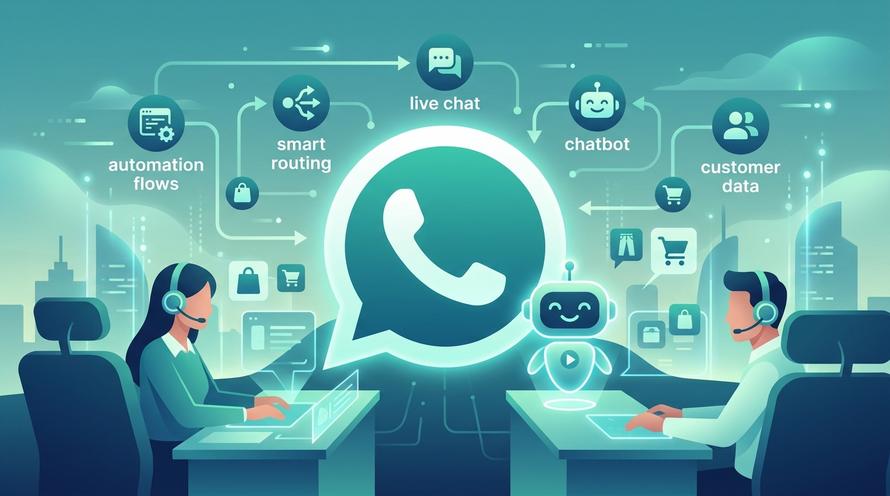
Trengo combines AI automation, Journeys, Flowbots, and Inbox AI into one multichannel platform and is built for growing teams.
Book a free demo with our team and explore how Trengo’s AI features can help your business handle more conversations, automate repetitive tasks, and support customers across every channel. See how it works, ask your questions, and get practical advice tailored to your workflow.
Frequently Asked Questions (FAQs)
What features should I look for in an AI assistant for work?
Key features include:
- Natural language processing for human-like conversation.
- Multi-channel support so it works across email, chat, and social media.
- Integration capabilities with tools like CRM, email, and project management apps.
- Automation workflows to handle repetitive tasks.
- Data security and compliance to protect customer information.
With Trengo, you get a unified inbox, AI-powered suggestions, and automation tools designed for both internal collaboration and customer-facing tasks.
Can AI assistants help automate my business workflows?
Yes. AI assistants can take over repetitive processes such as responding to FAQs, assigning tickets, updating CRM records, and scheduling follow-ups. In Trengo, automation rules can route conversations to the right person, trigger messages based on customer actions, and even integrate with external apps to complete tasks—freeing up your team for higher-value work.
Which AI assistant is best for taking meeting notes and generating summaries?
Many AI assistants now include transcription and summarisation features. While tools like Otter.ai or Fireflies specialise in meeting notes, integrating AI note-taking with your communication hub offers greater efficiency. In Trengo, you can combine AI conversation analysis with customer interaction history, creating accurate summaries for both internal and customer-facing discussions.
Can an AI assistant integrate with my CRM, email, or project management tools?
Absolutely. The best AI assistants connect seamlessly with the tools you already use. Trengo integrates with popular CRMs, email platforms, and task management systems, allowing your AI assistant to pull in customer data, send updates, and automate workflows without switching between apps.
Which AI assistant is best for handling customer support?
For customer support, choose an AI assistant that can:
- Understand customer intent.
- Provide instant, relevant responses.
- Escalate to human agents when needed.
With Trengo’s AI chatbots and assistants, you can deliver consistent, personalised customer service across live chat, social media, email, and messaging apps—all from one inbox.
What’s the most affordable AI assistant for business tasks?
Pricing depends on features and scale. Some tools offer free tiers, while others charge per user or per conversation. Trengo provides scalable pricing so you can start with core features and add advanced AI capabilities as your business grows—ensuring you only pay for what you need.
What’s the future of AI assistants in the workplace?
AI assistants will become more proactive, context-aware, and capable of managing complex workflows without human oversight. They’ll not only respond to requests but anticipate needs, suggest actions, and collaborate with team members in real time. With Trengo’s focus on unified communication and automation, future AI assistants will be deeply embedded in daily operations, bridging the gap between customer experience and internal productivity.

Let's meet
Grow your business with loyalty. Bring all of your customer contact into one, single platform to unlock delight at every step of the way.


