
Blog

Kundenbetreuung
Instagram-Push-Benachrichtigungen: Wie man sie verwaltet und warum sie wichtig sind
Instagram-Push-Benachrichtigungen: Wie man sie verwaltet und warum sie wichtig sind

Probier Trengo kostenlos aus

Trengo bringt WhatsApp, E-Mails, Web, Social Media und Anrufe in einem Posteingang zusammen, spart deinem Team stundenlange Routinearbeit und sorgt dafür, dass keine Unterhaltung verloren geht.
Trengo in Aktion sehen
- Umfassende Integrationen
- Einfache Konfiguration
- Skalierbare Preisstruktur

So funktionieren Instagram-Push-Benachrichtigungen und wie du sie verwaltest
Im Jahr 2026 ist Echtzeitkommunikation das Rückgrat der sozialen Medien. Eine Instagram-Push-Benachrichtigung ist eine sofortige Benachrichtigung, die direkt auf den Sperrbildschirm deines Handys oder deinen Desktop gesendet wird und dich dazu auffordert, auf neue Interaktionen zu reagieren. Wenn diese Benachrichtigungen versagen und wichtige Updates verpasst werden, führt das sowohl bei Gelegenheitsnutzern als auch bei Content-Erstellern zu großer Frustration. Für Unternehmen entscheidet eine effektive Verwaltung dieser Benachrichtigungen darüber, ob sie einen Kunden gewinnen oder verlieren. Daher ist es entscheidend zu verstehen, was Instagram-Push-Benachrichtigungen sind und wie man sie optimal nutzt.
Zusammenfassung
Eine Instagram-Push-Benachrichtigung ist eine wichtige Benachrichtigung, die Nutzer und Unternehmen sofort über neue Interaktionen auf dem Laufenden hält. Zu verstehen, wie diese Benachrichtigungen im Jahr 2026 funktionieren, ist entscheidend, um schnelle Reaktionszeiten und hohe Interaktionsraten zu gewährleisten. In dieser Anleitung erfährst du, wie du deine nativen Benachrichtigungseinstellungen geräteübergreifend verwaltest und warum ein Upgrade auf einen professionellen gemeinsamen Posteingang sicherstellt, dass du keine wichtige Kundenanfrage verpasst.
TL;DR
- Instagram-Push-Benachrichtigungen sind automatische Benachrichtigungen über Likes, Kommentare und Nachrichten, die direkt auf deinen Bildschirm gesendet werden.
- Benutzer können Benachrichtigungen ganz einfach über die nativen Einstellungen auf iOS- und Android-Geräten anpassen oder pausieren.
- Verzögerte oder Phantom-Benachrichtigungen werden in der Regel durch Energiesparmodi oder Fehler im Cache verursacht.
- Unternehmen, denen native Benachrichtigungen fehlen, sollten auf einen gemeinsamen Posteingang umsteigen, um das Nachrichtenaufkommen effektiv zu bewältigen.
- Durch die Nutzung der offiziellen API können Kundensupport-Teams unzuverlässige Push-Benachrichtigungen auf Mobilgeräten komplett umgehen.
Was sind Instagram-Benachrichtigungen?
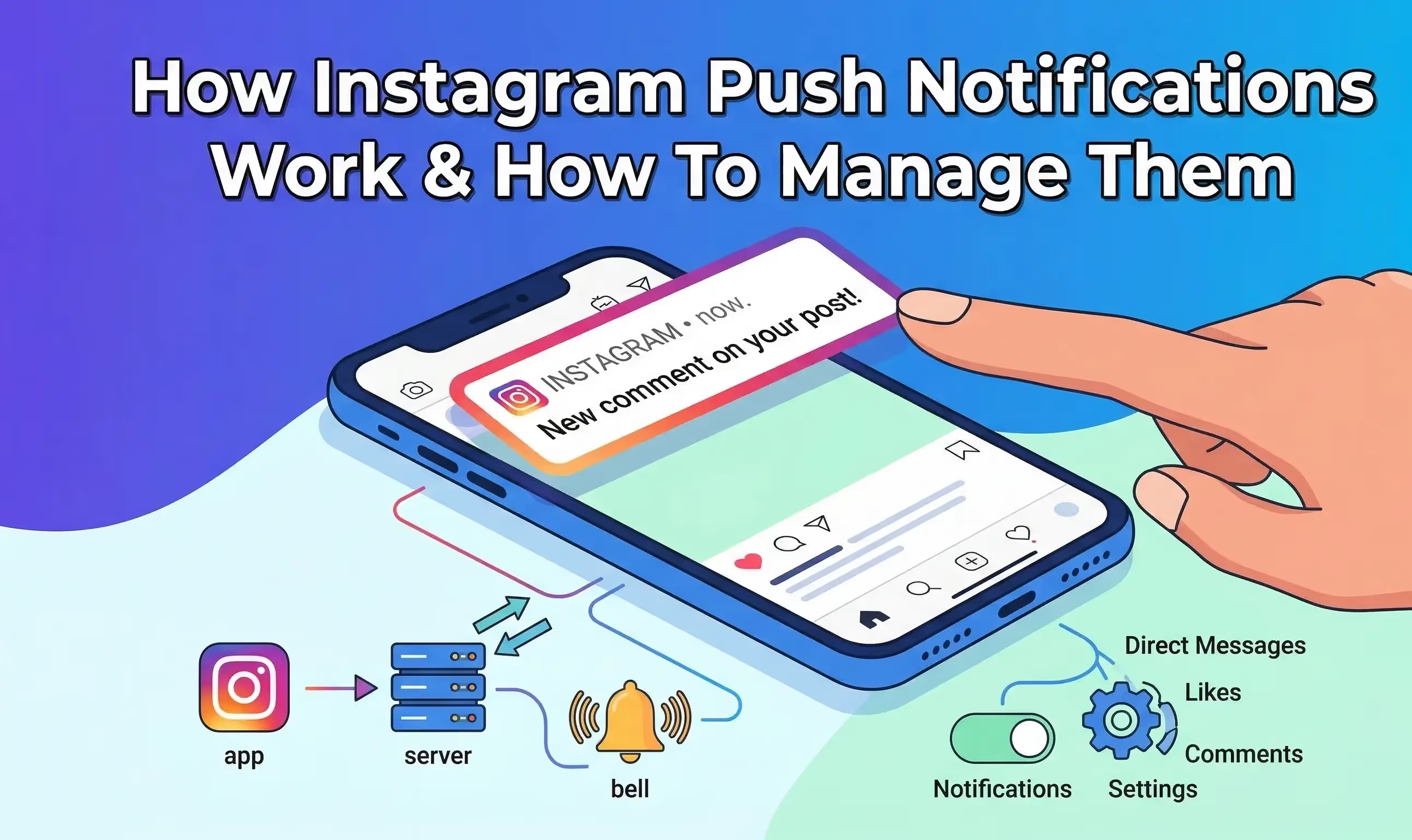
Eine Instagram-Push-Benachrichtigung ist eine automatische, anklickbare Nachricht, die auf einem Mobilgerät oder Desktop erscheint, auch wenn die App gerade nicht geöffnet ist. Falls du dich fragst, wie Instagram-Push-Benachrichtigungen aussehen: Sie erscheinen in der Regel als kleines Banner, das das App-Symbol, den Nutzernamen der Person, die mit dem Konto interagiert, und eine kurze Vorschau der Aktion enthält. Das kann zum Beispiel ein Text sein, der besagt, dass jemand dein Foto geliked oder dir eine Nachricht geschickt hat.
Es ist wichtig zu verstehen, was Push-Benachrichtigungen auf Instagram im Vergleich zu internen Benachrichtigungen bedeuten. Während interne Benachrichtigungen nur im Aktivitätsfeed unter dem Herz-Symbol erscheinen, wenn die App geöffnet ist, werden Push-Benachrichtigungen direkt an das Betriebssystem deines Geräts gesendet. Dank dieser leistungsstarken Benachrichtigungen musst du nie raten, ob jemand versucht, dich zu erreichen.
Verschiedene Arten von Instagram-Push-Benachrichtigungen
Die Plattform unterteilt die Vielzahl der von ihr versendeten Benachrichtigungen im Jahr 2026 in mehrere Hauptkategorien. Das Verständnis dieser Kategorien hilft Nutzern und Marken dabei, ihre digitale Präsenz effektiv zu verwalten.
- Benachrichtigungen zu Interaktionen: Dazu gehören Instagram-Push-Benachrichtigungen für Likes, Kommentare, Markierungen und Erwähnungen in Stories. Du wirst oft Instagram-Push-Benachrichtigungen für Likes erhalten, wenn deine Inhalte an Popularität gewinnen.
- Direktnachrichten: Dazu gehören Instagram-Push-Benachrichtigungen für Nachrichten, Sprachnachrichten und Videoanrufe. Für Marken ist dies die wichtigste Kategorie. Du kannst sogar einen kostenlosen Link-Generator für Instagram-DM (Direktnachrichten) nutzen, um mehr dieser wertvollen Interaktionen zu generieren.
- Netzwerk-Updates: Du erhältst Benachrichtigungen, wenn du neue Follower hast, wenn Follow-Anfragen angenommen wurden oder wenn ein enger Freund live geht.
- Sicherheitswarnungen: Oft wird gefragt, ob Instagram Benachrichtigungen bei neuen Anmeldungen verschickt. Ja, die Plattform sendet eine dringende Warnung, wenn ein unbekanntes Gerät auf das Konto zugreift – das ist eine wichtige Sicherheitsmaßnahme. Wenn du weißt, bei welchen Ereignissen Instagram Benachrichtigungen verschickt, bleibst du sowohl über die Interaktion auf deinem Profil als auch über die Sicherheit deines Kontos auf dem Laufenden.
So erhältst du Benachrichtigungen von Instagram
Wenn du dich fragst, wie du Instagram-Push-Benachrichtigungen erhalten kannst, müssen im Jahr 2026 drei grundlegende Voraussetzungen erfüllt sein. Erstens muss der Nutzer über eine aktive Internetverbindung per WLAN oder Mobilfunkdaten verfügen. Zweitens muss die App vom Betriebssystem des Geräts die Berechtigung erhalten haben, Benachrichtigungen auf den Sperrbildschirm zu senden. Drittens musst du die Instagram-Push-Benachrichtigungen für bestimmte Kategorien in den internen Einstellungen der App aktivieren.
Viele Nutzer fragen sich, wie Instagram-Push-Benachrichtigungen hinter den Kulissen funktionieren. Sobald eine Aktion auf den Servern eingeht, wird die Datenlast an den Apple Push Notification Service oder Firebase Cloud Messaging für Android weitergeleitet. Das wirft die Frage auf, wie schnell Instagram-Push-Benachrichtigungen sind. Sie sind so konzipiert, dass sie sofort erfolgen und dein Handy genau in dem Moment aufleuchtet, in dem eine Interaktion stattfindet.
Warum Instagram-Benachrichtigungen für die Interaktion wichtig sind
In der schnelllebigen Welt des Jahres 2026 ist das Wort „Benachrichtigung“ einfach ein Synonym für „Chance“. Jedes Mal, wenn ein Unternehmen eine Instagram-DM oder einen Kommentar erhält, erwartet ein Kunde eine schnelle Antwort. Die Geduld der Verbraucher ist auf einem historischen Tiefstand, was bedeutet, dass der Erfolg eines Unternehmens stark von der Reaktionsgeschwindigkeit abhängt. Wenn Instagram-Benachrichtigungen aufgrund einer technischen Panne oder eines überladenen Sperrbildschirms übersehen werden, könnte diese verspätete Reaktion einen direkten Verkauf kosten.
Schnelle Antworten auf Kommentare steigern zudem die Sichtbarkeit im Algorithmus erheblich. Während native Push-Benachrichtigungen auf Mobilgeräten für einzelne Nutzer hervorragend geeignet sind, werden sie für Kundensupport-Teams schnell zu einem großen Engpass. Sich ausschließlich auf einfache Benachrichtigungseinstellungen auf einem einzelnen Gerät zu verlassen, schränkt ein wachsendes Team ein, das ein robusteres und professionelleres System benötigt, um hohe Anfragevolumina zu bewältigen.
So verwaltest du Instagram-Push-Benachrichtigungen auf dem Handy
Die Plattform bietet sehr detaillierte Benachrichtigungseinstellungen, sodass Nutzer nicht zwischen „alles oder nichts“ wählen müssen. Du kannst ganz einfach festlegen, dass du Benachrichtigungen zu Direktnachrichten erhältst, während du Push-Benachrichtigungen für einfache Likes deaktiviert lässt. Um alle Instagram-Einstellungen im Zusammenhang mit Benachrichtigungen zu verwalten, öffne dein Profil, tippe auf das Hamburger-Menü, navigiere zu „Einstellungen und Datenschutz“ und wähle „Benachrichtigungen“ aus.
Über dieses Menü kannst du jeden Benachrichtigungstyp detailliert steuern. Wenn du wissen möchtest, wie du Instagram-Push-Benachrichtigungen vorübergehend deaktivieren kannst, kannst du die Funktion „Alle pausieren“ nutzen, um Benachrichtigungen für einen bestimmten Zeitraum stummzuschalten, ohne die Berechtigungen auf Systemebene ändern zu müssen.
So aktivierst/deaktivierst du Instagram-Push-Benachrichtigungen unter iOS
Die Verwaltung der Instagram-Push-Benachrichtigungen in den iPhone-Einstellungen ist auf modernen Apple-Geräten ganz einfach. Wenn du das Problem hast, dass du keine Instagram-Push-Benachrichtigungen auf deinem iPhone erhältst, solltest du hier zuerst nachsehen. Oft werden diese Berechtigungen auf Systemebene versehentlich durch ein aktuelles Software-Update oder einen aktiven Fokusmodus deaktiviert.
Um das Problem zu beheben und zu erfahren, wie du Benachrichtigungen aktivierst, öffne die iPhone-Einstellungen-App. Scrolle nach unten und tippe auf „Instagram“. Tippe dort auf „Benachrichtigungen“ und schalte den Schalter „Benachrichtigungen zulassen“ ganz nach deinen Wünschen ein oder aus.
So aktivierst/deaktivierst du Instagram-Push-Benachrichtigungen auf Android
Wenn deine Instagram-Push-Benachrichtigungen auf Android nicht funktionieren, ist das Anpassen der Systemeinstellungen der beste Schritt zur Fehlerbehebung. Zu lernen, wie man Push-Benachrichtigungen auf Android aktiviert, erfordert nur ein paar Fingertipps. Öffne die Android-Einstellungen-App und navigiere zu „Apps“ oder „App-Verwaltung“.
Such Instagram in der Liste und tippe auf „Benachrichtigungen“. Hier kannst du die Option „Benachrichtigungen zulassen“ ein- oder ausschalten. Android bietet Nutzern die einzigartige Möglichkeit, bestimmte Benachrichtigungskanäle zu aktivieren oder zu deaktivieren. Das heißt, du kannst Benachrichtigungen für Direktnachrichten direkt in den Android-Einstellungen deaktivieren, ohne die App selbst öffnen zu müssen.
So richtest du Push-Benachrichtigungstöne für Instagram auf Android ein
Android-Geräte bieten schon seit jeher umfangreiche Anpassungsmöglichkeiten für alle Instagram-Benachrichtigungstöne. Wenn du dich fragst, wie du den Benachrichtigungston in Instagram ändern kannst, um eine Direktnachricht von einer normalen Textnachricht zu unterscheiden, ist das ganz einfach.
Geh in deine Android-Einstellungen, wähle „Apps“, wähle „Instagram“ aus und tippe auf „Benachrichtigungen“. Wenn du auf eine bestimmte Kategorie wie „Direktnachrichten“ tippst, kannst du „Ton“ auswählen und den Standardton durch eine eigene Audiodatei ersetzen. Im Jahr 2026 ist das Herunterladen von Instagram-Benachrichtigungstönen bei Influencern sehr beliebt, die sich einen spezifischen und wiedererkennbaren Ton für ihre Markeninteraktionen wünschen.
So richtest du die Push-Benachrichtigungstöne für Instagram auf iOS ein
Aufgrund seines streng abgeschotteten Ökosystems behandelt Apple Benachrichtigungstöne anders als Android. Seit jeher und auch noch bis ins Jahr 2026 hinein erlaubt die Plattform es iOS-Nutzern nicht, den jeweiligen Benachrichtigungston direkt in der App einfach durch eine selbst heruntergeladene Datei zu ersetzen.
Für alle, die Instagram-Push-Benachrichtigungen auf dem iPhone verwalten: Es ist nicht möglich, einen eigenen Ton nur für Direktnachrichten festzulegen. Du kannst jedoch in den iOS-Einstellungen unter „Töne und Haptik“ den Standard-Benachrichtigungston für alle Apps von Drittanbietern ändern. Es ist wichtig, diese Einschränkungen zu kennen, damit du keine Zeit damit verschwendest, nach einer Funktion zu suchen, die es auf dem iPhone gar nicht gibt.
Warum deine Instagram-Benachrichtigungen nicht verschwinden
Der Umgang mit Phantom-Benachrichtigungen ist für viele Nutzer eine äußerst frustrierende Erfahrung. Wenn du dich fragst, warum deine Instagram-Benachrichtigungen nicht richtig gelöscht werden, oder nach Reddit-Threads suchst, in denen es darum geht, dass Instagram-Push-Benachrichtigungen nicht funktionieren, bist du nicht allein. Auch im Jahr 2026 tritt dieser Fehler noch gelegentlich auf, verursacht durch Fehler in zwischengespeicherten Daten oder ungelesene Nachrichtenanfragen, die sich unbemerkt im Ordner „Versteckte Anfragen“ verstecken.
Um das Problem zu beheben, dass Instagram-Push-Benachrichtigungen nicht wie erwartet funktionieren und der rote Punkt weiterhin angezeigt wird, überprüfe zunächst die Ordner „Nachrichtenanfragen“ und „Versteckte Wörter“ in deinen Direktnachrichten. Versuche anschließend, den App-Cache auf deinem Android-Gerät zu leeren. Durch das Abmelden und erneute Anmelden wird zudem eine Serversynchronisierung erzwungen. Stelle schließlich sicher, dass auf den verknüpften Meta-Konten keine ungelesenen Benachrichtigungen vorhanden sind, da diese Seiten eng miteinander verzahnt sind.
Wie lässt sich Trengo mit Instagram verbinden?
Sich im Jahr 2026 bei wachsenden Marken allein auf die üblichen Push-Benachrichtigungen auf einem einzigen Smartphone zu verlassen, ist ein riesiges Risiko. Wenn das Handy eines Social-Media-Managers den Geist aufgibt oder wenn Benachrichtigungen versehentlich weggewischt werden, sodass auf Instagram keine Push-Benachrichtigungen mehr angezeigt werden, gehen wichtige Kundenanfragen komplett verloren. Um das zu lösen, müssen Unternehmen eine Lösung auf Unternehmensniveau einführen, die das unzuverlässige mobile System komplett umgeht.
Durch die Nutzung des Omnichannel-Posteingangs von Trengo werden alle eingehenden Instagram-Nachrichten über die offizielle API direkt an eine zentrale, gemeinsam genutzte Plattform weitergeleitet. Diese leistungsstarke Integration bietet eigene, zuverlässige Benachrichtigungen für Desktop- und Mobilgeräte, damit garantiert keine Nachricht übersehen wird.
Es fördert die Zusammenarbeit im Team erheblich, indem es mehreren Mitarbeitern ermöglicht, Interaktionen gleichzeitig von ihren Arbeitsplätzen aus zu bearbeiten. Die Mitarbeiter können sich gegenseitig ganz einfach in internen Notizen markieren, um schnell Kontext zu liefern, ohne dass der Kunde den internen Dialog jemals zu sehen bekommt.
Ein großer Vorteil dieser Konfiguration ist die nahtlose Kommunikation über mehrere Kanäle hinweg. Deine sozialen Interaktionen werden direkt neben deinen WhatsApp Business API-Nachrichten, Standard-E-Mails und Website-Live-Chats angezeigt, wodurch ein wirklich einheitlicher Arbeitsbereich entsteht.
Schließlich verändert die Automatisierung die Art und Weise, wie du große Mengen an Anfragen bearbeitest. Teams können KI-Agenten einsetzen, um sofort auf häufig gestellte Fragen zu antworten. Das nimmt dir den ständigen Stress, innerhalb von Sekunden nach Erhalt einer Benachrichtigung manuell antworten zu müssen, und verwandelt eine unübersichtliche App in einen unglaublich gut organisierten Kundensupport-Kanal.
Häufig gestellte Fragen
Verschwinden Instagram-Push-Benachrichtigungen, wenn man einem Beitrag das „Gefällt mir“ entzieht?
Ja, wenn du einen Beitrag erst likest und dann sofort das Like wieder entfernst, verschwindet die Push-Benachrichtigung über das Entfernen des Likes in der Regel vom Sperrbildschirm der anderen Person. Wenn diese jedoch genau in dem Moment, in dem du das tust, gerade auf ihr Handy schaut, könnte sie es sehen. Im internen Aktivitätsfeed wird das Like nicht angezeigt.
Schickt Instagram eine Benachrichtigung, wenn du einen Screenshot von einer Story oder einem Chat machst?
Nein, die Plattform sendet keine Benachrichtigung, wenn du einen Screenshot von einer normalen Story, einem Beitrag oder einem Standard-Chat machst. Eine Benachrichtigung wird nur gesendet, wenn du einen Screenshot von einem Foto oder Video machst, das im Vanish-Modus über Direktnachrichten gesendet wurde und nach einer bestimmten Zeit verschwindet. Damit sind die Fragen, ob Instagram eine Benachrichtigung bei Screenshots sendet oder ob Instagram eine Benachrichtigung bei Screenshots von Stories sendet, vollständig beantwortet.
Warum funktionieren meine Instagram-Push-Benachrichtigungen nicht oder kommen verspätet an?
Verzögerte oder fehlgeschlagene Benachrichtigungen werden meist durch den Energiesparmodus verursacht, der die Aktualisierung von Apps im Hintergrund einschränkt. Wenn deine Instagram-Push-Benachrichtigungen nicht funktionieren oder du dich fragst, warum Instagram Benachrichtigungen verspätet sendet, überprüfe auch, ob die WLAN-Verbindung schlecht ist, ob du eine veraltete App-Version hast oder ob auf deinem Gerät der „Nicht stören“-Modus aktiviert ist.
Zeigt Instagram an, wenn du eine Nachricht zurückziehst?
Nein, die Plattform sendet keine spezielle Push-Benachrichtigung, dass ein Nutzer eine Nachricht zurückgezogen hat. Der Text verschwindet einfach aus dem Chatverlauf. Wenn der Empfänger die ursprüngliche Benachrichtigung jedoch bereits auf seinem Sperrbildschirm hatte, hat er den Text möglicherweise schon gelesen, bevor er zurückgezogen wurde.
Wie kannst du erkennen, ob jemand ständig auf deinem Instagram-Profil vorbeischaut?
Du kannst nicht mit Sicherheit sagen, ob jemand dein Profil ständig ansieht, da die Plattform keine Benachrichtigungen über Aufrufe anbietet. Die einzigen Anhaltspunkte sind, ob die Person regelmäßig deine Stories ansieht – bei denen es eine Liste der Zuschauer gibt – oder ob sie versehentlich mit deinen veröffentlichten Inhalten interagiert.
Erhältst du auf Instagram eine Benachrichtigung, wenn jemand dein Profil ansieht?
Nein, die Plattform hat noch nie Push-Benachrichtigungen für Profilaufrufe verschickt. Jede Drittanbieter-App, die behauptet, dies im Jahr 2026 zu tun, ist wahrscheinlich ein Betrugs- oder Phishing-Versuch. Du solltest also niemals Diensten vertrauen, die die Frage „Sagt Instagram dir, wenn jemand dein Profil ansieht?“ mit „Ja“ beantworten.
Warum verschickt Instagram Benachrichtigungen zweimal?
Dieser häufig auftretende Fehler tritt auf, wenn ein Nutzer eine Benachrichtigung erhält, darauf klickt und dann genau dieselbe Benachrichtigung erneut erhält. Das passiert meist, wenn mehrere Geräte wie ein Tablet und ein Smartphone gleichzeitig genutzt werden oder wenn es zu einer Verzögerung bei der Synchronisierung zwischen den Hauptservern und deinem lokalen App-Cache kommt.
Werden Leute benachrichtigt, wenn du ihnen auf Instagram nicht mehr folgst?
Nein, die Plattform sendet keine Push-Benachrichtigung, um jemanden darüber zu informieren, dass er nicht mehr verfolgt wird. Die Person wird es nur bemerken, wenn sie ihre Follower-Liste manuell überprüft und feststellt, dass dein Account fehlt.
Warum schickt Instagram Benachrichtigungen, wenn man jemandem folgt?
Der Algorithmus schickt Benachrichtigungen mit Vorschlägen für neue Follower, um die Nutzer in der App zu halten – basierend auf gemeinsamen Freunden, synchronisierten Telefonkontakten oder verknüpften Meta-Profilen. Du kannst diese Account-Vorschläge ganz einfach in deinen Benachrichtigungseinstellungen deaktivieren, wenn du sie nervig findest und dich fragst, warum Instagram so oft Benachrichtigungen schickt, jemandem zu folgen.
Mehr erfahren


Interessiert an einem Gespräch?
Lassen Sie Ihr Geschäft durch Kundentreue wachsen. Vereinen Sie alle Ihre Kontakte auf einer einzigen Plattform, um bei jedem Schritt Begeisterung zu erzeugen.


© 2026 Trengo

in europäischem Besitz