How to Add a WhatsApp Link to TikTok Bio (2026)


Try Trengo for Free

Trengo unites WhatsApp, email, web, social media, and calls in one inbox, saving your team hours of repetitive work and ensures no conversation is ever lost
How to Add a WhatsApp Link to TikTok in 2026 The Complete Guide
Summary
This guide provides a complete walkthrough on how to add a WhatsApp link to your TikTok bio to generate leads and drive sales. We cover how to create a custom WhatsApp link, the requirements for adding it to your profile, and how to manage the new influx of customer conversations. Following these steps will help you move followers from a public feed to a private, one on one conversation channel, creating a powerful new pipeline for your business.
TL;DR
- You need a TikTok Business Account or a personal account with at least 1,000 followers to add a clickable link.
- Create your WhatsApp link using a generator for a pre-filled message or manually with the `wa.me` format.
- Add the link to the dedicated "Website" field in your TikTok profile, not the "Bio" text area.
- Links in video descriptions or comments are not clickable; always direct viewers to the "link in bio."
- Use a tool like Trengo to manage all your TikTok and WhatsApp messages in a single shared inbox.
Can You Add a WhatsApp Link to TikTok?
Yes, you can absolutely add a WhatsApp link to your TikTok profile, but there are important conditions to be aware of. TikTok controls who can add a clickable link to their bio to prevent spam and ensure a quality user experience. Here are the key requirements.
First, the 1000 follower rule is the most common hurdle. As of 2026, most personal TikTok accounts need to have at least 1,000 followers before the "Website" field becomes available in the profile editor. This is TikTok's way of ensuring the feature is used by established creators and businesses.
However, there is a significant advantage for businesses. Switching to a free TikTok Business Account is the recommended best practice. This type of account often unlocks the website link feature even without reaching the 1,000 follower threshold, though availability can vary by region. A Business Account also grants you access to valuable analytics and advertising tools, making it an essential switch for any brand on the platform.
How to Create a WhatsApp Link for TikTok
Before you can add your link, you need to create it. A standard WhatsApp link directs users to a new chat with your number. You can create a basic link or one that includes a pre-filled message to help you track where your new leads are coming from. Here are the best methods to do it.
Method 1: Using a WhatsApp Link Generator Recommended
Positioning this as the most effective method, especially for businesses, is crucial. The simplest way to create a flawless link is by using a free whatsapp link generator. These tools eliminate any guesswork and offer significant benefits. The primary advantage is the ability to easily add a custom pre-filled message, such as "Hi, I saw your profile on TikTok and I'm interested in your new product." This immediately tells your team the lead's origin and intent, streamlining the conversation from the very first message.
Method 2: Manually Creating a wa.me Link
or those who prefer a hands-on approach, you can create the link yourself using WhatsApp's wa.me shortcut. The basic format is https://wa.me/<number>, where <number> is your full phone number in international format, excluding any leading zeros, brackets, spaces, or the + symbol.
For example, if your Dutch number is 06 12345678, you first convert it to the international format +31 6 12345678. Your WhatsApp link would then be:
https://wa.me/31612345678
To add a pre-filled message manually, append ?text=urlencodedtext to the URL. The text must be URL-encoded, meaning spaces are replaced with %20.
For example, for the message "Hi from TikTok", the full link would be:
https://wa.me/31612345678?text=Hi%20from%20TikTok
Creating Links for WhatsApp Groups and Channels
If you want to direct your TikTok followers to a WhatsApp Group or Channel instead of a direct chat, the process is different. You do not use the `wa.me` format for these. Instead, you must open the group or channel info within the WhatsApp app, find the "Invite to Group via Link" or "Channel Link" option, and copy the unique URL generated by WhatsApp. You can then use this invitation link directly in your TikTok profile.
How to Add Your WhatsApp Link to Your TikTok Profile Bio
Once you have your `wa.me` link ready, it's time to add it to your TikTok profile. This is the most important part of the process, and following these steps will ensure your link is clickable and drives traffic effectively.
- Step 1: Switch to a Business Account If You Haven't Already
- If you don't see the "Website" option in your profile, your first step is to switch to a Business Account. Go to your 'Settings and privacy', tap 'Account', and then select 'Switch to Business Account'. Follow the on-screen prompts to complete the process.
- Step 2: Navigate to Your Profile
- Open the TikTok app and tap on the 'Profile' icon located in the bottom-right corner of your screen. This will take you to your main profile page where your videos and bio are displayed.
- Step 3: Tap 'Edit Profile'
- Look for the 'Edit Profile' button, which is prominently displayed just below your profile picture and follower statistics. Tapping this button will open the editing interface for your profile information.
- Step 4: Add Your Link to the 'Website' Field
- This is the critical step. In the editing screen, scroll down until you see the 'Website' field. Tap on it and paste the full `wa.me` link you created earlier. It is crucial that you place the link in this specific field. Do not put it in the main 'Bio' text area, as it will appear as plain text and will not be clickable.
- Step 5: Save and Test Your Link
- After pasting the link, tap the 'Save' button at the top-right corner. Return to your profile page. You should now see your clickable WhatsApp link displayed below your bio. Tap the link yourself to test it and confirm that it correctly opens a new chat with your business number in WhatsApp.
Other Ways to Share Your WhatsApp Link on TikTok
While the bio link is the most reliable method, there are other creative ways to promote your WhatsApp connection. However, it's important to understand the limitations of these alternative methods.
In TikTok Video Descriptions or Comments
You can paste your WhatsApp link into your video captions or in the comments section, but it's essential to know that these links are not clickable. A user would have to manually copy the text, open their browser, and paste it in. This creates too much friction. Instead of relying on this, use your captions to create a strong call-to-action (CTA) that points users to the clickable link, such as "Have questions? Chat with us on WhatsApp! Link in bio."
In TikTok Stories
Some TikTok accounts have access to a "link sticker" feature in their Stories. This feature is typically reserved for verified accounts or those with a very large following. If your account has this functionality, it's a fantastic way to share your WhatsApp link for a limited-time promotion or announcement, as stories are only visible for 24 hours.
Using a QR Code in Your Video
A clever workaround is to generate a QR code for your WhatsApp link. You can then display this QR code as a visual element within your video content for a few seconds. Instruct viewers to pause the video and scan the code with their phone's camera. This is a highly visual and interactive way to drive traffic directly to a WhatsApp chat, bypassing the bio link entirely.
Why Connect TikTok Customers with WhatsApp?
Bridging your TikTok audience to WhatsApp is more than just a trick; it's a powerful business strategy. It transforms passive video viewers into engaged leads and loyal customers. Here are the key benefits of making this connection:
- Generate High-Quality Leads: Moving an interested follower from a public, one-to-many platform like TikTok to a private, one-on-one conversation on WhatsApp is a strong buying signal. These are warm leads who are actively seeking more information or are ready to purchase.
- Provide Instant Customer Support: Offer a direct, convenient channel for customers to ask questions about products, shipping, or services. Answering queries in real-time on a platform they use daily can significantly improve customer satisfaction and reduce purchase friction.
- Build a Community: Use WhatsApp Groups or Channels as an exclusive space for your most dedicated TikTok followers. You can share behind-the-scenes content, offer special discounts, and foster a sense of community that builds long-term loyalty.
- Close Sales Directly: WhatsApp is a perfect environment for consultative selling. You can handle the entire customer journey, from initial inquiry and product demonstration to sending payment links and confirming orders, all within a single, trusted chat interface.
Manage TikTok and WhatsApp Conversations in One Inbox
Successfully adding a WhatsApp link to your TikTok will lead to a great problem: a surge in customer messages. Your TikTok DMs will be active, and your WhatsApp will be filling up with new chats from potential customers. Managing these conversations across separate apps is inefficient and can lead to slow response times and lost sales.
The Challenge: Juggling Multiple Apps
As your business grows, switching between the TikTok app, the WhatsApp app, your email client, and other channels becomes chaotic. It's easy to miss messages, have multiple team members reply to the same customer, or lose track of a customer's history. This fragmentation hurts both your team's productivity and the customer's experience.
The Solution: A Shared Omnichannel Inbox
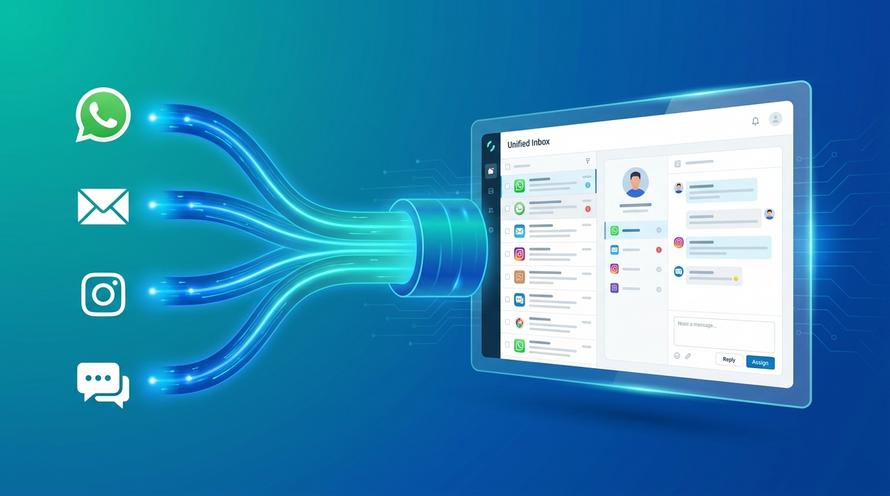
This is where a platform like Trengo becomes essential. Trengo consolidates all your customer communication channels into a single, unified dashboard. A shared omnichannel inbox brings your WhatsApp Business, TikTok DMs (via integration), Instagram DMs, email, and website live chat into one streamlined view, allowing your team to manage everything from one place.
How Trengo Supercharges Your Communication
By centralizing your messaging, Trengo transforms your customer communication from reactive and chaotic to proactive and organized. Here are the key benefits for businesses connecting their TikTok and WhatsApp:
- Team Collaboration: Assign conversations to specific team members, leave internal notes on customer chats, and see who is working on what in real time. Multiple agents can handle messages from the same WhatsApp number without confusion.
- Automation: Free up your team's time by using powerful automation. Set up quick replies for common questions, create auto-replies for after-hours inquiries, and deploy intelligent chatbots to handle routine queries 24/7.
- Efficiency: View the complete customer history in a single thread, no matter which channel they used to contact you. See if a customer first messaged on TikTok before moving to WhatsApp, giving your team full context for every conversation.
- Professionalism: Leverage the full power of the WhatsApp Business API through Trengo. This allows for features like the official green-tick verification, pre-approved message templates for outbound campaigns, and advanced analytics.
Frequently Asked Questions

You can add one clickable link to your TikTok profile by placing it in the dedicated "Website" field in your profile settings. This feature is typically available for Business Accounts or personal accounts that have more than 1000 followers.
First, create a WhatsApp link using the `https://wa.me/yournumber` format or a link generator. Then, go to your TikTok profile, tap 'Edit Profile', and paste the full link into the "Website" field. Finally, save your changes.
Yes, for most personal accounts, you need to reach 1000 followers to unlock the website link feature. However, switching to a free TikTok Business Account often grants you access to this feature without meeting the follower requirement.
There are two common reasons. First, your account may be a personal account with fewer than 1000 followers. Second, you might be trying to paste the link into the main "Bio" text box instead of the separate "Website" field. The solution is to switch to a Business Account and use the correct field.
No, links placed in TikTok video captions or comments are not clickable. The only reliable place to put a clickable link is in the "Website" field of your main profile bio. You should use captions to direct viewers to the link in your bio.


Let's meet
Grow your business with loyalty. Bring all of your customer contact into one, single platform to unlock delight at every step of the way.