

Intégration de WeChat à ton site web : ajoute WeChat à ton site


Essaie Trengo gratuitement

Trengo rassemble WhatsApp, les e-mails, le web, les réseaux sociaux et les appels dans une seule boîte de réception, ce qui fait gagner à ton équipe des heures de boulot répétitif et garantit qu'aucune conversation ne se perd.
Voir Trengo en action
- Intégrations étendues
- Configuration facile
- Structure tarifaire évolutive

Intégration de WeChat à ton site web : comment ajouter WeChat à ton site web
Résumé
L'intégration de WeChat à ton site web est une stratégie incontournable pour les entreprises qui souhaitent toucher un vaste public international en 2026. En intégrant directement cette application de messagerie très populaire à ton site, tu peux transformer instantanément des visiteurs passifs en clients actifs avec qui tu peux dialoguer. Cette mise en place améliore le service client et stimule les ventes en allant à la rencontre des consommateurs là où ils se trouvent. L'utilisation de plateformes omnicanales robustes permet à ton équipe de traiter efficacement les demandes entrantes, parallèlement aux autres canaux de communication.
TL;DR
- L'intégration du site web à WeChat permet de rapprocher ta marque de plus d'un milliard d'utilisateurs à travers le monde.
- L'ajout d'un widget dédié permet aux équipes commerciales de générer des prospects et d'éviter les abandons de panier.
- Les agents du service client peuvent résoudre les problèmes plus rapidement grâce aux fonctionnalités natives de partage de contenu multimédia.
- Les versions classiques des navigateurs ont des limites strictes, ce qui rend indispensable l'utilisation d'outils professionnels tiers.
- La création d'un code QR scannable permet une transition fluide entre l'ordinateur et le mobile.
- Le fait de regrouper ces échanges dans une boîte de réception omnicanale évite à ton équipe d'être submergée.
Alors que le commerce électronique mondial et la communication numérique continuent d'évoluer en 2026, les entreprises cherchent sans cesse des moyens d'aller à la rencontre de leurs clients là où ils se trouvent. Avec plus d'un milliard d'utilisateurs actifs dans le monde, cette application est un incontournable pour toute marque internationale souhaitant toucher un public très lucratif. Pour les entreprises qui souhaitent capter ce public, une intégration réussie de WeChat à leur site web est un atout incontournable.
Lorsque tu intègres WeChat à ton site web, tu élimines instantanément les obstacles entre un simple visiteur et un client converti. Au lieu d'obliger les prospects à quitter ton site pour trouver un formulaire de contact, tu leur offres un moyen familier et instantané de te contacter. Une intégration efficace de WeChat transforme le trafic passif de ton site web en conversations actives et engageantes. En mettant en place un canal de communication dédié, tu garantis que toute personne visitant ton site puisse contacter ton entreprise directement via l'application qu'elle utilise déjà plusieurs heures par jour.
Que ton objectif soit d'accompagner une base d'utilisateurs internationale ou de rationaliser ta stratégie, une configuration adéquate est la solution idéale. Nous allons voir ci-dessous comment cette technologie fonctionne exactement et comment ton équipe pourra, au final, gérer en toute sécurité chaque message reçu.
Intégration de WeChat à un site web : comment utiliser le chat Web de WeChat pour ton entreprise
WeChat Web Chat for Business est un outil puissant qui permet d'intégrer la messagerie mobile directement à ton site web, tant sur ordinateur que sur mobile. Intégrer un widget de chat sur ton site est le moyen le plus direct d'instaurer immédiatement un climat de confiance. Lorsque les utilisateurs voient cette icône verte reconnaissable apparaître dans un coin de leur écran, ils savent qu'un simple clic ou un scan les mettra directement en relation avec un interlocuteur humain. Pour les entreprises modernes de 2026, se contenter d'un simple bouton de contact générique n'est plus suffisant.
Tu dois t'assurer que ces conversations soient bien orientées vers les services concernés. Un widget de chat performant te permet de classer les demandes entrantes par catégorie afin que le visiteur reçoive exactement l'aide dont il a besoin. Cela garantit une transition en douceur entre le statut de simple visiteur et celui de client bénéficiant d'un accompagnement complet.
Widget WeChat pour les ventes
Un widget dédié est un outil extrêmement efficace pour générer des prospects pour ton service commercial. Lorsque des acheteurs potentiels consultent tes pages produits, ils ont souvent des petites questions sur les tailles ou les livraisons à l'international. S'ils ne trouvent pas de réponse tout de suite, ils abandonneront leur panier. En utilisant le widget de chat commercial, tes conseillers peuvent interagir avec les prospects en temps réel, sans délai.
L'acheteur potentiel n'a pas besoin de rester scotché à son navigateur web en attendant une réponse. Il peut envoyer une question, fermer son ordinateur portable et recevoir la réponse du commercial directement sur son appareil mobile quelques minutes plus tard. Ce mode de communication asynchrone mais instantané est idéal pour entretenir les relations avec les prospects et guider l'utilisateur tout au long du processus d'achat.
Widget WeChat pour le service client
Le service après-vente est tout aussi crucial que la vente elle-même. Pour les équipes du service client, ce widget est une véritable bouée de sauvetage pour les acheteurs frustrés ou désorientés. Au lieu de se débattre avec des systèmes complexes de tickets par e-mail, les clients peuvent simplement utiliser la fonctionnalité de chat sur ton site pour demander des informations sur leur commande ou résoudre des problèmes techniques.
Comme la plateforme prend en charge les contenus multimédias, les clients peuvent facilement prendre des photos de produits défectueux ou faire des captures d'écran des codes d'erreur, puis les envoyer directement via le widget. Tes conseillers du service client peuvent ensuite répondre en envoyant des vidéos explicatives étape par étape ou des messages vocaux. Cela réduit considérablement les délais de résolution et améliore les scores de satisfaction client, tout en contribuant à désamorcer les avis négatifs potentiels.
Les subtilités de WeChat Web : limites et solutions de contournement
Si tu as déjà essayé de gérer les communications de ton entreprise manuellement, tu connais sans doute WeChat Web. À l'origine, cette version web de l'application permettait aux utilisateurs de scanner un code et de taper des messages depuis le clavier de leur ordinateur. Cependant, les chefs d'entreprise se heurtent souvent à un obstacle et se demandent pourquoi ils ne peuvent pas utiliser WeChat Web pour offrir un service client évolutif.
La réponse réside dans la sécurité de la plateforme et les restrictions imposées aux comptes. Ces dernières années, Tencent a considérablement restreint l'interface native pour lutter contre le spam et les activités malveillantes. De nombreux comptes nouvellement créés se voient totalement empêcher de se connecter à la version web. Même si un compte parvient à se connecter, l'interface est strictement conçue pour un usage individuel. Elle ne prend pas en charge la connexion simultanée de plusieurs agents et ne dispose pas des fonctionnalités de gestion des tickets de base.
Pour une entreprise en pleine croissance en 2026, il est pratiquement impossible de se contenter de cette version standard. Si ton volume de ventes augmente, un seul téléphone équipé de l'application compagnon pour ordinateur risque de devenir un goulot d'étranglement pour l'ensemble de tes opérations. Au lieu de te débattre avec une interface web grand public, les entreprises peuvent contourner ces limites en utilisant une connexion via l'interface de programmation d'applications (API) officielle, qui garantit un accès sécurisé et stable.
Génère un code QR depuis ton WeChat
L'un des moyens les plus efficaces pour diriger le trafic de ton site web vers ton entonnoir de communication consiste à utiliser des images scannables. Étant donné que l'application repose en grande partie sur le scan de codes pour ajouter des amis et suivre des comptes officiels, les visiteurs de ton site web sont déjà habitués à ce type d'interaction. Pour faire le lien entre ton site web et ton compte, tu dois générer un lien WeChat dédié et une image scannable correspondante.
Lorsque les utilisateurs d'ordinateurs de bureau visitent ton site, il leur suffit de pointer leur téléphone vers le code affiché dans ton widget pour ouvrir instantanément une conversation avec ton entreprise. Quant aux visiteurs sur le Web mobile, un simple clic sur le code les redirigera directement vers l'application. Tu peux facilement créer ton code personnalisé à l'aide de notre outil ci-dessous. Il te suffit de saisir l'identifiant de ton compte officiel et le générateur te fournira un extrait de code HTML prêt à être intégré à ton site.
Une fois généré, insère ce code dans le pied de page de ton site web ou dans ton widget de chat flottant dédié pour t'assurer qu'il soit toujours visible par tes visiteurs.
Élargir ta portée : intégrer d'autres canaux
Même si conquérir le marché asiatique et la diaspora chinoise est très rentable, une entreprise véritablement mondiale doit s'adresser à un public plus large. Si tu as du trafic européen ou nord-américain, tu te demandes peut-être si tu peux intégrer WhatsApp à ton site web en plus d'autres plateformes ? La réponse est clairement oui.
En utilisant l'API WhatsApp Business via des solutions officielles, tu garantis des taux d'ouverture inégalés et une livraison fiable. Un public numérique varié s'attend à disposer d'un large éventail d'options de communication. Pour optimiser tes taux de conversion auprès de tous les segments démographiques, ton site web doit prendre en charge diverses applications de messagerie instantanée.
En déployant un widget omnicanal, tu permets à l'utilisateur de choisir sa plateforme préférée à partir d'un seul menu déroulant. Cette approche centrée sur l'utilisateur garantit que, quelle que soit l'origine de ton trafic web, tu offres à tes visiteurs un moyen localisé et très accessible de prendre contact avec tes équipes commerciales et d'assistance.
Gère sans effort les conversations du widget WeChat avec Trengo
À mesure que tu déploies tes widgets avec succès et que tu commences à générer du trafic vers tes canaux de communication, tu seras rapidement confronté à des problèmes de volume. Lorsque les demandes commerciales et les demandes d'assistance client affluent, les gérer via des applications mobiles natives devient un véritable casse-tête logistique. C'est là que la boîte de réception omnicanale de Trengo révolutionne ton flux de travail.
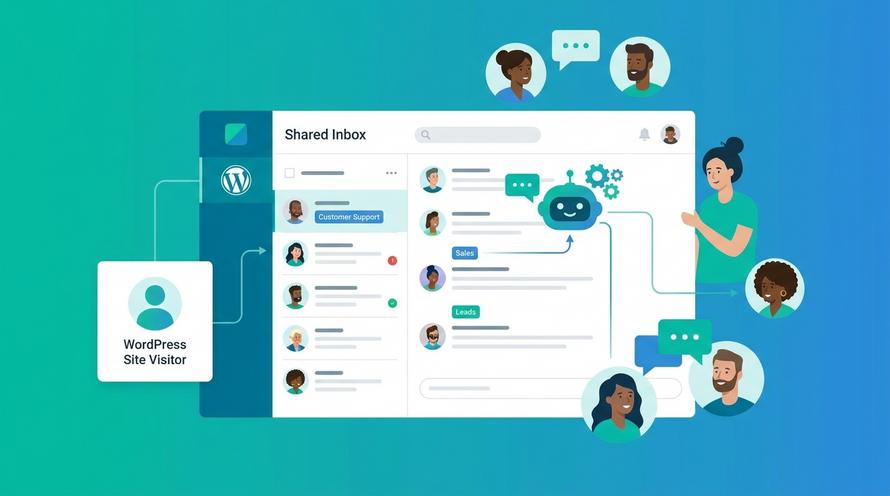
Au lieu que ton équipe passe sans cesse d'un appareil à l'autre ou attribue manuellement les conversations, tu peux tout centraliser. Trengo regroupe tous tes messages entrants, qu'ils proviennent de ton nouveau widget, de WhatsApp, d'Instagram ou d'un e-mail classique, dans une boîte de réception d'équipe unique. Grâce à cette configuration collaborative, ton entreprise est en mesure d'offrir un service client d'excellence.
Si tu es en train d'évaluer différents outils avant de te décider, tu peux consulter ce guide sur les logiciels de chat pour le commerce électronique afin de comparer les meilleures solutions et de déterminer quelle plateforme correspond le mieux aux besoins de ton entreprise.
Tes agents peuvent se mentionner mutuellement dans les notes internes pour discuter d'un problème technique complexe avant de répondre au client. Grâce aux agents IA, tu peux même automatiser les réponses aux questions fréquentes et effectuer des actions de base instantanément. De plus, les résumés IA fournissent un contexte rapide lorsque les conversations sont transférées entre les membres de l'équipe. En intégrant ton site web à Trengo, tu t'assures que chaque client reçoive une réponse rapide et personnalisée, ce qui permet à ton entreprise de se développer à l'international.
Questions qu'on se pose souvent (FAQ)

Oui, tu peux l'utiliser sur ton site web en déployant un widget de chat personnalisé ou en intégrant un code scannable. Bien qu'il ne soit pas possible d'afficher l'intégralité de l'interface de l'application dans une fenêtre de navigateur web sans outils tiers, un widget connecté via une API permet aux visiteurs de cliquer sur un bouton de ton site, ce qui transfère alors la conversation directement vers leur application mobile personnelle.
Pour parvenir à une intégration complète, on utilise généralement une plateforme de communication client omnicanale qui se connecte directement à l'interface de programmation d'applications (API) officielle. Une fois ton compte professionnel officiel vérifié, tu le relies à un fournisseur de logiciels qui permet à ton équipe de recevoir et de transférer tous les messages entrants depuis un tableau de bord centralisé.
Pour intégrer un chat en direct, il suffit généralement de copier un petit bout de code HTML fourni par ton logiciel et de le coller dans l'en-tête ou le pied de page de ton code source. Si tu veux intégrer un chat en direct à ton site web en toute simplicité, l'utilisation de plugins dédiés pour les principaux systèmes de gestion de contenu te permet d'activer la bulle de chat flottante sans aucun effort.
Oui, la question de savoir s'il est sûr d'installer WeChat à des fins professionnelles revient souvent, et la réponse est oui, à condition de respecter les protocoles standard de sécurité des données. L'application utilise un cryptage de type client-serveur, et les comptes professionnels officiels offrent des points d'accès sécurisés permettant aux employés autorisés de gérer leurs communications.
Plus de détails



Rencontrons-nous
Développe ton activité grâce à la fidélisation. Rassemble tous tes contacts avec les clients sur une seule et même plateforme pour débloquer l'enchantement à chaque étape.


