

Come creare un chatbot per WhatsApp Business senza scrivere codice

Prova Trengo gratuitamente

Trengo riunisce WhatsApp, e-mail, web, social media e chiamate in un'unica casella di posta, consentendo al tuo team di risparmiare ore di lavoro ripetitivo e garantendo che nessuna conversazione vada persa.
Guarda Trengo in azione
- Integrazioni estese
- Configurazione semplice
- Struttura dei prezzi scalabile

Se vuoi creare un chatbot WhatsApp per la tua attività, sei nel posto giusto.
In questa guida completa tratterò tutti gli aspetti relativi ai vantaggi dell'utilizzo di un chatbot WhatsApp Business e spiegherò come configurare il tuo bot personale. Il tutto senza dover scrivere una sola riga di codice.
Innanzitutto, cos'è un chatbot di WhatsApp Business?
Un chatbot di WhatsApp Business è una tecnologia che simula una conversazione con i tuoi clienti tramite WhatsApp. Viene utilizzato per rispondere alle domande più frequenti, fornire informazioni e raccogliere contatti.
Esempio di chatbot per WhatsApp Business
Ora è il momento di un esempio tratto dalla vita reale.
Ferryscanner è un motore di ricerca e prenotazione con sede in Grecia che aiuta le persone a trovare biglietti per traghetti convenienti verso destinazioni emozionanti in tutto il mondo. Quando i clienti contattano Ferryscanner tramite WhatsApp, vengono prima sottoposti a una serie di domande da parte di un flowbot.
Il bot di WhatsApp fa risparmiare un sacco di tempo raccogliendo le informazioni di base sul cliente prima che entri in contatto con un agente umano. Non dover chiedere il nome, il paese e il codice di prenotazione a ogni singolo cliente fa una grande differenza nel lungo periodo.
Quando visiti il sito web di Ferryscanner, puoi avviare una chat WhatsApp tramite il widget del sito.

Quando avvii una conversazione con Ferryscanner, un bot ti chiede innanzitutto il tuo nome e indirizzo e-mail, quindi ti chiede come può aiutarti offrendoti diverse opzioni:
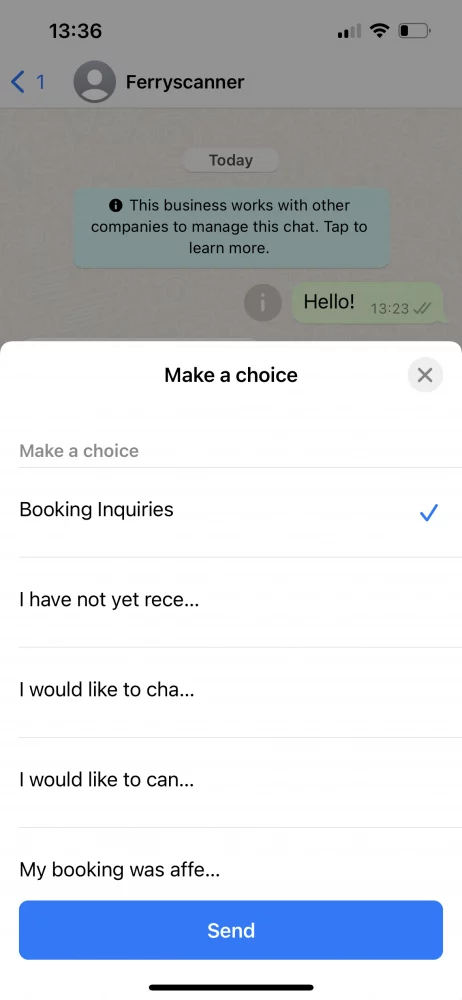
Una volta selezionata un'opzione, il bot ti mette in contatto con l'agente Ferryscanner più adatto al tuo caso specifico. Ciò consente di risparmiare tempo sia al team del servizio clienti che al cliente.

Quali sono i vantaggi dell'utilizzo di un chatbot di WhatsApp per le aziende?
Creando un chatbot per WhatsApp Business, prendi due piccioni con una fava.
1. Migliorare l'esperienza del cliente
Innanzitutto, i tempi di risposta miglioreranno notevolmente. Ciò non significa necessariamente che il cliente riceverà immediatamente una risposta alla sua domanda, ma che riceverà sempre una risposta in tempo reale. Se il bot non è in grado di rispondere alla domanda, può comunicare al cliente quando potrà ricevere una risposta da un operatore umano. Anche al di fuori dell'orario di apertura.
2. Migliorare l'efficienza del team
A causa delle crescenti aspettative dei clienti, i team di assistenza clienti sono sottoposti a una pressione maggiore che mai. Devono rispondere quasi istantaneamente, risolvere rapidamente i problemi e su un numero di canali di comunicazione più ampio che mai.
Grazie al chatbot di WhatsApp integrato nel loro team, gli operatori risparmiano molto tempo. Le domande più frequenti, alle quali può rispondere il bot, non sono più di loro competenza. I messaggi urgenti vengono riconosciuti automaticamente e assegnati all'operatore giusto. In questo modo, l'operatore del servizio clienti può dedicarsi a ciò che sa fare meglio: aiutare i clienti.
3. Generare lead
Un bot non è solo un ottimo strumento per il servizio clienti, ma è anche utile per scopi di marketing. Spesso i bot di WhatsApp sono progettati per raccogliere informazioni di contatto e persino fissare appuntamenti.
Immagina di poter fissare un appuntamento dal parrucchiere inviando un messaggio e stabilendo rapidamente l'orario con l'aiuto di un bot. Per la maggior parte delle persone, specialmente quelle che trascorrono molto tempo su WhatsApp, questo è più comodo e personale rispetto al dover navigare su un sito web.
Come creare un chatbot per WhatsApp (una guida passo dopo passo)
Per prima cosa, dovrai iniziare a utilizzare l' API di WhatsApp Business. Questo perché la normale app WhatsApp Business non ti permette di creare chatbot, mentre l’API sì. L’API di WhatsApp Business non ha una propria interfaccia ed è accessibile solo tramite un fornitore di soluzioni WhatsApp Business come Trengo. Una volta ottenuto l'accesso all'API, potrai iniziare immediatamente a creare un bot.
https://www.youtube.com/watch?v=f16HrNcO8eg
A questo punto, dovrai decidere se vuoi configurare un chatbot, un flowbot o una combinazione dei due.
Chatbot
Un chatbot capisce ciò che dice il cliente riconoscendo determinate parole chiave e formulando una risposta. Puoi addestrare il bot semplicemente inserendo le risposte alle domande che ti vengono poste più spesso. Più varianti fornisci, più il tuo bot diventa intelligente.

Flowbot
Un flowbot consente ai tuoi visitatori di trovare le informazioni che stanno cercando offrendo loro opzioni a scelta multipla.

📚 Per saperne di più: Spiegazione della differenza tra chatbot e flowbot
Configurazione di un chatbot WhatsApp in Trengo
https://www.youtube.com/watch?v=vIH2FnCzUgs
1. Vai su Impostazioni > Automazione > Chatbot
2. Configurare le impostazioni del chatbot

1. Titolo interno:assegna un nome al tuo bot.
2. Lingua del chatbot:selezionare la lingua.
3. Canali:seleziona WhatsApp come canale.
4. Chiave Google Cloud: inserisci la tua chiave Google Cloud.
Hai appena creato il tuo chatbot WhatsApp Business 🎉
Puoi aggiungere diverse categorie di contenuti al tuo bot. Pensa a categorie come prezzi, prodotti e consegna.
3. Vai su "Categorie" e clicca su "Aggiungi categoria"

4. Inserisci il nome della tua categoria.

Hai creato con successo una categoria per il tuo bot. Ora è il momento di pensare alle domande.
Aggiungere domande al tuo chatbot di WhatsApp
Quando aggiungi una domanda al tuo bot, assicurati di inserire diverse varianti. La nostra regola generale è quella di aggiungere circa cinque varianti per ogni domanda. Più ne aggiungi, più il tuo bot diventa "intelligente".
5. Per prima cosa, clicca su "Domande" e poi sull'icona "più" accanto alla categoria alla quale desideri aggiungere delle domande

6. Aggiungi domande e risposte relative a queste domande. Clicca sull'icona del "segno di spunta" per salvare le domande

Dopo aver aggiunto un numero sufficiente di domande, puoiconfigurare le impostazioni del chatbotetestarlo.
Configurazione di un flowbot WhatsApp in Trengo
https://www.youtube.com/watch?v=_fPKhc2Q6qU
1. Vai su Impostazioni >Automazione >Flowbot.
2. Clicca sul segno verde + per creare il tuo bot.
3. Inizia a progettare il tuo flowbot aggiungendo passaggi, pulsanti e azioni.
💡Suggerimento: prima di iniziare, traccia uno schema decisionale su un foglio di carta. In questo modo avrai una buona panoramica di come sarà il tuo flowbot e di quanti passaggi, pulsanti e azioni saranno necessari.
4. Fatto? Quindi clicca su "Configura il tuo flowbot" nell'angolo in basso a sinistra.

Ora che hai creato il tuo flowbot WhatsApp, devi configurarlo:
- Vai suImpostazioni>Automazione>Flowbote seleziona il tuo bot di WhatsApp.
- Clicca su "Configura il tuo flowbot"
- Compila il modulo sottostante





Prima di pubblicare il tuo chatbot per WhatsApp Business, puoi provarlo nell'area di test. In questo modo, potrai assicurarti che funzioni correttamente prima di consentire ai tuoi clienti di interagire con esso.
Migliori pratiche per chatbot di successo su WhatsApp Business
Ora che hai completato la configurazione, è il momento di impostare il tuo bot per il successo. Ecco alcuni suggerimenti per iniziare con il piede giusto.
Conosci i tuoi clienti
Prima di creare un bot, approfondisci la conoscenza del comportamento dei tuoi clienti su WhatsApp. Che tipo di domande pongono? Sono relative all'assistenza o alle vendite? Assicurati di progettare il tuo bot di conseguenza.
Mantieni il tuo testo frammentato
Se vuoi che i tuoi clienti leggano davvero ogni parola che scrivi loro, sii conciso. Troppo spesso mi sono imbattuto in bot che rispondono con risposte prolisse che richiedono troppo tempo per essere lette. I tuoi clienti sono impegnati, vogliono una risposta rapida e diretta al punto.
Usa un tono informale
Tieni presente che WhatsApp viene utilizzato principalmente in modo informale. L'utente medio lo usa per parlare con amici e familiari. In altre parole, le conversazioni non dovrebbero sembrare un'interazione via e-mail. Mantieni piuttosto un tono informale, purché non si discosti troppo dal tuo marchio.
Creare messaggi di fallback
Quando utilizzi un chatbot, assicurati di impostare un messaggio di fallback chiaro. Si tratta del messaggio che il bot invia ai tuoi clienti quando non riesce a capire ciò che stanno cercando di dire. Ecco un esempio:
"Mi dispiace, non so ancora come rispondere. Per favore, riformuli la sua domanda."
Inoltra i messaggi a una persona in tempo
Come ho detto prima, i tuoi clienti sono molto impegnati. Non vogliono perdere tempo con un bot che sembra incapace di fornire le informazioni giuste. E un bot, semplicemente, non può essere sempre perfetto. Ecco perché dovresti addestrarlo a riconoscere quando è il momento di passare la conversazione a un operatore umano. Ciò potrebbe avvenire quando un cliente utilizza una determinata parola chiave, come "arrabbiato" o "reclamo". Ma puoi farlo anche dopo che un bot non è riuscito a riconoscere le domande di un cliente più di due volte. Questo evita che il cliente si senta frustrato nei confronti della tua azienda.
Vuoi terminare una conversazione? Aggiungi un CTA
Quando una conversazione tra un bot e il tuo cliente giunge al termine, dovresti sempre concluderla con una chiara call to action. Questo è un modo per dare al tuo cliente l'opportunità di compiere la prossima azione logica senza dover pensare a quale dovrebbe essere.
Non è necessario essere uno sviluppatore per creare un chatbot con l'API di WhatsApp Business
Creare il tuo bot WhatsApp Business non deve essere necessariamente complicato. Con Trengo, puoi creare il tuo bot senza codice, senza dover scrivere una sola riga di codice.
Puoi iniziare oggi stesso una prova gratuita di 14 giorni per scoprire quanto sia facile e veloce creare un bot su Trengo. Se hai bisogno di aiuto, il nostro team è sempre pronto ad assisterti.

Altri simili



Incontriamoci
Fai crescere la tua attività con la fedeltà. Riunisci tutti i contatti dei tuoi clienti in un'unica piattaforma per garantire la massima soddisfazione in ogni fase del percorso.


